Behind every login screen, checkout button, and news feed sits a developer who wrote the code to make it work. That invisible layer of the internet is what makes it worth asking what is web development and why it has become such a high demand skill in 2026.
At its core, it is the craft of creating websites and web applications that people use through a browser. Some of this work shapes what you see on the page, while the rest powers the logic, storage, and connections that run out of sight. Together these pieces turn a plain idea into a working product that anyone can open and use.
This guide explains each part in plain language, one step at a time. If you would rather learn it properly, a structured full stack developer course can help you build the right skills in order.
What is Web Development?
Web development is the process of building and maintaining websites and web applications that run in a browser (like Chrome, Firefox, or Safari).
Think of it like constructing a building:
- The architect draws the blueprint → a developer plans the structure
- The interior designer decorates it → a developer styles the visuals
- The electrician & plumber make it functional → a developer adds logic and data
The Three Core Layers
- Frontend (What you see) Everything visible on screen — buttons, text, images, colors, layout. Built with HTML, CSS, and JavaScript.
- Backend (What happens behind the scenes) The server, database, and logic that powers the site. When you log in or place an order, that's the backend working. Built with languages like Python, Node.js, PHP, etc.
- Database (Where data lives) Stores all the information — user accounts, products, messages — using tools like MySQL or MongoDB.
Web Development vs. Web Design: Key Difference
This confuses a lot of beginners, so let us clear it up.
Web design is about how a website looks and feels. Designers think about colors, fonts, layouts, and user experience. They create visual blueprints.
Web development is about making that design actually work. Developers take the design and build it with code. They make it interactive, connect it to databases, ensure it loads fast, and keep it secure.
Think of it like building a house. The architect (designer) draws the plans and decides how they should look. The construction team (developer) builds it, installs the plumbing, wires the electricity, and makes it livable.
In practice, some professionals do both. But they are distinct skills.
Types of Web Development
This is where a lot of beginners get confused, so let us break it down clearly. Understanding the types of web development will help you decide which path suits you best.
Web development is generally divided into three main types: frontend, backend, and full stack. Each one focuses on a different part of how a website works.
1. Frontend Development (What Users See)
Frontend development is everything the user sees and interacts directly in their browser.
When you land on a website and see a headline, a menu, a search bar, and a button that is all frontend. The frontend developer wrote the code that placed those elements on screen, styled them, and made them respond when you click or scroll.
The three core languages of frontend development are:
- HTML (HyperText Markup Language): Gives a page structure. Think of it as a skeleton.
- CSS (Cascading Style Sheets): Controls how everything looks like colors, fonts, spacing, and layout.
- JavaScript: Makes interactive animations, dropdown menus, live search, and more.
Frontend developers also use frameworks like React, Vue.js, and Angular to build more complex interfaces faster and more efficiently. If you are considering this path, following a structured front-end developer roadmap can help you learn the right skills in the right order.
2. Backend Development (What Users Do Not See)
Backend development handles everything that happens behind the scenes on the server.
When you type your email and password to log into a website, the backend checks whether your credentials match what is stored in the database. When you place an online order, the backend processes the payment, updates inventory and sends a confirmation email. None of that is visible to you, but all of it is essential.
Backend developers work with:
- Programming languages like Python, PHP, Node.js, Java, Ruby, and Go
- Databases like MySQL, PostgreSQL, and MongoDB for storing and retrieving data
- APIs (Application Programming Interfaces) for connecting different systems together
- Servers and cloud platforms like AWS, Google Cloud, and Heroku
A backend developer is essentially the engine builder. You do not see the engine when you drive a car, but without it, nothing moves.
3. Full Stack Development (Both Sides)
A full stack developer works on both the frontend and the backend. They can build an entire web application from start to finish.
"Full stack" refers to the full "stack" of technologies involved in building a website from the database at the bottom to the interface at the top.
Full stack developers are highly valued because they can contribute to every part of a project. They are the Swiss Army knives of web development. Employers often prefer hiring them because they can handle multiple aspects of a project, saving time and resources. Wondering how AI is affecting this role? We cover whether will AI replace full stack developers later in this guide.
Recommended Professional Certificates
Full Stack Development Course with AI Engineering
WordPress Bootcamp
Other Types of Web Development Worth Knowing
Beyond the main three, there are a few specializations that are worth mentioning:
- eCommerce development: Building online stores using platforms like Shopify and WooCommerce
- CMS development: Working with content management systems like WordPress, which powers over 40% of all websites
- API development: Creating the connections that allow different software and systems to talk to each other
- DevOps / Site Reliability Engineering: Managing the deployment, performance, and infrastructure of web applications
- Mobile web development: Optimizing web experiences specifically for smartphones and tablets
| Type | Focus | Core Skills | Typical Salary (US, 2026) |
| Frontend | User interface, visuals | HTML, CSS, JS, React | ₹67.0 lakh – ₹1.15 crore |
| Backend | Server, database, logic | Python, Node.js, SQL, APIs | ₹76.6 lakh – ₹1.24 crore |
| Full Stack | Both frontend and backend | All the above | ₹90.9 lakh – ₹1.53 crore |
| DevOps | Deployment, infrastructure | Cloud, CI/CD, Docker | ₹95.7 lakh – ₹1.53 crore |
How Does a Website Actually Work?
This is one of the most overlooked topics in beginner guides and understanding it will make you a better developer or at least a smarter client.
When you type a URL into your browser and press Enter, a lot happens in less than a second.
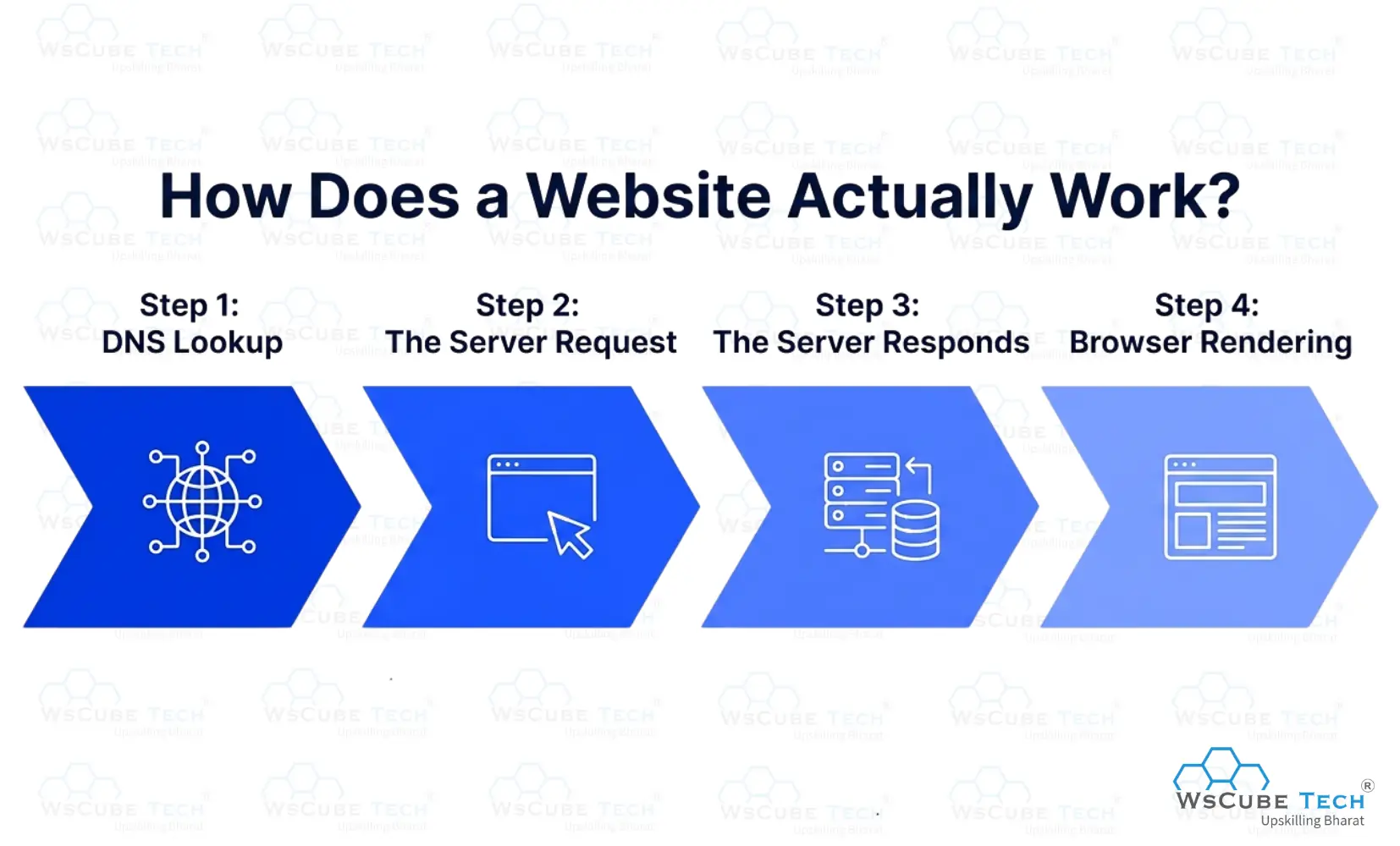
Step 1: DNS Lookup
Your browser does not understand "www.google.com." It needs an IP address with a numerical label like 142.250.80.46. The Domain Name System (DNS) is like an internet phone book. It translates the domain name you typed into the IP address of the server where that website lives.
Step 2: The Server Request
Your browser sends an HTTP or HTTPS request to that server, essentially saying: "Please give me the files for this page."
HTTP (HyperText Transfer Protocol) is the language of browsers and servers to use to communicate. HTTPS is the secure version of the padlock icon you see in your browser's address bar. HTTPS means the connection is encrypted, which protects sensitive data like passwords and payment information.
Step 3: The Server Responds
The web server receives the request and sends back the files typically HTML, CSS, and JavaScript files that make up the page.
Step 4: Browser Rendering
Your browser receives those files and "renders" them to process the code and displays the visual result you see on screen. It reads the HTML to understand the structure, applies the CSS to style it, and runs the JavaScript to add interactivity. All of this happens in the blink of an eye.
Core Web Development Languages and Technologies
Let us go through the essential building blocks of web development in plain language.
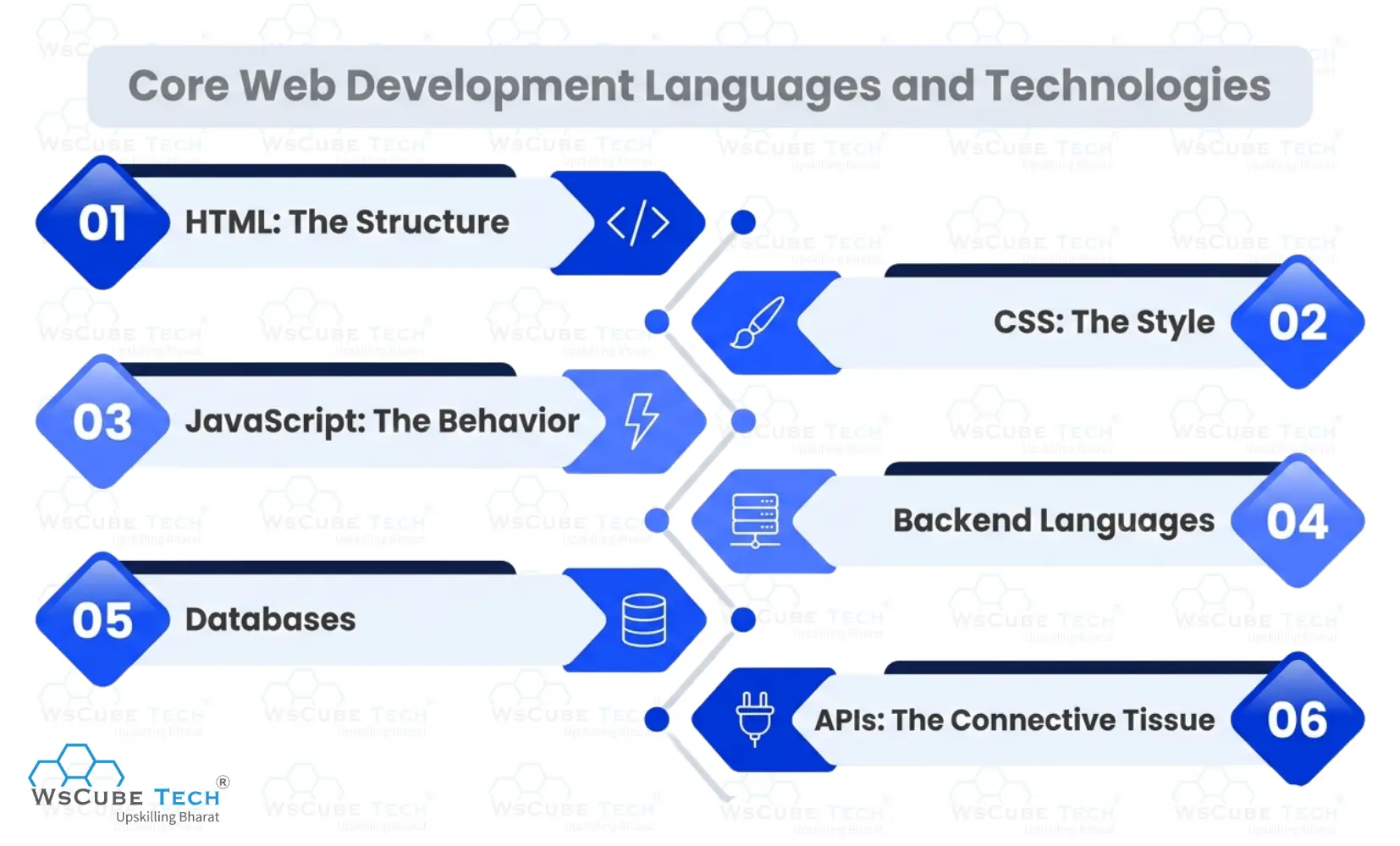
1. HTML: The Structure
HTML stands for HyperText Markup Language. It is the first language every web developer learns, and for good reason. HTML defines what content is on a page of headings, paragraphs, images, links, lists, buttons, and forms.
Think of HTML as a bone. Without it, there is no structure, and nothing else can be placed or styled.
2. CSS: The Style
CSS (Cascading Style Sheets) controls appearance. Font size, color, spacing, background, layout, animations all of it is CSS. It is what makes a plain HTML document look like a professionally designed website.
In 2026, modern CSS also handles complex responsive layouts, meaning sites automatically adjust to look good on any screen size, from a smartphone to a widescreen monitor.
3. JavaScript: The Behavior
JavaScript is a programming language on the web. It is what makes websites interactive and dynamic. When something on a page change without the page reloading a live notification, a popup, a real-time search result that is JavaScript at work.
JavaScript is currently used by 65.6% of all developers worldwide, making it the most popular programming language on the planet for web work.
4. Backend Languages
Once you move to the server side, you have more language choices:
- Python: Readable, beginner-friendly, widely used in web and AI development. Popular frameworks include Django and Flask.
- PHP: Powers WordPress and millions of other websites. Less fashionable in 2026 but still very widely used.
- Node.js: Lets you use JavaScript on the server, allowing full stack developers to use one language for everything.
- Java: Robust and enterprise-grade. Used by large companies and financial institutions.
- Go (Golang): Fast and efficient. Growing rapidly in popularity for backend and cloud-native development.
5. Databases
Every dynamic website needs a place to store data. There are two main types:
- Relational databases (SQL): Data stored in tables with rows and columns. Examples: MySQL, PostgreSQL. Great for structured data.
- Non-relational databases (NoSQL): More flexible structures. Example: MongoDB. Great for large amounts of varied data.
6. APIs: The Connective Tissue
An API (Application Programming Interface) allows different software systems to talk to each other. When a weather app shows you the forecast, it is called a weather API. When you log into a site using Google, that uses an API. APIs are everywhere in modern web development and understanding them is essential.
Upcoming Masterclass
Attend our live classes led by experienced and desiccated instructors of Wscube Tech.



Popular Web Development Frameworks and Tools
Learning programming languages is just the beginning. Modern web development relies on the right web development framework and tools to build faster, and high-performing apps.
Frontend Frameworks
- React: Built by Meta. The most popular frontend framework in 2026, with 40.6% market share. Used by Facebook, Instagram, Airbnb, and thousands of other products.
- Next.js: Built on top of React. Adds server-side rendering and routing, making it excellent for SEO and performance.
- Vue.js: A lightweight, beginner-friendly alternative to React. Popular in Asia and among smaller teams.
- Angular: Built by Google. More structured and opinionated favored in large enterprise applications.
- Astro: A newer framework gaining traction for content-heavy sites that need exceptional performance.
Backend Frameworks
- Node.js / Express: JavaScript on the server. Fast, flexible, and very popular APIs.
- Django: Python-based. Batteries included come with built-in tools for databases, security, and user authentication.
- Laravel: PHP framework known for its clean syntax and rapid development capabilities.
- FastAPI: A modern Python framework for building APIs quickly. Growing fast in 2026.
Developer Tools You Should Know
- Git and GitHub: Version control. Every professional developer uses Git to track code changes and collaborate with others. It is non-negotiable.
- VS Code: The most popular code editor in the world. Free, lightweight, and endlessly customizable.
- Chrome DevTools: Built into the browser. Let's inspect, debug, and test websites in real time.
- Postman: Used for testing APIs.
- Figma: A design tool that many developers use to collaborate with designers on UI.
AI Coding Tools Used in Web Development
This is genuinely new. 77% of developers now use AI coding tools, and the impact is real. Tools like GitHub Copilot, Cursor, and Claude Code can write code suggestions, catch errors, generate boilerplate, and explain unfamiliar code for all your type.
These tools do not replace the need to understand code. But they do make experienced developers significantly faster. According to GitHub research, developers using AI assistance finish assigned tasks 55% faster than those working manually.
| Framework | Language | Best For | Popularity (2026) |
| React | JavaScript | Dynamic UIs, SPAs | Very High |
| Next.js | JavaScript | SEO-friendly web apps | Very High |
| Vue.js | JavaScript | Lightweight, easy to learn | High |
| Django | Python | Full-featured web apps | High |
| Laravel | PHP | CMS, eCommerce sites | High |
| FastAPI | Python | Modern API development | Growing |
The Web Development Process: How a Website Gets Built
Understanding the web development process helps both developers and business owners. This is what actually happens from idea to live website.
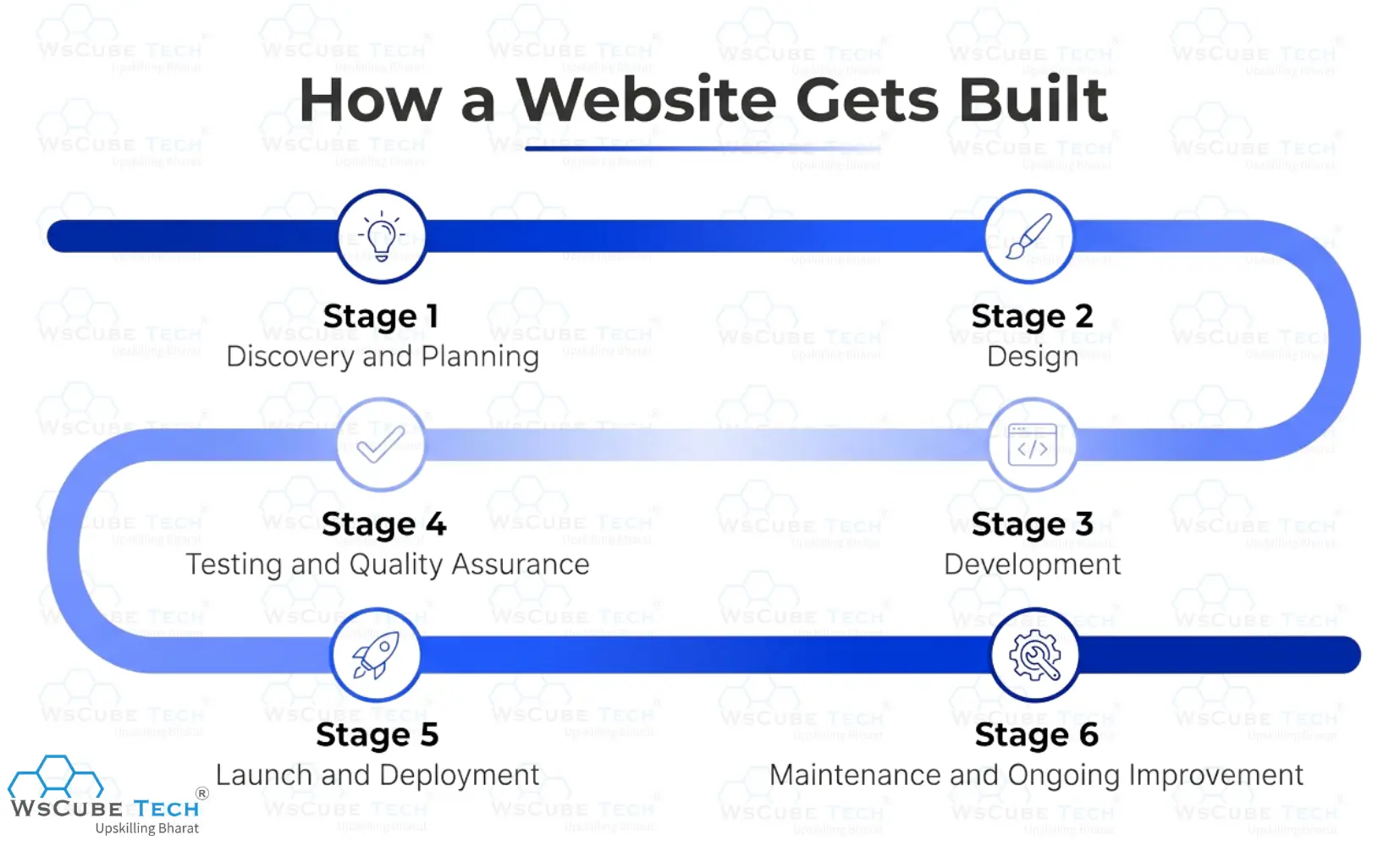
Stage 1: Discovery and Planning
Before a single line of code is written, there are conversations. What is the website for? Who is the audience? What should users be able to do? What are the goals?
This stage involves creating a sitemap (a map of all the pages), writing a brief, and identifying the technology stack (which languages and tools will be used). Skipping this stage is the number one reason websites fail to meet their goals.
Stage 2: Design
A designer creates wireframes with simple sketches showing where elements will go on each page. Then they develop full visual mockups in a tool like Figma, showing exactly how the finished site will look.
A good design is not decoration. It is a strategic decision that affects how users feel, how they navigate, and whether they convert into customers.
Stage 3: Development
Now the code is written. Frontend developers build the visual interface. Backend developers build the server logic, database connections, and APIs. This phase often takes the longest, especially for complex applications.
A typical B2B website takes four to six weeks. An eCommerce store or custom web app takes six to twelve weeks.
Stage 4: Testing and Quality Assurance
Before launching, the website was tested rigorously. Does it work on every major browser? Does it look good on all screen sizes? Does it load fast enough? Are there any security vulnerabilities? Does every link, form, and checkout process function correctly?
Over 53% of mobile users will leave a website if it takes longer than three seconds to load.
Stage 5: Launch and Deployment
The website is transferred to a live web server, and the domain is pointed to it. This is the "going live" moment.
Deployment in 2026 often uses cloud platforms like AWS, Netlify, or Vercel, and modern CI/CD pipelines that automate much of the process.
Stage 6: Maintenance and Ongoing Improvement
This is the stage most people forget. Web development is not a one-time task. Websites need regular updates to fix bugs, patch security issues, update content, add new features, and stay current with browser and platform changes.
A website is a living product, not a one-off project. Businesses that treat it as ongoing work see far better results than those that build and abandon.
Read More Web Development Related Guides
Types of Websites and Web Applications
Not all websites are the same. The type you need depends on what you want it to do.
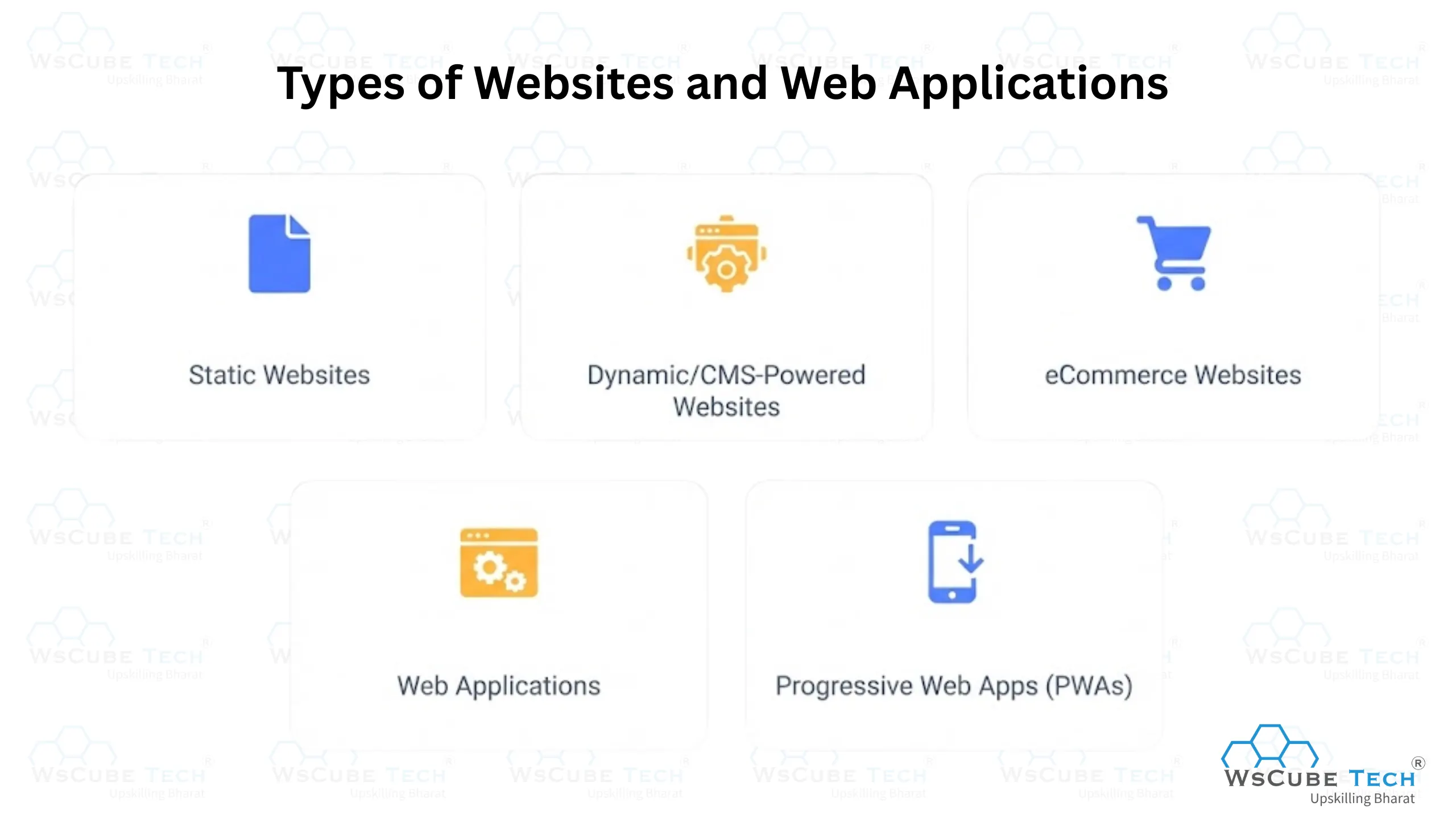
1. Static Websites
A static website shows the same content to every visitor. It does not change based on who is viewing it or when. These are simple, fast, and cheap to host. They work well for portfolios, small business brochure sites, and simple landing pages.
2. Dynamic/CMS-Powered Websites
A dynamic website uses a Content Management System (CMS) like WordPress to let non-technical people update content without touching code. These are the most common types for businesses, blogs, news sites, and service providers.
WordPress alone powers over 40% of all websites on the internet, which tells you how dominant this approach is.
3. eCommerce Websites
Online stores require product listings, shopping carts, payment processing, order management, and more. Platforms like Shopify are the go-to for most businesses. WooCommerce (built on WordPress) works well for businesses already using that platform. Custom builds using Magento or headless commerce setups suit larger retailers with complex needs.
4. Web Applications
A web application is more interactive than a website it behaves more like software. Think of your Gmail inbox, a project management tool like Trello, or a bank's online portal. Web apps require more complex backend logic, user authentication, real-time data, and often, significant ongoing development effort.
5. Progressive Web Apps (PWAs)
PWAs are websites that behave like mobile apps. They can be installed on a phone's home screen, work offline, and send push notifications. PWAs combine the best features of websites and mobile applications, and they are growing fast in 2026 because they reduce development costs compared to building separate native apps for iOS and Android.
Essential Skills for Web Developers in 2026
Beyond knowing languages and frameworks, web developers in 2026 need a broader skillset to stand out.
1. Technical Hard Skills
- Proficiency in HTML, CSS, and JavaScript
- One or more frameworks (React for frontend, Node.js or Django for backend)
- Git and version control
- Basic understanding of databases and SQL
- Working knowledge of APIs
2. SEO and Web Performance
This is a skill gap most developers ignore, and it is a significant one. 75% of users assess a company's credibility based on its website design, and websites on the first page of Google capture 95% of web traffic. Building a website that performs well fast loading, clean code, and mobile-optimized is now a core development skill, not a bonus.
Google's Core Web Vitals measure real-world page experience and directly influence search rankings.
3. Web Accessibility
Building accessible websites means making sure people with disabilities visual, hearing, motor, or cognitive can use your site effectively. This is both an ethical responsibility and, in many countries, a legal requirement. The WCAG (Web Content Accessibility Guidelines) provide the standard.
Accessibility is consistently underprioritized in the industry and is therefore a skill that genuinely differentiates you.
4. Web Security Basics
Every developer should understand common vulnerabilities like SQL injection (inserting malicious code into a database query), Cross-Site Scripting (XSS), and the OWASP Top 10 list of security risks. Insecure websites get hacked. Approximately 12.8 million websites worldwide are infected with malware. Security is not a specialist topic anymore.
5. Soft Skills
Communication, problem-solving, the ability to learn constantly, and the discipline to manage your own time this matter as much as technical skills, especially if you work remotely or freelance. The best developers are not always the ones who know the most code. They are the ones who can understand requirements, communicate clearly, and deliver reliably.
6. Working Alongside AI
Knowing how to use AI coding tools effectively without becoming dependent on them is a new and valuable skill. 77% of developers now use AI tools and report 55% faster task completion. But AI makes mistakes. Developers who can critically review AI-generated code, catch errors, and maintain code quality are more valuable than those who blindly accept AI output.
Explore Our Web Development Related Courses
How to Learn Web Development in 2026: A Beginner's Roadmap
So, you want to learn what is web development and get started. Here is a realistic, structured path. For a more detailed breakdown of each stage, you can also explore a dedicated web development roadmap that walks you through every step from beginner to job ready.
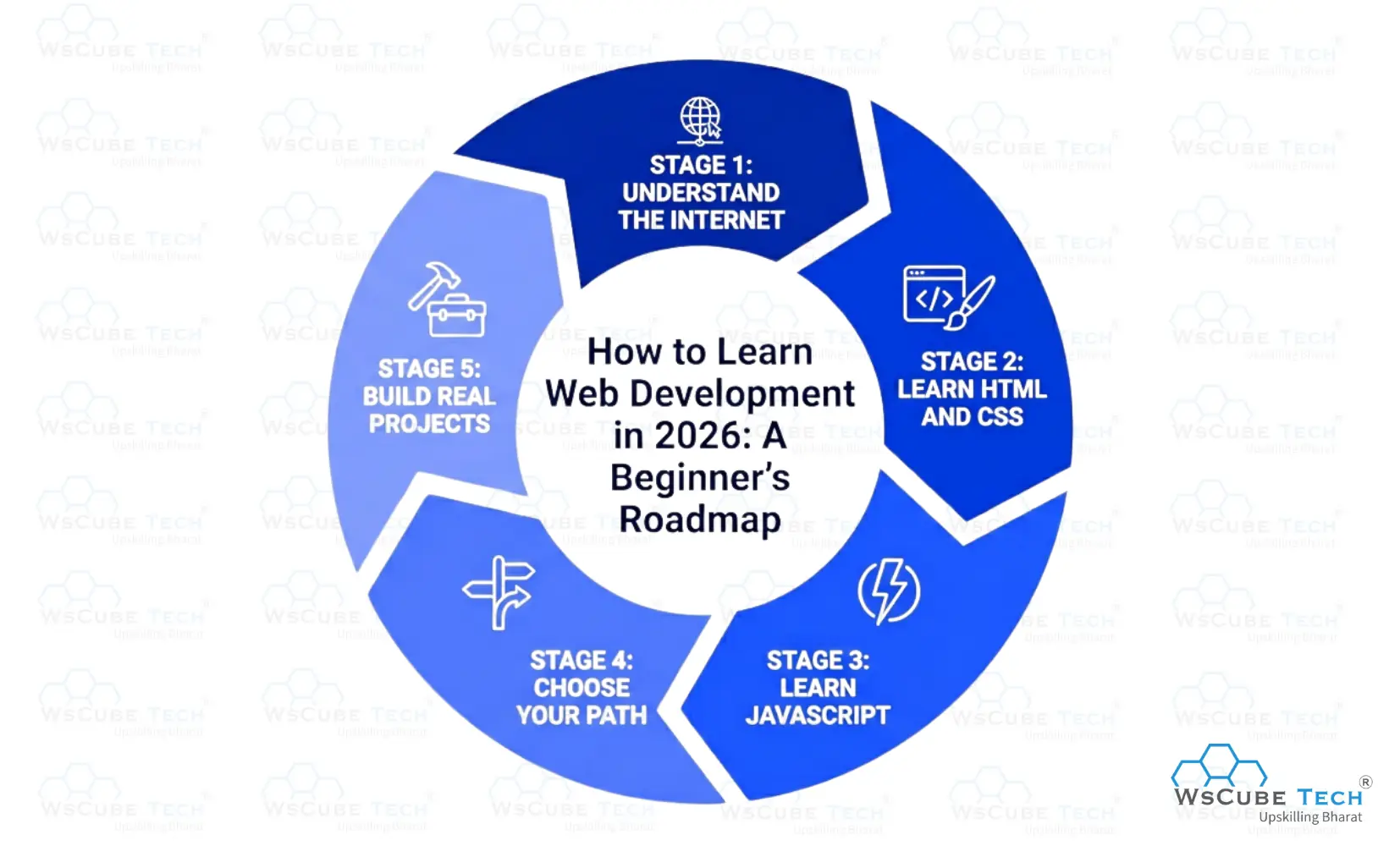
Stage 1: Understand the Internet (Week 1 to 2)
Before writing a line of code, spend a little time understanding how the web works. How does a browser communicate with a server? What is HTTP? What is a domain name? What is hosting? This foundational knowledge will make everything else click faster.
Stage 2: Learn HTML and CSS (Month 1 to 2)
Start here. Always. HTML gives you structure, and CSS gives you style. You will be building real, visible web pages surprisingly quickly. WsCube Tech, freeCodeCamp and The Odin Project are some of the best resources available, and they are rival paid bootcamps in quality and depth.
At this stage, build small projects. A simple webpage about yourself. A recipe page. A blog layout. The act of building something, even something imperfect, is what makes concepts stick.
Stage 3: Learn JavaScript (Month 2 to 4)
Once you can build static pages, JavaScript will bring them to life. Focus on the fundamentals first: variables, functions, loops, arrays, objects, and DOM manipulation (changing what appears on a page using code). Avoid jumping into frameworks before you understand the basics.
Stage 4: Choose Your Path
After building confidence with the basics, you need to decide which direction to go:
- Frontend: Learn React (the most employable choice). Pair it with Next.js. A front-end developer roadmap can help you map out exactly what to learn and in what order.
- Backend: Learn Node.js with Express, or Python with Django.
- Full stack: Learn React on the frontend and Node.js or Python on the backend.
There is no universal answer. 45% of developers are self-taught via online resources, and many are successfully employed. Pick a path and commit to it.
Stage 5: Build Real Projects
A portfolio with three to five real, functional projects is worth more than any certificate. Build things you would actually use. A to-do app is a start, but a weather app with a real API, a blog with a CMS, or a simple eCommerce store shows much more depth.
GitHub is where developers host their code publicly. Having a strong GitHub profile is one of the most practical things you can do for your career.
Where to Learn Web Development in 2026
If you are wondering where to learn web development, the good news is that the options have never been better or more affordable. Here are the best free resources available right now:
| Resource | What It Covers |
| WsCube Tech | Web Development, JavaScript, React, Node.js, Python, DSA, and Career-Focused Projects |
| freeCodeCamp | HTML, CSS, JS, Python, Data structures |
| The Odin Project | Full stack (JS or Ruby on Rails) |
| MDN Web Docs | All web technologies (reference + tutorials) |
| CS50 by Harvard | Computer science fundamentals + web |
| Coursera (audit) | University-backed courses |
Is Website Development a Good Career in 2026?
Yes, website development is a great career choice in 2026. As businesses continue to invest in their online presence, the demand for skilled web developers remains strong across industries such as e-commerce, healthcare, education, finance, and technology.
- High Demand: Companies of all sizes need developers to build, maintain, and improve websites and web applications.
- Attractive Salaries: Web developers earn competitive salaries, with higher earning potential as they gain experience and specialize in areas like full-stack or front-end development.
- Flexible Career Options: You can work as a front-end developer, back-end developer, full-stack developer, freelancer, or remote professional.
- Future-Proof Skills: While AI tools can speed up development, businesses still need developers to create custom solutions, solve technical problems, and manage complex projects.
Website development requires continuous learning because technologies and frameworks evolve regularly. However, developers who keep their skills updated can enjoy excellent career growth and job security.
If you're asking is website development a good career in 2026, the answer is yes. With strong demand, good salaries, flexible work opportunities, and long-term growth potential, web development remains one of the best technology careers to pursue.
Read More on Topics Related to Web Development
Is Web Development Hard to Learn?
Is website development hard? It depends on what you compare it to and how you approach it. Let us be honest about both sides.
What Makes It Challenging
- There is a lot to learn: HTML, CSS, JavaScript, a framework, a backend language, databases, Git, APIs, deployment the list is long, and the industry keeps adding to it.
- The learning curve can feel steep at first: Debugging your own code when you cannot see why it is broken is one of the most frustrating experiences in web development. Every developer goes through it.
- The field moves fast: What was the best tool two years ago may not be the best tool today. Staying current requires ongoing learning.
What Makes It More Manageable Than You Think
- You do not need to learn everything at once: The path is sequential. HTML, then CSS, then JavaScript, then a framework. Each step builds on the last.
- Resources have never been better: In 2026, there are more free, high-quality learning resources available than at any point in history.
- You start seeing results quickly: Within days of learning HTML and CSS, you can build visible, shareable web pages. That early feedback loop is motivating.
- The community is genuinely helpful: Developer communities on Reddit, GitHub, Stack Overflow, and Discord are some of the most supportive in any industry.
Most learners with consistent effort (one to two hours per day) can build their first functional website within a month and be job-ready within six to twelve months. That timeline is realistic, not a guarantee it depends on the effort you put in.
Is Web Development Replaced by AI?
This is one of the most common questions people ask in 2026: is web development replaced by AI? The short answer is no AI has replaced web development. However, it has significantly changed how developers work. If you are specifically curious about the future of specialized roles, the deeper question of will AI replace full stack developers is worth exploring on its own.
Today, AI tools can write code, generate components, fix bugs, and explain unfamiliar functions. In fact, a large percentage of developers now use AI in their daily workflows. This shift is real and important, but using a tool is very different from being replaced by one.
How AI Is Changing Web Development
The rise of AI in web development is helping developers automate repetitive tasks and improve productivity. AI is particularly effective at:
- Writing boilerplate code
- Generating basic UI components
- Finding and fixing simple bugs
- Explaining code and documentation
- Automating routine development tasks
These capabilities help developers work faster and more efficiently.
What Developers Still Do Better in this AI Era
While AI can assist with coding, it cannot replace human judgment and decision-making. Developers are still responsible for:
- Application architecture
- Product strategy and planning
- User experience design
- Security and performance decisions
- Understanding business requirements
- Solving complex real-world problems
These areas require creativity, context, and critical thinking that AI cannot fully replicate.
Recommended Professional Certificates
Full Stack Development Course with AI Engineering
WordPress Bootcamp
The Future of Web Development Career
Web development continues to be one of the most promising career fields in the technology industry. As businesses increasingly depend on websites, web applications, and digital services, the need for skilled web developers is expected to grow in the coming years.
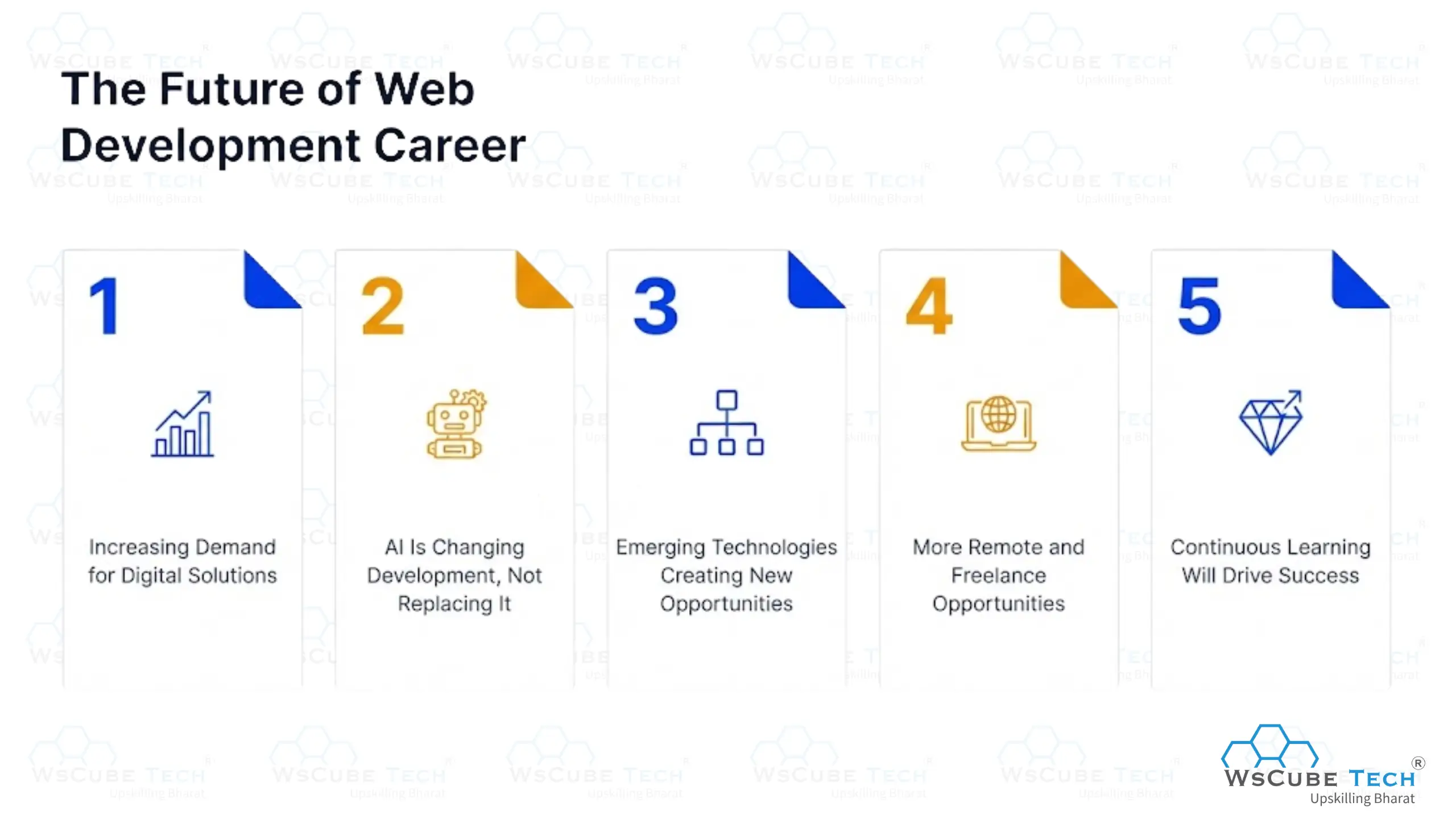
1. Increasing Demand for Digital Solutions
Companies across industries are investing in digital transformation to improve customer experiences and expand their online presence. This creates a steady demand for developers who can build responsive, secure, and high-performing websites.
2. AI Is Changing Development, Not Replacing It
AI-powered coding tools are making development faster and more efficient. However, businesses still need developers to plan projects, solve complex problems, customize solutions, and ensure websites meet user and business requirements. Developers who learn to work alongside AI will have a significant advantage.
3. Emerging Technologies Creating New Opportunities
Modern web development is evolving beyond traditional websites. Technologies such as Progressive Web Apps (PWAs), cloud computing, AI integration, Web3, and serverless architecture are creating new career paths for developers. Learning these technologies can open doors to higher-paying and more specialized roles.
4. More Remote and Freelance Opportunities
Web development remains one of the most flexible professions. Developers can work remotely, collaborate with global teams, freelance clients worldwide, or even launch their own digital products and businesses.
5. Continuous Learning Will Drive Success
The web development industry is changing rapidly. New frameworks, tools, and best practices emerge regularly. Developers who stay updated and continuously improve their skills will enjoy stronger career growth and better job opportunities.
Overall, the future of web development is full of opportunities. As businesses continue to invest in digital experiences, skilled developers will remain in high demand. Those who keep learning and adapting to new technologies can enjoy strong career growth, competitive salaries, and long-term job security.
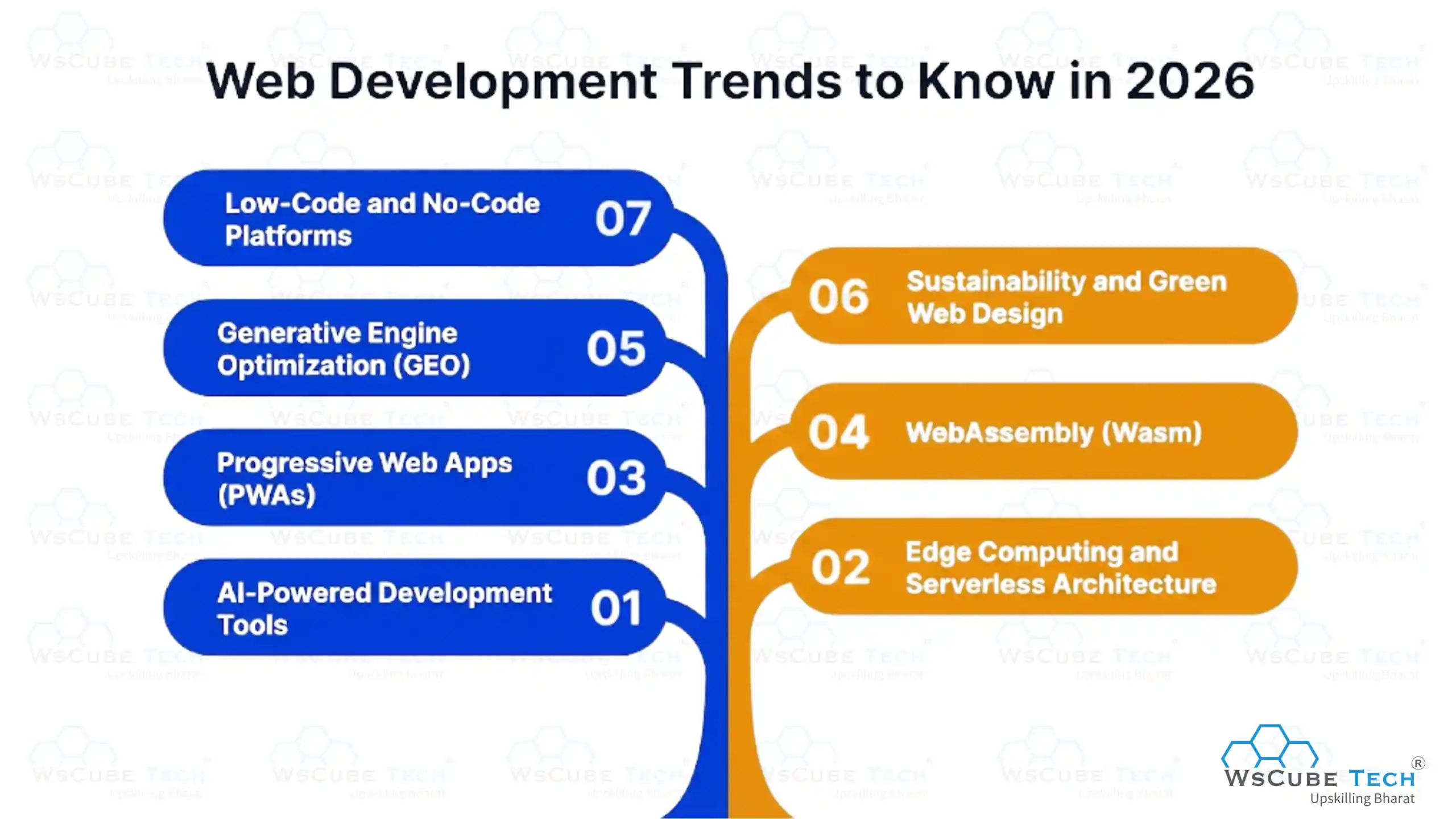
Web Development Trends to Know in 2026
Staying current is part of the job. Here are the most important trends shaping web development right now.
1. AI-Powered Development Tools
AI coding assistants are now standard. GitHub Copilot, Cursor, and Claude Code are used by the majority of professional developers. They will not write a complete application for you, but they are powerful tools for writing faster, catching errors, and exploring unfamiliar code.
2. Edge Computing and Serverless Architecture
Instead of running code on a central server far from the user, edge computing runs code at distributed data centers closer to wherever the user is located. This reduces load times dramatically. Applications using edge computing reduce average latency by 40 to 60 percent for users who are far from the origin server.
Serverless functions (like Cloudflare Workers and Vercel Edge Functions) go a step further developers deploy individual functions without managing any server infrastructure at all.
3. Progressive Web Apps (PWAs)
PWAs are getting more capable. Modern PWAs support biometric authentication and background synchronization, and they can be installed directly from the browser to a device's home screen. They are increasingly preferred by businesses that want app-like experiences without the cost of maintaining separate iOS and Android apps.
4. WebAssembly (Wasm)
WebAssembly allows code written in languages like Rust and C++ to run directly inside a browser at near-native speed. Figma, the collaborative design tool used by millions, is built entirely on WebAssembly. In 2026, Wasm is being used in production for video editing tools, game engines, and complex data visualization applications.
5. Generative Engine Optimization (GEO)
This is new to 2026 and genuinely important. As AI-powered search platforms like Perplexity, ChatGPT, and Google AI Overviews become more common, web developers and content teams need to think about how content shows AI-generated responses, not just traditional search results. Structuring content clearly, using authoritative sources, and building strong topical depth are all key factors.
6. Sustainability and Green Web Design
An underappreciated trend is the growing focus on the environmental impact of websites. Data centers consume significant energy. Developers and businesses are increasingly thinking about how to reduce the size, complexity, and resource consumption of their websites.
7. Low-Code and No-Code Platforms
Low-code and no-code platforms help build websites faster, but they do not replace developers. Businesses still need skilled professionals for customization, integrations, security, scalability, and complex web applications.
What is Web Development: Video Guide
FAQs About Web Development
The web development meaning refers to all the work involved in building, coding, and maintaining websites and web applications. It covers design implementation, server logic, database handling, and the ongoing updates that keep a site running.
A good introduction to web development begins with understanding how the internet works, then learning HTML, CSS, and JavaScript in order. After the basics, pick a path such as frontend or backend and practice by building small projects.
Everyday examples include online stores like Amazon, streaming platforms, banking portals, blogs, and booking sites. Every login page, search bar, and checkout button you use exists because of web development.
Common tools include the VS Code editor, Git and GitHub for version control, Chrome DevTools for debugging, Postman for testing APIs, and Figma for design collaboration. Most developers now also use AI coding assistants.
When you enter a URL, your browser finds the site's server through DNS, then requests its files. The server sends back HTML, CSS, and JavaScript, which the browser renders into the page you see, all in under a second.
They refer to the same discipline seen from slightly different angles. Web development often emphasizes the broader coding workflow, while website development focuses on the specific site being built, though the two terms are used interchangeably.
Core skills include HTML, CSS, and JavaScript, at least one framework, Git, and basic knowledge of databases and APIs. Soft skills like problem solving and clear communication matter just as much in real projects.
Full stack development means working on both the frontend and the backend of a website. A full stack developer can build an entire web application from the user interface down to the database and server logic.
Salaries vary by role, location, and experience, with full stack and backend developers generally earning more than frontend or entry level roles. Earning potential rises steadily as you specialize and gain years of experience.
Frontend development handles what users see and interact with, built using HTML, CSS, and JavaScript. Backend development handles the server, database, and logic working behind the scenes to make the site function.
Explore Our Free Tech Tutorials
| Python Tutorial | Java Tutorial | JavaScript Tutorial |
| C Tutorial | C++ Tutorial | HTML Tutorial |
| CSS Tutorial | SQL Tutorial | DSA Tutorial |
Practice Coding With Our Free Compilers
| Online Python Compiler | Online HTML Compiler | Online C Compiler |
| Online C++ Compiler | Online JS Compiler | Online Java Compiler |
Join Our On-Campus Full Stack Related Courses
Free Courses for You


Leave a comment
Your email address will not be published. Required fields are marked *Comments (0)
No comments yet.