
Every website you use has two sides. One side is what you see, and the other side is what makes it work. This is the simplest way to understand the difference between front-end and back-end development.
Think of a food delivery app. The screen with the search bar, food images, buttons, and the cart is the front end. The part that checks if the restaurant is open, saves your order, and calculates the bill is the back end. Both sides need each other. Without the front end, users have nothing to click. Without the back end, nothing actually happens when they click.
If you are new to web development and trying to pick a starting point, this guide will help. We will cover front-end and back-end development in detail, including skills, languages, tools, salary, job roles, and how to decide which path suits you better.
What Is Front-End Development?
Front-end development is the work of building the part of a website or app that users see and interact with. It is also called the client side. Everything on your screen, such as the menu bar, buttons, fonts, colours, images, forms, and animations, is created by a front-end developer.
The main goal of front-end development is to make the website look good and work smoothly on every device. A front-end developer takes a design file from a UI/UX designer and turns it into a real, working web page using code. They also make sure the page loads fast, adjusts properly on mobile screens, and responds correctly when a user types, clicks, or scrolls.
Front-end developers mainly work with three technologies: HTML for structure, CSS for styling, and JavaScript for behaviour. On top of these, they use frameworks like React, Angular, and Vue to build bigger applications faster.
What front-end code actually handles:
- Structure: HTML defines the headings, paragraphs, images, forms, and links on a page
- Styling: CSS controls colours, fonts, spacing, and how the layout shifts on smaller screens
- Interactivity: JavaScript reacts to clicks, typing, and scrolling without reloading the page
- Data display: The front end receives data from back-end APIs and shows it in a readable format
- Browser compatibility: The same code must render correctly in Chrome, Safari, Firefox, and mobile browsers
Simple example: On a shopping website, the product grid, filters, image gallery, and "Add to Cart" button are all front-end work.
What Is Back-End Development?
Back-end development is the work that happens behind the screen. It is also called the server side. Users never see it directly, but every action they take on the front end sends a request to the back end. The back end processes that request, talks to the database, and sends the correct answer back.
A back-end developer builds three main things: the server, the database, and the APIs. The server is the machine that receives requests and runs the application logic. The database is where all the information is stored, such as user accounts, orders, prices, and messages. The API is the bridge that lets the front end and the back end talk to each other in a fixed format.
Back-end work also covers security, login systems, payments, data validation, and speed. If a website can handle thousands of users at the same time without crashing, that is good back-end engineering. Common backend languages include Python, Java, PHP, and Node.js, and common databases include MySQL, PostgreSQL, and MongoDB.
What back-end code actually handles:
- The server: Receives every request from the browser and decides what should happen next
- The database: Stores and retrieves information such as accounts, orders, prices, and messages
- The API: Sends data to the front end in a fixed format that the interface can read
- Business logic: Applies the actual rules, such as discount calculations or stock checks
- Security and access: Verifies who the user is and what data they are allowed to see
Simple example: On the same shopping website, checking stock, saving your order, processing payment, and sending the confirmation email are all back-end work.
Recommended Professional Certificates
Full Stack Development Course with AI Engineering
WordPress Bootcamp
Front-End vs Back-End Development: Quick Comparison
This is the detailed version of front-end vs back end across 15 parameters.
| Parameter | Front-End Development | Back-End Development |
| Definition | Building the visual and interactive part of a website | Building the server, database, and logic behind a website |
| Other name | Client side | Server side |
| User interaction | Direct | Indirect, through the front end |
| Primary languages | HTML, CSS, JavaScript, TypeScript | Python, Java, PHP, Node.js, C#, Ruby, Go |
| Frameworks | React, Angular, Vue, Next.js, Bootstrap | Django, Laravel, Spring Boot, Express, Rails |
| Databases used | Rarely, only local storage in the browser | MySQL, PostgreSQL, MongoDB, Redis |
| Tools | VS Code, Git, Chrome DevTools, Figma, npm | Postman, Docker, Git, pgAdmin, AWS |
| Key skills | Responsive design, UI logic, browser debugging | Data modelling, API design, server management |
| Security role | Input validation and safe display of data | Encryption, authentication, database protection |
| Testing type | UI testing, cross-browser testing | Unit testing, API testing, load testing |
| Performance focus | Page load speed and smooth interaction | Query speed, server response time, scaling |
| Can it work alone | No, it needs data from the back end | Yes, it can run and be tested without a UI |
| Concurrency | Each user runs their own copy in the browser | One server handles many users at the same time |
| Design sense needed | High | Low |
| Average salary in India | Roughly 6 to 10 LPA based on experience | Roughly 6 to 13 LPA based on experience |
Note: The front end decides how a website looks and feels. The back end decides how it works and what it can do.
Skills Required for Front-End Developers
If you want to start with the front end, focus on this skill list first. The core stack is HTML, CSS, and JavaScript plus one framework, and Section 7 covers those in detail. The skills below are what actually separate a hired front-end developer from someone who has only finished tutorials.
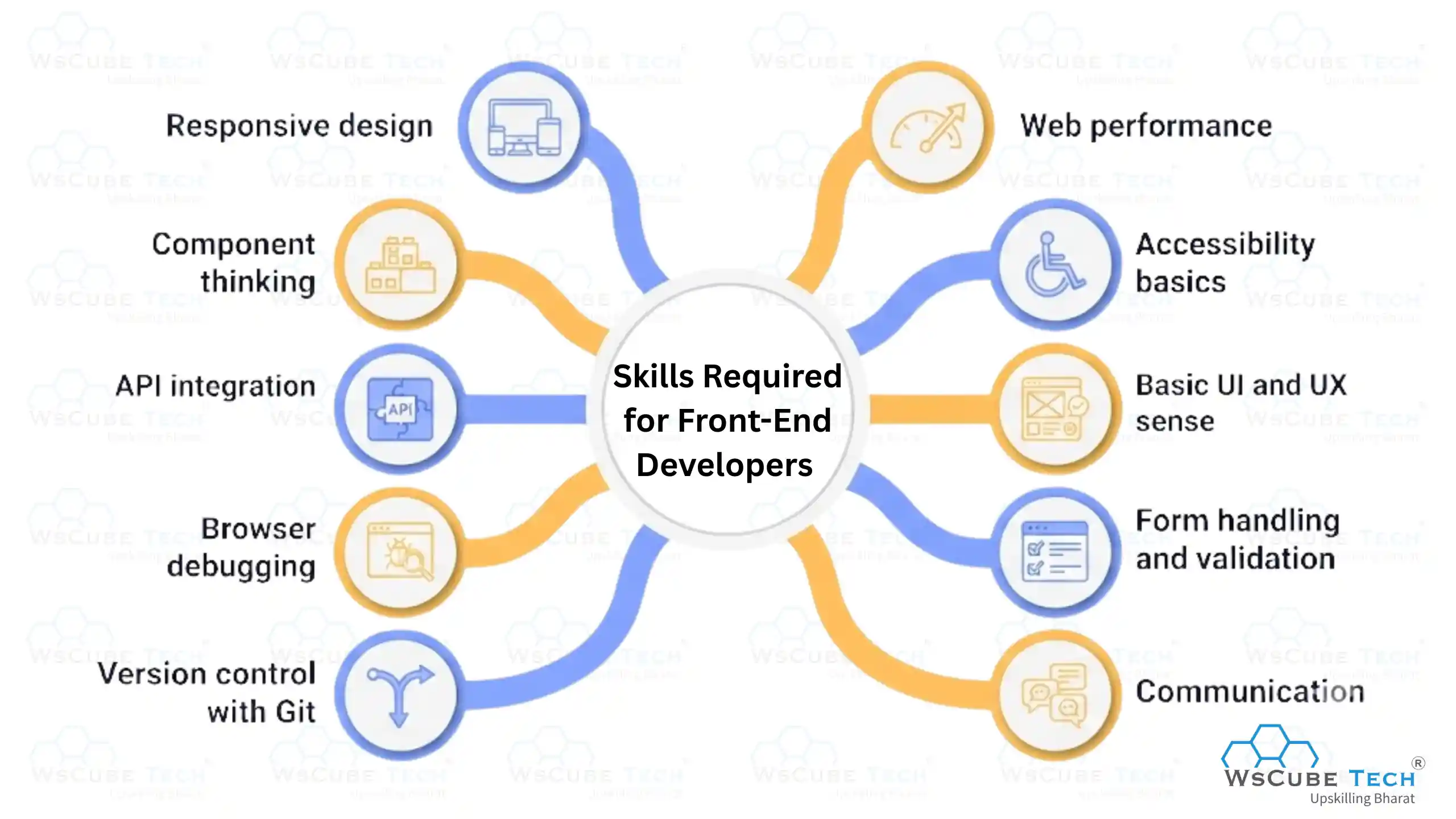
- Responsive design: Your page must look correct on a 5-inch phone and a 27-inch monitor without breaking.
- Component thinking: Splitting a page into small reusable parts instead of writing one long file.
- API integration: Fetching data from a back-end API and handling loading states and errors on screen.
- Browser debugging: Using DevTools to find layout issues, failed network calls, and slow renders.
- Version control with Git: Branching, commits, and pull requests, since every team works this way.
- Web performance: Image optimisation, lazy loading, and keeping the page size small.
- Accessibility basics: Proper labels, contrast, and keyboard navigation so everyone can use the site.
- Basic UI and UX sense: You do not need to be a designer, but you should understand spacing and readability.
- Form handling and validation: Catching wrong inputs before they ever reach the server.
- Communication: Reading design files correctly and asking the right questions before you start coding.
Skills Required for Back-End Developers
Back-end work is more about logic and data, so the skill list looks different. Pick one language from the popular backend programming languages and go deep instead of touching four of them. Beyond the language itself, these are the skills hiring managers test.
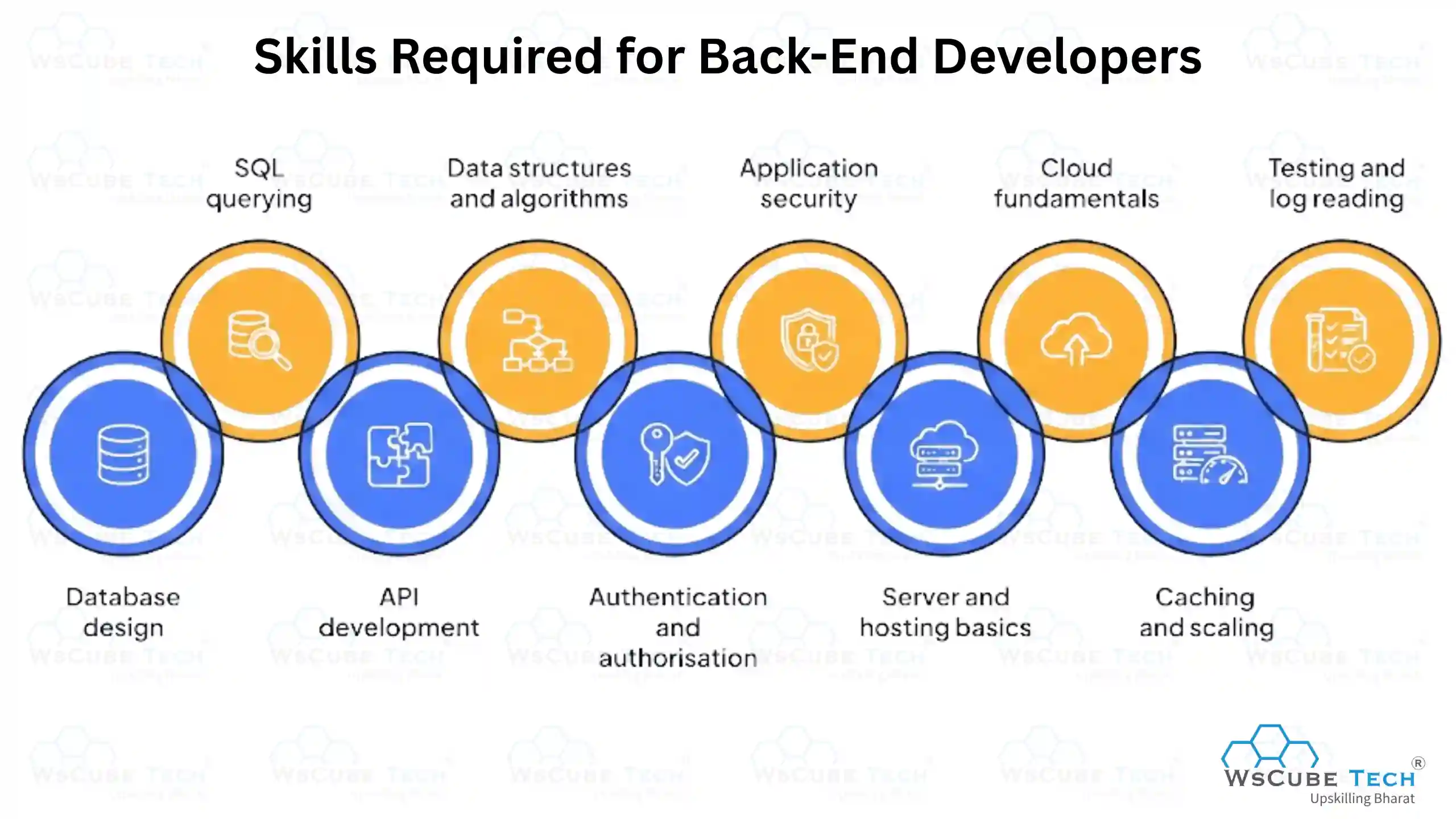
- Database design: Structuring tables and relationships so data stays clean as the app grows.
- SQL querying: Writing joins, using indexes, and understanding why a slow query is slow.
- API development: Designing REST endpoints, choosing correct status codes, and documenting them clearly.
- Data structures and algorithms: Needed for efficient code and for clearing technical interviews.
- Authentication and authorisation: Sessions, tokens, password hashing, and role based access.
- Application security: Preventing SQL injection, unsafe file uploads, and data leaks.
- Server and hosting basics: Linux commands, environment variables, and deployment steps.
- Cloud fundamentals: AWS, Google Cloud, or Azure at least at a basic working level.
- Caching and scaling: Knowing when to add Redis, a queue, or a read replica.
- Testing and log reading: Writing unit tests and tracing a production error back to its cause.
Upcoming Masterclass
Attend our live classes led by experienced and desiccated instructors of Wscube Tech.



Programming Languages Used in Front-End vs Back-End
The biggest technical difference between front-end and back-end is the language stack. Front-end languages run inside the browser, so the browser must understand them. Back-end languages run on a server, so you have far more choice there.
Front-end work is built on three core front-end languages. Back-end work can be done in many different back-end languages, and companies pick based on their project needs. If you are still exploring options, this list of web development programming languages gives a wider view.
| Language | Side | Used For | Beginner Friendly |
| HTML | Front-end | Page structure and content | Very easy |
| CSS | Front-end | Styling, layout, and responsiveness | Easy |
| JavaScript | Both | Interactivity on front end, servers with Node.js | Moderate |
| TypeScript | Both | JavaScript with type safety for large apps | Moderate |
| Python | Back-end | Web apps, APIs, data work, automation | Very easy |
| Java | Back-end | Large enterprise and banking systems | Moderate |
| PHP | Back-end | Websites, CMS platforms, WordPress | Easy |
| C# | Back-end | Microsoft based enterprise applications | Moderate |
| Ruby | Back-end | Fast web app development with Rails | Easy |
| Go | Back-end | High performance and scalable services | Moderate |
One important point for beginners: JavaScript appears on both sides. This is why many students start with JavaScript and later move into full-stack development without learning a completely new language.
Frameworks and Tools for Front-End and Back-End
Frameworks save time. Instead of writing everything from scratch, you use ready structures and focus on your actual features.
Front-End Frameworks and Tools
- React: A JavaScript library by Meta for building user interfaces. Component based and the most in demand today.
- Angular: A complete framework by Google. Good for large, structured enterprise applications.
- Vue.js: Light and easy to learn. A good choice for beginners and small to medium projects.
- Next.js: Built on React. Adds server-side rendering, which helps a lot with SEO.
- Bootstrap and Tailwind CSS: CSS frameworks for building responsive layouts quickly.
- Tools: VS Code, Git and GitHub, Chrome DevTools, Figma, npm, Webpack, Vite.
Back-End Frameworks and Tools
- Django: A Python framework with security, admin panel, and database tools built in.
- Express.js: A light Node.js framework used for building APIs quickly.
- Spring Boot: A Java framework used widely in banking, fintech, and large companies.
- Laravel: A PHP framework with clean syntax and strong built-in features.
- Ruby on Rails: Known for very fast development of complete web applications.
- Tools: Postman, Docker, MySQL Workbench, MongoDB Compass, Git, AWS, Nginx.
Roles and Responsibilities of Front-End vs Back-End Developers
Both roles sit in the same team but handle very different daily tasks.
Front-End Developer Responsibilities
- Turning design mockups from Figma into working, coded pages
- Building reusable UI components such as cards, modals, and navigation bars
- Making the site responsive across all screen sizes
- Calling back-end APIs and displaying the returned data correctly
- Handling form validation and error messages on screen
- Testing pages across Chrome, Safari, Firefox, and mobile browsers
- Improving load speed and fixing UI bugs reported by testers
- Coordinating with designers and back-end developers on requirements
Back-End Developer Responsibilities
- Writing the business logic that powers the application
- Designing database tables and relationships
- Creating and documenting APIs for the front-end team
- Building login, signup, and permission systems
- Integrating third-party services such as payment gateways and email tools
- Securing data and preventing unauthorised access
- Monitoring server performance and fixing slow queries
- Handling deployment, backups, and error logs
Read More Guides Related to Front-end & Back-end Development
Front-End vs Back-End: Salary Comparison
Salary depends on your skills, city, company, and portfolio far more than on which side you choose. Still, here are the general ranges you can expect in the Indian market.
| Experience Level | Front-End Developer (India) | Back-End Developer (India) | Global Average (USD per year) |
| Fresher (0 to 1 year) | 3.5 to 7 LPA | 3.5 to 6 LPA | 55,000 to 70,000 |
| Junior (1 to 3 years) | 5 to 9 LPA | 5 to 9 LPA | 70,000 to 90,000 |
| Mid level (3 to 6 years) | 9 to 17 LPA | 9 to 16 LPA | 90,000 to 120,000 |
| Senior (6 plus years) | 16 to 28 LPA | 16 to 28 LPA | 120,000 to 160,000 |
| Full-stack developer | 6 to 35 LPA depending on level | 6 to 35 LPA depending on level | 75,000 to 165,000 |
Career Opportunities in Front-End and Back-End Development
Both paths have steady demand. Almost every company today needs a website, an app, or an internal tool, and that means both sides of development keep hiring. The front end has more entry-level openings because the learning curve is shorter. The back end has stronger long-term growth into architecture and system design roles.
You are also not locked in. Many developers start on one side, work for two or three years, and then move to the other side or become full-stack.
Common job roles after learning front-end development:
- Front-End Developer
- UI Developer
- React Developer
- Web Designer and Developer
- JavaScript Developer
- Mobile App Developer using React Native
Common job roles after learning back-end development:
- Back-End Developer
- API Developer
- Python or Java Developer
- Database Developer
- DevOps Engineer
- Cloud Engineer
Front-End or Back-End: Which Is Easier to Learn?
For most beginners, the front end is easier to start with. You write a few lines of HTML and CSS and you immediately see a result on your screen. That instant feedback keeps you motivated in the first few months. The back end takes longer before you see anything visible, because you spend early time on logic, databases, and terminal commands.
That said, easier to start does not mean easier to master. Front-end work becomes complex once you reach state management, performance tuning, and large component structures.
Front-End: Pros and Cons
| Front-End Pros | - You see visual results from day one - Fewer concepts to learn at the beginning - More beginner-friendly jobs and freelance work |
| Front-End Cons | - Tools and frameworks change quickly, so you must keep learning - Browser compatibility issues can be frustrating |
Back-End: Pros and Cons
| Back-End Pros | - Skills stay relevant for longer - Slightly higher average salary - Strong logic skills open doors to many other tech roles |
| Back-End Cons | - Slower and less visual start for beginners - Requires comfort with data structures and databases |
If you are unsure where to begin, spend two weeks on HTML and CSS and two weeks on Python basics. Whichever one you enjoy more is the right starting point for you.
Explore Our Web Development Related Courses
Front-End vs Back-End: Which Should You Choose?
Use this table to match your own interests before you decide.
| Choose Front-End If... | Choose Back-End If... |
| You enjoy design, layout, and visual detail | You enjoy logic, puzzles, and problem solving |
| You want to see results quickly while learning | You are comfortable with slower, deeper learning |
| You like working closely with designers | You like working with data and systems |
| You care about how a product feels to use | You care about how a product performs at scale |
| You prefer creative work over mathematical work | You are comfortable with maths and algorithms |
| You want more entry-level job options | You want higher long-term salary growth |
| You enjoy instant visual feedback | You enjoy building things users never see |
WsCube Tech's recommendation: If you are a student with no coding background, start with the front end. It builds confidence fast and gives you a portfolio you can show within a few months.
If you already enjoy programming logic, maths, or have written some code in C or Python, start with the back end because it will feel natural to you. Either way, plan to learn the other side within a year. The strongest developers understand both.
Can You Learn Both Front-End and Back-End?
Yes, and a lot of developers do. A person who works on both sides is called a full-stack developer. You do not need to learn both at the same time though. Trying to do that usually slows you down and leaves you weak on both sides.
The right method is simple. Learn one side properly, build two or three real projects with it, then start the second side. Because JavaScript works on both the front end and the back end through Node.js, many students take that route and avoid learning a completely new language.
How to Become a Full-Stack Developer
Full-stack developers are in demand because they can handle a feature from the interface all the way to the database. Follow these ten steps in order. Do not skip ahead, because each step depends on the one before it. A realistic timeline for a beginner studying two to three hours a day is around ten to twelve months.
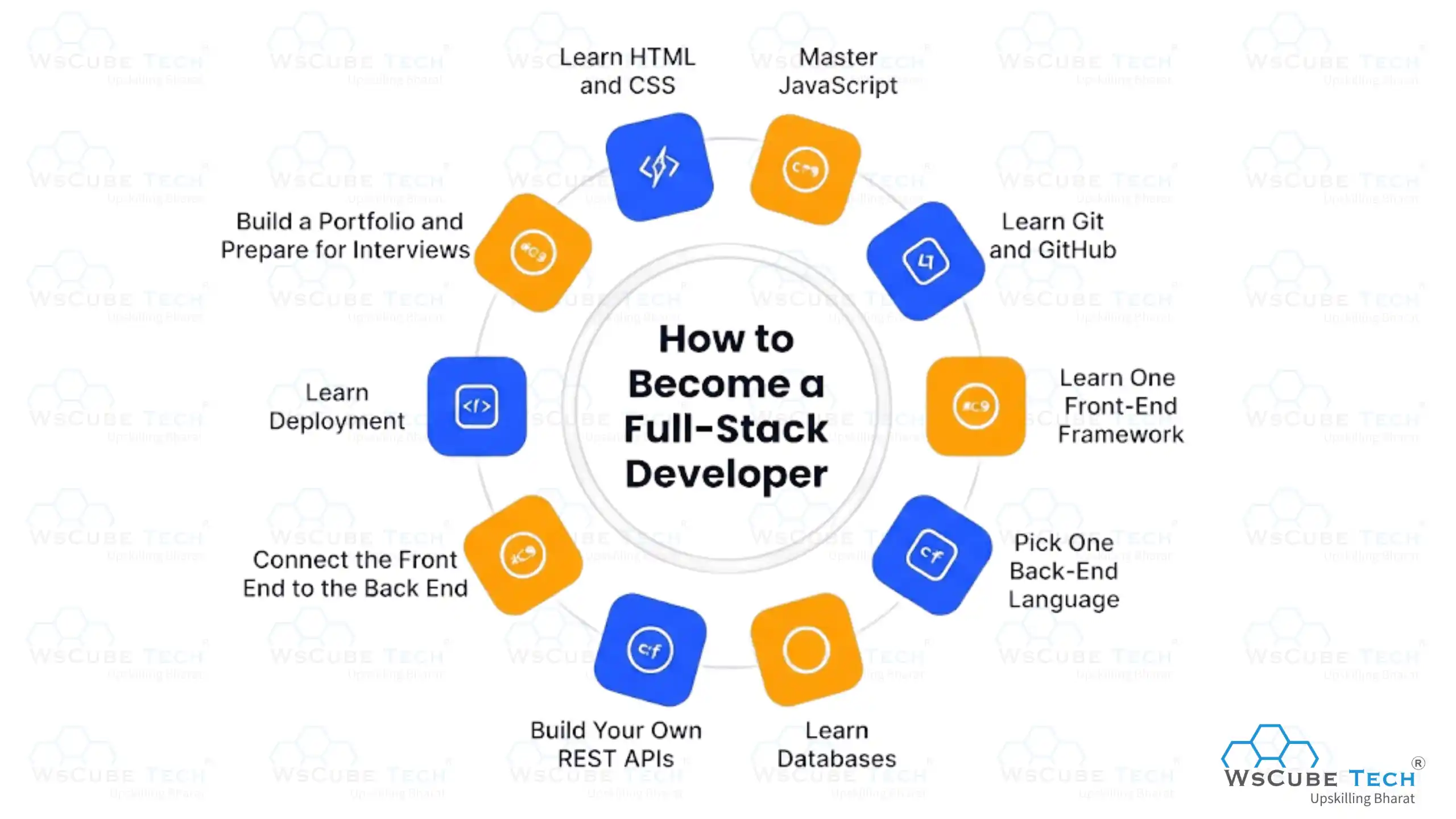
Step 1: Learn HTML and CSS
Time needed: 3 to 4 weeks Start with page structure and styling. Learn semantic tags, Flexbox, Grid, and media queries.
Build this: Three static pages copied from real websites, fully responsive on mobile.
Step 2: Master JavaScript
Time needed: 8 to 10 weeks This is the most important step in the whole path, so do not rush it. Cover functions, arrays, objects, the DOM, events, ES6 features, promises, and async code.
Build this: A to-do list, a calculator, and a page that loads data from a public API.
Step 3: Learn Git and GitHub
Time needed: 1 week Learn commits, branches, merges, and pull requests. Push everything you have built so far.
Build this: A clean GitHub profile with your first three projects and a proper README on each.
Step 4: Learn One Front-End Framework
Time needed: 6 to 8 weeks React is the safest choice in 2026 based on job openings. Focus on components, props, state, hooks, and routing.
Build this: A multi-page React app such as a movie search or weather dashboard.
Step 5: Pick One Back-End Language
Time needed: 6 to 8 weeks Node.js keeps you in JavaScript, Python is the easiest to read, and Java suits large enterprise roles. Pick one and stay with it.
Build this: A simple server that handles basic requests and returns data.
Step 6: Learn Databases
Time needed: 4 to 5 weeks Begin with MySQL or PostgreSQL for SQL, then add MongoDB later. Learn table design, joins, and indexes.
Build this: A database schema for a blog with users, posts, and comments, plus working queries.
Step 7: Build Your Own REST APIs
Time needed: 4 weeks Create endpoints for create, read, update, and delete. Test everything in Postman and learn status codes.
Build this: A complete API for the blog schema you designed in Step 6.
Step 8: Connect the Front End to the Back End
Time needed: 2 to 3 weeks This is the step that actually makes you full-stack. Take a React project and replace all dummy data with your own live API. Add login and authentication.
Build this: One working application where both sides are written by you.
Step 9: Learn Deployment
Time needed: 2 weeks Learn environment variables, basic Linux commands, and how to host on a cloud platform.
Build this: A live URL you can share with recruiters, not just code sitting on your laptop.
Step 10: Build a Portfolio and Prepare for Interviews
Time needed: 6 to 8 weeks Create three complete projects, such as a blog with login, an e-commerce page with a cart, and a dashboard with charts. Alongside this, revise data structures, JavaScript concepts, and SQL queries.
Build this: A portfolio site linking all projects, plus a clear two-minute explanation of each one.
If you would rather follow a structured path with mentors, live doubt sessions, and project reviews instead of learning alone, a guided online full-stack developer course can cut your learning time significantly.
Front-end vs Back-end: Explained in 1 Minute
FAQs about Front end vs Back end
The front end is the part of a website you can see and click, such as buttons, menus, and images. The back end is the server, database, and logic that runs behind the screen. Both work together, but only one of them is visible to the user.
Front end is usually easier to start with because you see visual results from your very first day of coding. Back end takes longer before anything appears on screen, since you begin with logic and databases. Neither is easy to master, so pick the one you enjoy more.
Back-end roles pay slightly more on average because they involve databases, security, and system scaling. However, the gap is small and closes quickly with experience. Your skill level, portfolio, and city matter far more than the side you choose.
Yes, and such a developer is called a full-stack developer. They can build a complete feature from the user interface all the way to the database. Most developers learn one side well first and then add the second side.
Start with HTML and CSS for structure and styling, then move to JavaScript. JavaScript is the most important choice because it works on the front end and also on the back end through Node.js. This path keeps both career options open for you.
It is both. In the browser it handles all front-end interactivity such as forms, sliders, and pop-ups. With Node.js, the same language runs on servers and builds APIs, which is why many students choose it first.
Basic knowledge is enough. You do not need design skills, but understanding page structure helps you build APIs that the front-end team can use easily. It also makes team discussions much smoother.
With regular daily practice, most learners reach a job-ready front-end level in four to six months. That includes HTML, CSS, JavaScript, and one framework like React. Building two or three real projects during this time matters more than finishing tutorials.
Demand is almost equal, but the pattern is different. Front end has more entry-level and fresher openings, while back end has more mid-level and senior roles. Full-stack developers usually get the widest range of interview calls.
No, a degree is not compulsory in most hiring processes. Companies mainly check your projects, your GitHub profile, and how well you explain your code in interviews. A strong portfolio can matter more than your academic background.

Conclusion
The difference between frontend and backend development is not about which one is better. It is about which part of the product you want to own. The front end shapes how people experience a website, and the back end decides what that website can actually do. Both roles will stay in demand, so pick the side you enjoy more and learn it well enough to build real projects.
If your goal is to build a complete application on your own, full-stack is the strongest career bet in 2026. The live online full-stack developer course by WsCube Tech covers both sides with live classes, real projects, and placement support, so you can move from beginner to job ready with a clear plan.
Explore Our Free Tech Tutorials
| Python Tutorial | Java Tutorial | JavaScript Tutorial |
| C Tutorial | C++ Tutorial | HTML Tutorial |
| CSS Tutorial | SQL Tutorial | DSA Tutorial |
Practice Coding With Our Free Compilers
| Online Python Compiler | Online HTML Compiler | Online C Compiler |
| Online C++ Compiler | Online JS Compiler | Online Java Compiler |
Join Our On-Campus Full Stack Related Courses
Free Courses for You


Leave a comment
Your email address will not be published. Required fields are marked *Comments (0)
No comments yet.