
Website design and website development sit side by side in every project, yet the two are constantly mixed up. One shapes how a site looks and feels. The other decides how it actually works.
The line between them used to be simple. Design was creative, development was technical. That has blurred. Most designers now work comfortably with HTML and CSS, and plenty of developers have a sharp eye for layout and visual detail.
This blog breaks down web design vs web development in full detail: what each role does, the tools and skills each one demands, salary ranges in India for both, how the two work together on a live project, and which career path makes more sense for you. By the end, you will know exactly where you fit.
Web Design vs Web Development: Quick Answer
Web design is the visual and experience layer of a website. It covers layout, colour, typography, navigation, and how the site feels to use. Web development is the functional layer. It covers the code that turns those designs into a working site, along with the servers, databases, and logic running behind it. In short, design decides how a website looks and behaves for the user, while development decides how it actually works.
Both roles depend on each other, and most live websites are the result of the two working in sequence. If you are weighing web development vs web design as a career choice, the short version is that both are in demand, and the decision comes down to whether you prefer visual problem solving or logical problem solving.
What is Web Design?
Website design covers the visual aesthetics and usability of a website, including information flow, color scheme, layout, and other UI/UX factors. Web designers put these parts together to create an attractive online space for a business.
Rather than building websites, web designers use Illustrator and Photoshop to prototype the home page and internal pages. This gives clients an idea of where their website design is going, while working as a building block for developers when they write code.
A website stands out for its user experience. If it is responsive and easy to navigate, it scores high among internet users. Layout and color scheme, however, remain the two core concerns.
Here are some common tools and skills that web designers must master:
- Figma, Adobe XD, and Sketch
- Adobe Photoshop and Illustrator
- Wireframing and prototyping
- Color theory and typography
- Responsive and grid based layouts
- Basic HTML and CSS
What is Web Development?
Web development centers on the mechanism that enables a website to work seamlessly. Developers write the code that makes a website tick and bring a designer's idea to life.
They are responsible for the frontend or backend of a site or web app. Front-end development decides how a website is displayed across devices and browsers. Back-end development is the server side that manages data within the database and displays it on the front end.
In simple terms, developers make a web design function as expected. A designer creates a CTA button, but developers write the code that makes it respond correctly. Take up our web development course to become career-ready.
Here are some common tools and skills that web developers must master:
- HTML/CSS/JavaScript
- Frameworks (AngularJS, ReactJS, Ember)
- CSS preprocessors (LESS or Sass)
- Libraries (jQuery)
- Web template design
- Git and GitHub
- On-page search engine optimization (SEO)
Recommended Professional Certificates
Full Stack Development Course with AI Engineering
WordPress Bootcamp
Web Design Fundamentals
As we discuss web design vs development, it's essential that we gain a fair knowledge of the best practices of visual design. Here are a few web design fundamentals to follow while designing websites.
- Color Theme and Psychology - Designers use different hues and color schemes strategically to spark emotions and convey a brand's vision.
- Layout - It is the responsibility of a designer to create a layout that makes it easier for visitors to read the content of the page.
- Text - Clearly arranged and well-formatted texts increase the visual appeal of a website and ensure effective communication.
- Contrast - Contrast highlights important elements of a web page and maintains legibility.
- Hierarchy - It shows the importance of various elements of a website.
Web Design Specializations
Apart from fundamentals, web designers also need to know best practices to offer a seamless user experience and user interface. They make a website look good and contribute to its appeal and usability. Hence, they must focus on the overall feel, look, and style of a website using different tools, technologies, and software, such as Corel Draw, Photoshop, etc. Here are web design specializations you should know:
1. User Experience (UX) Designers
UX designers figure out how to get users' attention at once, engage them, compel them to take design actions, and make them come back. They take care of how users would feel after using the website. This means they focus on the efficiency and usability of a website.
Their designs are mostly research-intensive and even demand interviews with the target audiences. Their other responsibilities include wireframing, A/B testing, and prototyping. Moreover, they build user stories, sketch user personas, and run tests to ensure that a website meets user requirements, has a logical web flow, and exhibits intuitive interactions.
2. User Interface (UI) Designers
UI designers build the structural foundation of a website based on the UX process to create appealing websites. They create illustrations, graphics, typography, and images to improve the layout and display of websites across various devices. Basically, they focus on aesthetics, interactivity, and neatness and make it easier for users to navigate through the website.
Also, they maintain visual consistency to avoid any confusion and engage the visitors. User interface elements include navigational components (slider, search fields, tags, and icons), input controls (menus, buttons, drop-down, and data fields), and informational elements notifications, progress bars, and message boxes).
3. Visual Designers
Visual designers combine UX and UI to design dynamic, efficient, and appealing websites and other interfaces. They make sure that the digital product looks attractive. Many confuse graphic design and visual design. The former revolves around print and digital design media, while the latter is about web and app interface designs.
Web Development Fundamentals
To understand web development or web design, which is better, it is important to get familiar with the fundamentals of both. Once a web designer decides the look and feel of a website, it's time for a web developer to turn this design into a fully functional and live website. For this, they need to understand the principles of web development clearly.
- Structure and Hierarchy of a Website - Web developers use HTML to create the structure and hierarchy for web pages.
- Hosting and File Transfer Protocol (FTP) - After building a website, developers launch it and push it live. However, the process may vary based on where a website was developed- the local server or hosting account of the client.
- Responsive Website - The website must be compatible with all devices and work efficiently across all screen sizes, operating systems, and browsers.
- Security - The website must be secure and protected from any infringements and cyberhacks.
- GitHub, Git, and Command Line - Developers use these open-source platforms to manage version control.
Web Development Specializations
Web developers are coders or programmers who convert web designs into rich and accessible websites. As a website has different aspects - frontend or backend, developers can specialize in any one of them based on their skill sets.
They use different tools and languages, such as jQuery, PHP, HTML, CSS, JavaScript, Python, React, etc., to build a seamless website. They collaborate with designers to build web pages according to their designs. To understand web development and web designing difference, you must know web developer specializations.
1. Front-end Developers
Front-end development involves crafting the part of a website that users interact with or see. It is also known as the client side of a website or web app and involves building user-facing or visible elements that decide user experiences, such as text colors, fonts, images, buttons, navigation menu, graphs, tables, etc.
Whenever you open an app or website, everything you see on your screen is implemented by front-end developers. They aim to make a website responsive and performance-oriented. The primary languages used for front-end development are HTML, CSS, and JavaScript.
2. Back-end Developers
Back-end development focuses on building the core structure of a website, which is the server side. This is behind-the-scene of a website where all the coding and programming take place. It stores and arranges data, making sure that everything on this end is working well. Users can't see or interact with the backend and indirectly access the elements and features through the front end.
It includes working with system components without user interfaces, writing APIs, scientific programming, or creating libraries. Back-end developers use complex programming languages, such as Ruby, Python, Java, PHP, etc., to integrate servers, databases, and applications.
3. Full-stack Developers
Full-stack development combines the front-end and back-end elements of a website. Hence, it demands developers who are proficient in front-end and back-end technologies and programming languages.
They possess knowledge of user-side application development, Windows and Linux server setup and configuration, website debugging, database operations and querying, server-side API coding, structuring and designing web pages, and more.
Upcoming Masterclass
Attend our live classes led by experienced and desiccated instructors of Wscube Tech.



Web Designing vs. Web Development: Key Differences
| Criteria | Web Designers | Web Developers |
| Meaning | Web design is concerned with how a website looks and feels to users. It involves creating graphical components to be used on the World Wide Web. | Web development is concerned with the functionality of a website, i.e., how it works. It involves creating features and writing codes. |
| Tools and Technologies Used | Web designers use tools such as Adobe Photoshop, Illustrator, Dreamweaver, Sketch, etc. | Web developers use programming languages such as HTML, PHP, JavaScript, CSS, Python, Ruby, jQuery, etc. |
| Area of Expertise | Web Designers are creative and add aesthetic elements, turning ideas into visually appealing designs. | Web Developers are more technical and ensure that the website is user-friendly and meets the client's specifications. They turn designs into functional websites. |
| Skill Set | Web designers must be proficient in Photoshop, Illustrator, and other designing software. | Web developers must possess HTML, CSS, and JavaScript skills, along with open-source CMS. |
| Job Responsibilities | Web designers are responsible for designing a website's visual and creative aspects and don't need to be involved in technicality. They create the idea and style of a website and prepare mockups based on visual, UX, and UI features. | Web developers are technically savvy with knowledge of sophisticated programming languages and frameworks. They determine the financial and technical feasibility and accordingly work on coding. |
| Deadlines & Time Management | Web designers invest their time in building wireframes, choosing the right images, designing the themes, and creating designs specified by the clients. | Web developers spend most of their time on website maintenance, including updating the CMS, providing online support in case of any issue, and monitoring security. |
| Types | User Experience (UX) Designer, User Interface (UI) Designer, Visual/Graphic Designer | Front-end Developer, Back-end Developer, Full-stack Developer |
| Education & Certification | Web designers can have one or more of the following certifications: Web Developer, Master Certified Web Professional - Designer (CWP), and Web Programming Certificate. | Web developers complete the following certification courses: Certified Web Professional - Web Developer, Master Certified Web Professional - Designer (CWP), and Certified Software Development Professional (CSDP). |
| Portfolio | The portfolio of web designers highlights their capabilities in web designing, layouts, themes, graphics, etc. | Web developers exhibit their skills to rearrange and simplify code, so other developers and stakeholders find it elegant and comprehensible. |
| Web Designer vs Web Developer Salary | Web designers are in less demand than web developers, and their average annual salary is relatively lower. | Web development is one of the most sought-after skills, and recruiters are ready to pay handsome salary packages to skilled candidates. |
Tools Used in Web Design vs. Web Development
The tools used in web design and development are one of the clearest points of separation between the two roles. Designers and developers work on the same website but rarely open the same software. The design side runs on visual and prototyping tools, while the development side runs on editors, version control, and frameworks. Here is a side-by-side view of what each role actually uses day to day.
| Category | Web Design Tools | Web Development Tools |
| Primary working tool | Figma, Adobe XD, Sketch | Visual Studio Code, Sublime Text, WebStorm |
| Graphics and editing | Adobe Photoshop, Illustrator, Canva, CorelDRAW | Not applicable in most workflows |
| Prototyping and wireframing | Figma, Balsamiq, InVision, Marvel | Not applicable in most workflows |
| Handoff and specs | Figma Dev Mode, Zeplin, Avocode | Same files consumed from the developer side |
| Languages and markup | Basic HTML and CSS for design accuracy | HTML, CSS, JavaScript, Python, PHP, Java, Ruby |
| Frameworks and libraries | Design systems such as Material Design, Tailwind UI kits | React, Angular, Vue, Node.js, Django, Laravel |
| Version control | Figma version history, Abstract | Git, GitHub, GitLab, Bitbucket |
| Testing and QA | Usability testing, A/B testing, Hotjar, Maze | Chrome DevTools, Jest, Cypress, Postman |
| Collaboration | Miro, FigJam, Notion | Jira, GitHub Issues, Slack |
| Deployment | Not applicable | Netlify, Vercel, AWS, cPanel, Docker |
If you are entering the field, learning Figma first and then moving into HTML, CSS, and JavaScript gives you a working view of both sides before you pick a specialisation.
Read More Web Development Related Guides
Skills Required: Web Designer vs. Web Developer
The skills required for web development and design overlap only at the edges. Both roles need a mix of technical ability and judgement, but the balance is different. Designers lean on visual reasoning and user empathy. Developers lean on logic, structure, and problem solving. The table below breaks it down.
| Skill Area | Web Designer | Web Developer |
| Core technical skill | Visual design, layout, typography, colour theory | Programming logic, data structures, algorithms |
| Languages | HTML and CSS at a working level | HTML, CSS, JavaScript, plus at least one backend language |
| Software proficiency | Figma, Photoshop, Illustrator, Adobe XD | Code editors, terminal, Git, package managers |
| User focused skills | UX research, wireframing, user personas, journey mapping | Performance optimisation, accessibility implementation, error handling |
| Structural skills | Information architecture, design systems, responsive grids | Database design, API development, server configuration |
| Testing skills | Usability testing, A/B testing, heatmap analysis | Unit testing, integration testing, debugging |
| Business skills | Brand understanding, client presentation, storytelling | Requirement analysis, estimation, technical feasibility |
| Soft skills | Communication, empathy, creative thinking, feedback handling | Analytical thinking, patience, documentation, collaboration |
| Nice to have | Motion design, illustration, basic front-end coding | Basic design sense, SEO fundamentals, DevOps exposure |
A useful rule of thumb is this. If you enjoy solving problems visually, design suits you. If you enjoy solving problems logically, development suits you.
Web Designer vs Web Developer Salary in India
Web design vs web development salary depends on city, experience, portfolio quality, and the tech stack you work with. Web developers generally earn more at every level because the skill takes longer to build and the demand is broader across industries. Designers, however, close the gap quickly once they move into UX or product design roles.
| Experience Level | Web Designer (Average Annual Salary) | Web Developer (Average Annual Salary) |
| Fresher (0 to 1 year) | Rs. 2.5 LPA to Rs. 4 LPA | Rs. 3.5 LPA to Rs. 6 LPA |
| Junior (1 to 3 years) | Rs. 4 LPA to Rs. 6.5 LPA | Rs. 6 LPA to Rs. 10 LPA |
| Mid-level (3 to 6 years) | Rs. 6.5 LPA to Rs. 12 LPA | Rs. 10 LPA to Rs. 18 LPA |
| Senior (6 to 10 years) | Rs. 12 LPA to Rs. 20 LPA | Rs. 18 LPA to Rs. 30 LPA |
| Lead or Architect (10+ years) | Rs. 20 LPA and above | Rs. 30 LPA and above |
| Freelance rate | Rs. 500 to Rs. 1,500 per hour | Rs. 800 to Rs. 2,500 per hour |
A few factors that shift these numbers:
- City: Bengaluru, Hyderabad, Pune, and Gurugram pay noticeably higher than tier 2 cities.
- Specialisation: UX designers and full-stack developers sit at the higher end of their respective ranges.
- Company type: Product companies and funded startups pay more than service agencies.
- Portfolio: A strong live portfolio often matters more than a degree in both fields.
How Web Design and Web Development Work Together
Website design and development run as two halves of the same process. A website is never the output of one role working alone. The two functions sit in a sequence, and the quality of the handoff between them decides how good the final product is.
Here is how a typical project moves:
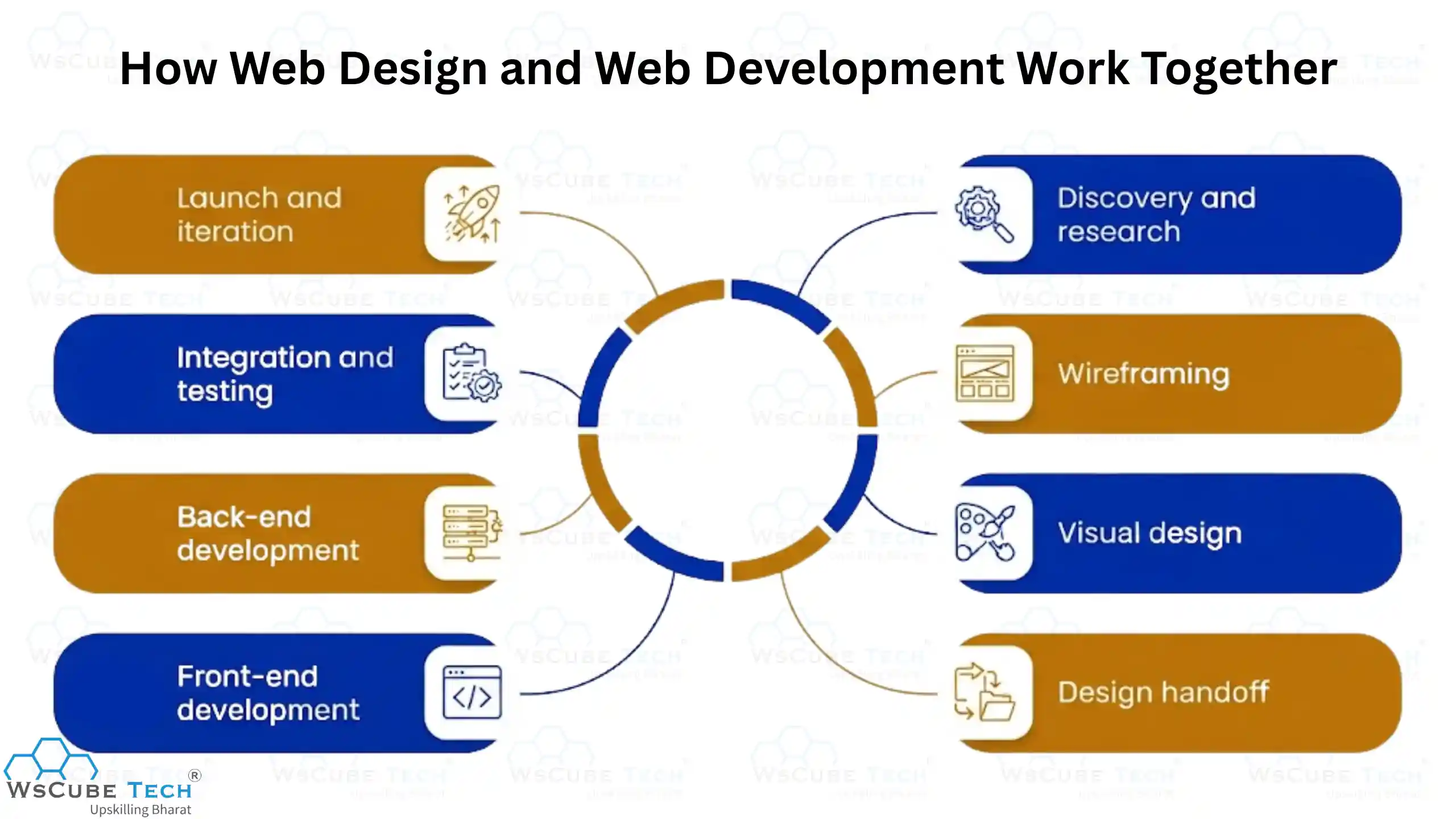
- Discovery and research: The designer studies the business goal, the target user, and competitor sites.
- Wireframing: Low-fidelity layouts map out structure and content hierarchy before any visual polish.
- Visual design: Colour, typography, imagery, and components are applied to build high-fidelity screens.
- Design handoff: The designer shares specs, assets, spacing rules, and interaction notes with the developer.
- Front-end development: The developer converts the design into responsive, browser-ready code.
- Back-end development: Databases, APIs, authentication, and business logic are built and connected.
- Integration and testing: Both teams review the build for visual accuracy, responsiveness, and functionality.
- Launch and iteration: Analytics and user feedback feed back into design changes, and the cycle repeats.
The best teams overlap these stages rather than treating them as a relay race. Designers who understand technical constraints create designs that are actually buildable. Developers who understand design intent protect the details that make an interface feel right. This shared vocabulary is why many companies now hire people comfortable on both sides.
Which Career Path Should You Choose? Web Design or Web Developer
When people compare web development vs web design as a career, they usually look at salary alone, but long-term fit matters far more. There is no universally better option. The right choice depends on how you like to think and what kind of work keeps you engaged.
Choose web design if you:
- Enjoy visual problem solving and have an eye for detail
- Like understanding user behaviour and motivations
- Prefer work that is exploratory rather than rule bound
- Are comfortable presenting ideas and defending design decisions
- Want a faster entry point into the industry with a portfolio-led approach
Choose web development if you:
- Enjoy logic, structure, and breaking problems into steps
- Are comfortable spending long stretches debugging
- Want a wider range of roles and industries to move into
- Prefer measurable outcomes such as speed, uptime, and correctness
- Are aiming for a higher starting salary and steeper pay growth
Also consider the market. Development roles are more numerous and pay better on average, but design roles face less competition at the senior end, especially in UX. If you are still unsure, spend two weeks on each. Build one landing page in Figma and code one static page in HTML and CSS. Your own reaction will tell you more than any comparison article can.
Explore Our Web Development Related Courses
Can You Learn Both Web Design and Web Development?
Yes, and a growing number of professionals do exactly that. Learning web design and web development together is realistic, though the order you learn them in matters. People who work across both web development and design are usually called full-stack designers, design engineers, or simply front-end developers with strong design sense.
Learning both makes sense if you:
- Plan to freelance and want to deliver complete projects on your own
- Want to build your own product or startup without a large team
- Are aiming for roles at early-stage companies where responsibilities overlap
- Want better collaboration outcomes in a larger team
There are trade-offs to be aware of. Going wide takes longer, and you risk being average at both instead of strong at one. The practical approach is to pick a primary skill, reach a hireable level in it, and then add the second skill as a supporting strength. For example, become a competent front-end developer first, then learn Figma and design fundamentals to make your builds better.
A realistic timeline for a beginner is roughly six months to become job-ready in one discipline, and another four to six months to reach working proficiency in the second.
How to Start a Career in Web Design or Web Development
Breaking into website design and development does not require a specific degree or a fixed academic background. The path is fairly similar for both fields, with the difference showing up in what you practise.
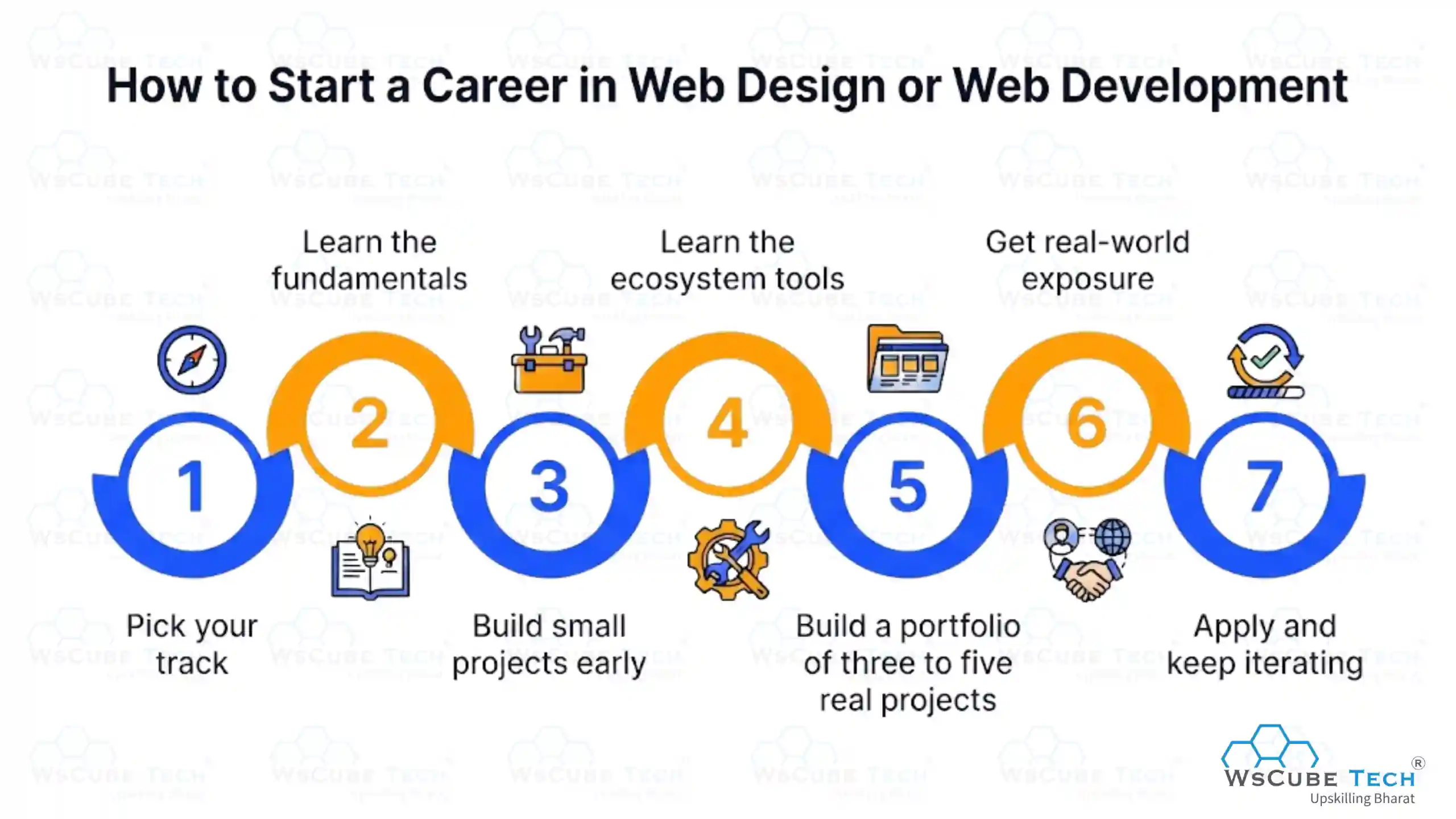
Step 1: Pick your track. Decide between design and development based on the questions covered above. Committing to one track for the first few months prevents scattered learning.
Step 2: Learn the fundamentals. Designers should start with layout, typography, colour, and Figma. Developers should start with HTML, CSS, and JavaScript before touching any framework.
Step 3: Build small projects early. A personal portfolio site, a landing page clone, and a simple multi-page site are enough to apply what you learn. Practice beats passive video watching.
Step 4: Learn the ecosystem tools. Designers should add prototyping, design systems, and handoff workflows. Developers should add Git, GitHub, a framework such as React, and basic deployment.
Step 5: Build a portfolio of three to five real projects. Quality matters more than count. Each project should explain the problem, your approach, and the result.
Step 6: Get real-world exposure. Take on freelance work, internships, open-source contributions, or projects for a local business. Real constraints teach what tutorials cannot.
Step 7: Apply and keep iterating. Tailor your resume to the role, keep your portfolio live and updated, and stay active on LinkedIn, GitHub, Behance, or Dribbble depending on your track.
A structured course can compress this timeline significantly, especially for the fundamentals stage where most self-learners lose momentum.
FAQs About Web Design and Web Development
Web design covers how a website looks and feels, including layout, colour, typography, and user experience. Web development covers how the website works, including the code, databases, and server logic that make it functional.
Web design is generally easier to start with because the initial tools are visual and the feedback is immediate. Web development has a steeper learning curve but offers more role options once you are past the basics.
Not necessarily, but a working knowledge of HTML and CSS is a strong advantage. It helps designers create layouts that developers can build accurately and reduces back-and-forth during handoff.
Web development pays more on average at every experience level. However, senior UX designers and design leads can match or exceed developer salaries in product companies.
Yes. Many designers move into front-end development because they already understand layout, responsiveness, and user behaviour. The main addition is JavaScript and framework knowledge.
With consistent daily practice, most beginners reach a job-ready level in about four to six months for web design and six to nine months for web development.
No. Both fields hire heavily on the strength of portfolios and practical skills. A relevant degree helps in some large companies but is rarely a hard requirement.
Start with HTML and CSS. They sit at the intersection of both disciplines and give you a foundation you can extend in either direction.
Yes. Every business that goes online needs someone to build and maintain its web presence, and demand has stayed steady across agencies, product companies, and freelance work.
Web Designing and Web Development: Difference in a Nutshell
By now the difference should be clear. Web design and development are not rival careers, they are two stages of the same build. A designer decides what a visitor sees and how easily they find their way around. A developer turns that thinking into a site that actually loads, responds, and keeps working long after launch. Take either one away and you are left with something half finished.
So the real question is not which field is better, but which suits the way you think. If that answer is still both, our online full-stack web developer course covers the full journey, from the first wireframe to a live, working website.
Explore Our Free Tech Tutorials
| Python Tutorial | Java Tutorial | JavaScript Tutorial |
| C Tutorial | C++ Tutorial | HTML Tutorial |
| CSS Tutorial | SQL Tutorial | DSA Tutorial |
Practice Coding With Our Free Compilers
| Online Python Compiler | Online HTML Compiler | Online C Compiler |
| Online C++ Compiler | Online JS Compiler | Online Java Compiler |
Join Our On-Campus Full Stack Related Courses
Free Courses for You




Leave a comment
Your email address will not be published. Required fields are marked *Comments (0)
No comments yet.