
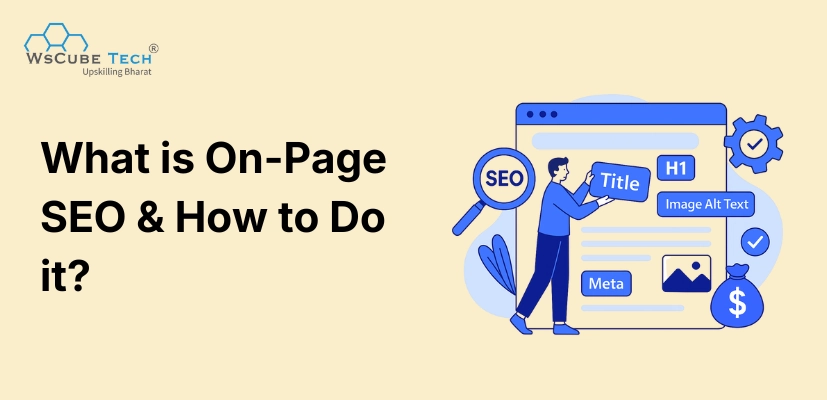
If you want higher rankings on Google, you cannot ignore the on page SEO. When you create a webpage, Google doesn’t rank it just because the content exists; it ranks it based on how well that page is optimized.
That’s where understanding what is on page SEO becomes important. On-page SEO helps search engines understand your page clearly so they can rank it for the right keywords. You can write the best content in your niche, but without strong on-page optimization, the page won’t reach your target audience. This is the foundation of every successful SEO strategy.
What is On-Page SEO?
On-page SEO means all the optimizations you do directly on your webpage or website to help search engines understand your content better and rank it higher. It includes improving your title, meta description, URLs, headers, images, content quality, page speed, and internal linking.
On-page SEO also makes your content more readable and useful for users. Think of it as polishing your webpage so both Google and your audience can easily understand what the page is about.
When done correctly, on-page SEO improves your rankings, brings organic traffic, and increases your visibility for the keywords you want to rank for.
Recommended Professional Certificates
AI-Powered Digital Marketing Course
Performance Marketing Bootcamp
SEO Specialist Bootcamp
How to Optimize for On-Page SEO?
Use these techniques for on-page SEO optimization:
1. Place Your Keywords in Right Locations on Page
On-page SEO starts with placing your primary, secondary, and related keywords at strategic locations so Google instantly understands your topic.
Your primary keyword must appear in:
- Title tag
- URL
- H1
- First 100 words of introduction
- 2–3 subheadings (H2/H3)
- Naturally throughout the content
- Image alt text
- Meta description
Do NOT overuse keywords. Use natural language and add LSI keywords like “on-page optimization,” “SEO elements,” etc.
2. Use Heading Tags Properly (H1, H2, H3 Hierarchy)
Heading tags tell Google how your content is structured and what each section means.
- Use only 1 H1 tag on the entire page
- Use H2 tags for main sections
- Use H3 tags for subsections under H2
- Use H4 tags only when needed (e.g., deep subpoints)
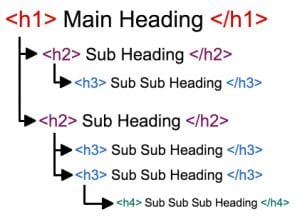
This makes content scannable, improves readability, and helps Google understand your page hierarchy. Never use H1 for design purposes — it should always define the page’s main topic.
3. Write an SEO-Friendly Title Tag
A strong title tag or meta title improves both rankings and click-through rate.
Follow these rules:
- Include your primary keyword at the beginning
- Keep it under 580 pixels.
- Make it clickworthy using curiosity, numbers, or power words
- Match the search intent (informational, commercial, etc.)
- Keep every page title unique
Example formats:
- “On-Page SEO Guide: Complete Checklist for Beginners (2026)”
- “On-Page SEO: 15 Factors You Must Optimize Today”
Avoid vague titles like:
❌ “SEO Tips”
❌ “Learn SEO”
Your title should clearly represent your content and attract clicks.
4. Create a Clean, Keyword-Rich, and Short URL
Your URL should be simple, readable, and reflect your main topic. Google prefers short URLs with relevant keywords because they help both users and crawlers understand the page quickly.
Good URL examples:
- /on-page-seo-guide
- /best-digital-marketing-course
Avoid:
- /page?id=0934
- /how-to-do-seo-in-2026-complete-guide-for-students-and-beginners-and-businesses
Best practices:
- Use hyphens (–), not underscores (_)
- Avoid stopwords like “and,” “the,” “a,” etc.
- Keep it under 60 characters
- Use lowercase letters only
A good URL boosts ranking chances and click-through rate.
5. Optimize Your Meta Description for CTR & Relevance
Meta descriptions don’t directly impact rankings, but they heavily influence how many users click your result. Your meta description should act like a mini-advertisement.
Best practices:
- Keep it 990 pixels.
- Add your primary keyword
- Add a CTA like “Learn more,” “Explore the guide,” or “Start now”
- Summarize the page clearly
Example:
“Learn what on-page SEO is and how to optimize your titles, URLs, keywords, and headings to rank higher. Simple steps + complete checklist included.”
Google may rewrite descriptions, but an optimized version still boosts CTR significantly.
6. Use the First 100 Words to Set Context
The opening paragraph is one of the most important sections of your page. Google scans the first 100 words to understand the core topic.
Do this:
- Add your primary keyword once
- Mention user intent
- Clearly define what the page will cover
- Avoid fluff
Example intro:
“Get into IIMs with India’s most trusted online IPMAT coaching. Learn from IIM alumni, attend live classes, get 1:1 mentorship, and practice with AI-powered tests and detailed analysis. With a proven track record, this is the complete program to help you crack IPMAT.”
This approach tells Google exactly what the page is about from the start.
7. Write High-Quality, Intent-Focused Content
Your content must satisfy the user’s problem completely. Google rewards clarity, completeness, and usefulness.
To write strong SEO content:
- Break large text into short paragraphs
- Use bullet points and examples
- Cover everything the user expects
- Answer related sub-questions
- Use simple, conversational language
- Avoid keyword stuffing
Example:
If writing about “On-page SEO Checklist,” include every practical step; not just theory. Good content = higher time-on-page + lower bounce rate = better rankings.
Upcoming Masterclass
Attend our live classes led by experienced and desiccated instructors of Wscube Tech.




8. Add Internal Links to Strengthen Your Website SEO
Internal linking helps Google navigate your website and understand topic relationships.
Internal linking rules:
- Add 3–10 internal links per page
- Use descriptive anchor text like: “on-page SEO checklist”, “technical SEO guide”.
- Do not use generic anchors like “click here”
- Link to only relevant, high-value pages
- Ensure important pages receive more internal links
Example:
A blog about "On-page SEO" should link to:
- Off-page SEO guide
- Technical SEO checklist
- Keyword research techniques
A strong internal linking strategy improves rankings across the entire website.
9. Optimize Images With Alt Text, Compression & File Names
Images affect both SEO and page speed. Unoptimized images slow down your website.
Do this:
- Compress images using tools (TinyPNG, ShortPixel)
- Use descriptive file names like on-page-seo-checklist.webp
- Add alt text that describes the image
- Use WebP format for fastest performance
- Resize images to proper dimensions
Bad image name and URL: IMG_00291.jpg
Good image name and URL: on-page-seo-title-tag-example.jpg
Image SEO helps in ranking in Google Images and improves page accessibility.
10. Improve Page Speed & Core Web Vitals
Page experience is a ranking factor. Slow websites perform poorly in SEO.
How to improve page speed:
- Compress images
- Enable caching
- Minimize CSS & JS
- Use a fast hosting provider
- Remove unnecessary plugins
- Use LiteSpeed or Cloudflare CDN
- Aim for LCP under 2.5 seconds
- Use PageSpeed Insights to analyze Core Web Vitals like LCP, FID, and CLS.
Faster pages lead to higher rankings + better conversions.
11. Make Your Page Mobile-Friendly
Most users browse from mobile devices, and Google indexes your mobile version first.
Ensure:
- Responsive design
- Large readable fonts
- Proper spacing between elements
- Fast-loading mobile layout
- No overlapping text or images
- Check using Google’s Mobile-Friendly Test.
A fully optimized mobile version is essential to on-page SEO success.
12. Add Schema Markup to Enhance Your SERP Appearance
Schema markup helps Google understand the purpose of your content and makes it eligible for rich results.
Useful schema types:
- FAQ Schema
- Article Schema
- Breadcrumb Schema
- Product Schema
- Course Schema
Implement using plugins (Rank Math, Yoast) or manual JSON-LD.
13. Strengthen E-E-A-T Signals (Especially for YMYL Topics)
Google trusts websites that show expertise, experience, authority, and trust.
How to strengthen E-E-A-T:
- Add author bio with credentials
- Link to authoritative sources
- Use clear references and citations
- Add About, Contact, and Privacy pages
- Display expert opinions
- Update content regularly
Example:
A blog about “investment planning” must show genuine expertise for better ranking.
Key SEO Topics That You Must Read
Why On-Page SEO is Important?
1. Helps Google Understand Your Page Clearly
Google needs signals to understand your topic, keywords, and intent. On-page SEO gives those signals through optimized titles, headings, URLs, and content structure. Without clear on-page signals, Google may misunderstand the purpose of your page and rank it lower.
2. Improves Search Rankings and Visibility
Even strong content won’t rank unless it follows proper optimization. On-page SEO directly influences how well your content performs compared to competitors and helps your pages reach the top results more consistently.
3. Enhances User Experience (UX)
On-page elements such as mobile responsiveness, page speed, and structured content improve readability and engagement. Better UX leads to lower bounce rates and higher dwell time, which indirectly boosts rankings.
4. Increases Organic Click-Through Rate (CTR)
Optimizing your title tag and meta description helps your page attract more clicks from search results. Higher CTR signals Google that your page is relevant and useful, leading to better rankings over time.
5. Ensures Your Page Matches Search Intent
Google rewards pages that solve the user’s exact problem. On-page SEO ensures your content aligns with the user’s intent: informational, commercial, or transactional, improving your chances of ranking.
6. Builds Foundations for Internal Linking & Site Structure
Internal linking passes authority between pages, keeps users on your site longer, and helps Google crawl your entire website efficiently. On-page SEO ensures every page fits well within your site’s structure.
7. Boosts Conversions and User Trust
When a page loads fast, is easy to read, and gives reliable information, users are more likely to trust your website and take desired actions like sign-ups, purchases, or inquiries.
Explore Our Most Popular Marketing Courses
On-Page SEO Checklist
Content & Keywords
- Target one primary keyword per page
- Add 4–6 secondary/LSI keywords
- Include the primary keyword in the first 100 words
- Write long-form, high-quality content
- Focus on search intent
- Use simple and clear language
Title & Meta
- Unique title under 580 px
- Include primary keyword at the beginning
- Compelling meta description under 990 px
- Avoid keyword stuffing
URL
- Short, clean, and keyword-rich
- Use hyphens instead of underscores
- Avoid unnecessary numbers or parameters
Headings
- Only one H1 per page
- Use H2 and H3 for structure
- Add keywords in headings naturally
Images
- Descriptive filenames
- Add alt text
- Compress images for faster loading
- Use WebP format if possible
Links
- Add 4–10 internal links
- Use descriptive anchor text
- Add external links to trusted sources
- Fix broken links regularly
Technical On-Page
- Mobile-friendly design
- Improve page speed (LCP under 2.5s)
- Reduce unused CSS/JS
- Enable caching
- Minify HTML, CSS, and JS
- Schema & UX
- Add FAQ, Article, Breadcrumb, or Product schema
Suggested Reading: Full On-Page SEO Checklist (With Strategy)
On-Page SEO Optimization Tools
These SEO tools help you analyze, improve, and audit your on-page SEO effectively.
Free Tools
- Google Search Console: Keyword tracking, crawling, indexing
- PageSpeed Insights: Page performance score
- Google Analytics: Behavior & engagement metrics
- Yoast SEO / Rank Math: WordPress on-page optimization
Paid Tools
- Ahrefs
- SEMrush
- Surfer SEO
- Screaming Frog

FAQs About On-Page SEO
On-page SEO helps Google understand your page better and ensures your content matches search intent. It directly impacts rankings, traffic, user experience, and conversions.
It includes title tags, meta descriptions, URL structure, keywords, heading tags, images, internal links, schema markup, page speed, mobile optimization, content quality, and Core Web Vitals.
On-page SEO includes optimizations within your website. Off-page SEO refers to external signals like backlinks, social sharing, brand mentions, and domain authority.
Begin with keyword research, then optimize your title, URL, headings, content structure, images, internal links, meta tags, and page speed. Use SEO tools to audit improvements.
Yes. On-page SEO elements such as content quality, keyword placement, page speed, Core Web Vitals, and internal linking directly impact rankings.
Add 3–10 internal links depending on content length. Link naturally to relevant pages with descriptive anchor text.
Keyword stuffing is the overuse of keywords unnaturally. It harms rankings. Google prefers natural writing with relevant variations and synonyms.
Yes. Use only one H1 tag per page which includes your primary keyword. Subheadings should be H2, H3, etc.
Absolutely. Use compressed images, descriptive file names, and alt text. It improves page speed and image search rankings.
Search intent is the purpose behind a user’s query. Optimizing your content to match intent (informational, transactional, navigational) increases your chances of ranking.
Use short paragraphs, bullet points, headings, simple vocabulary, active voice, and examples. Break long sections into digestible chunks.
Join Our On-Campus Digital Marketing Program
Explore Our Free Courses



Leave a comment
Your email address will not be published. Required fields are marked *Comments (0)
No comments yet.