
The road to becoming a digital marketer has many steps, and one of the most important is finding a way to showcase your skills to potential clients and recruiters. Creating a digital marketing portfolio is the best way to accomplish that goal. While portfolios are typically associated with photographers, writers, and artists, professionals across industries benefit from compiling their best work for public view.
A portfolio helps you back up your claims, build credibility, and visualize your skills for others. It gives potential clients a clear picture of what you bring to the table before they even speak to you. Think of it as your most powerful sales tool.
If you are serious about breaking into this field, enrolling in a digital marketing course is a great starting point before putting your portfolio together and attracting your first clients.
What is a Digital Marketing Portfolio?
A digital marketing portfolio is a compilation of material that shows examples of your work. Often, portfolios are associated with artists and writers, which are collections of artwork or previous books/articles they have written.
For digital marketing professionals, this may be a collection of some of the best projects they have worked on, as well as your qualifications, training, and experience in general. Rather than printing off your work and experience pages, you are better off creating a personal marketing portfolio and putting it online on a website.
Some freelancers or consultants use their entire website as their marketing portfolio.
Difference Between a CV and a Portfolio
A CV and a portfolio might seem similar, but they serve very different purposes in your professional journey.
A CV is a structured document that lists your work history, education, certifications, and skills in a chronological format. It tells employers what you have done and where you have been. It is text-heavy, standardized, and typically follows a fixed template.
A digital marketing portfolio, on the other hand, is proof of what you can actually do. It goes beyond listing skills and instead shows them in action. Where a CV says "managed social media campaigns," your portfolio shows the actual campaign, the creative, the strategy, and the results it delivered.
Here is a quick breakdown of the key differences:
| Category | CV | Portfolio |
| Purpose | Lists credentials and history | Demonstrates skills and results |
| Format | Text-based document | Website, PDF, slides, or video |
| Content | Job titles, education, certifications | Case studies, campaigns, metrics |
| Length | 1 to 2 pages | As detailed as needed |
| Audience | HR and hiring managers | Clients, recruiters, and decision-makers |
Think of your CV as the what and your portfolio as the how and the so what. Together, they create a complete picture of your professional value.
What is the Need for a Digital Marketing Portfolio?
Digital marketing portfolios are vital to winning new business as a digital marketing agency or freelancer.
Most companies review the portfolios of potential partners when searching for a marketer to help them boost their business. You can spend as much time as you like telling your prospects how good a digital marketer you are, but at some point, you will need to provide details about your competency.
Through a digital portfolio, potential clients review your previous work to understand better what they can expect to accomplish when working with you. If you show successful results in past projects, potential clients reviewing your portfolio become more confident in paying for your services.
Your digital marketing portfolio should accurately represent your skills and experience. It must also be well-organized and easy to navigate so potential clients find the information they want with ease.
Think of your digital marketing portfolio as a personal website or blog that showcases your best work. It must show potential clients what you can do and the results you can achieve.
There are a few key reasons why you need a digital marketing portfolio:
- It helps you land jobs and clients. Your digital marketing portfolio is like your resume but with more depth and creativity. It lets you showcase your skills and experience more engagingly than a traditional resume. As a result, it can help you land jobs and clients more quickly than if you didn’t have a portfolio. To become a successful digital marketer, enroll in an online digital marketing course to skyrocket your career!
- It makes you more credible. A digital marketing portfolio is a great way to build trust and credibility with latent employers. Showing them your previous work and the results will allow them to see your ability.
- It sets you apart from the competition. With so many people competing for jobs, finding ways to stand out is essential. A digital marketing portfolio is a great way to do this—not everybody has one!
List of Elements to Include in Digital Marketing Portfolio
As you begin to piece together your marketing portfolio, below is a quick checklist of the elements you should include:
1. Short Bio
Introduce your work with a solid professional bio highlighting your background, expertise, and interests. This is also a great place to include a mission statement explaining why you find your work meaningful.
2. Resume
Include a resume in your portfolio to outline your experience with some context behind your work. Be sure to incorporate all the fundamentals of a solid CV, including employment history and academic background, like a digital marketing course.
3. Contact Details
If your portfolio aims to attract individuals who want to contact you for work opportunities, you must make it easy for them to find your professional email address and phone number. You may also link those pages to your social media accounts relevant to your profession—an Instagram page or a LinkedIn account showcasing your work.
4. Samples of Your Best Work
This is the core of your digital marketing online portfolio. Highlight your acknowledged projects by sharing stunning visuals of your work and explaining each project's thought process and methodology.
You must also accompany each explanation with data-driven metrics, such as growth in conversions and revenue. This is how you will start the communication process with prospective clients or employees, so make it impactful.
5. Testimonials
Place positive customer testimonials alongside your work samples to create a solid first impression. Assuring people that customers are satisfied with your work can enhance the credibility of your claims.
6. Awards and Recognition
Add to your portfolio if you have received public recognition, such as an award in your field or a feature in a publication. This helps portray you as an authority in the industry.
7. Cover Page and Table of Contents
Preparing a printable version of your digital marketing portfolio is a good idea to bring to interviews, meetings with potential clients, and more. In this case, prepare a cover page with your name, professional title, business name, and logo (if relevant).
How to Create a Digital Marketing Portfolio?
There are several non-negotiable aspects of your portfolio. Most of these items are self-evident, but it's worth considering each section. How can you make each one have a more significant impact? Let's check out.
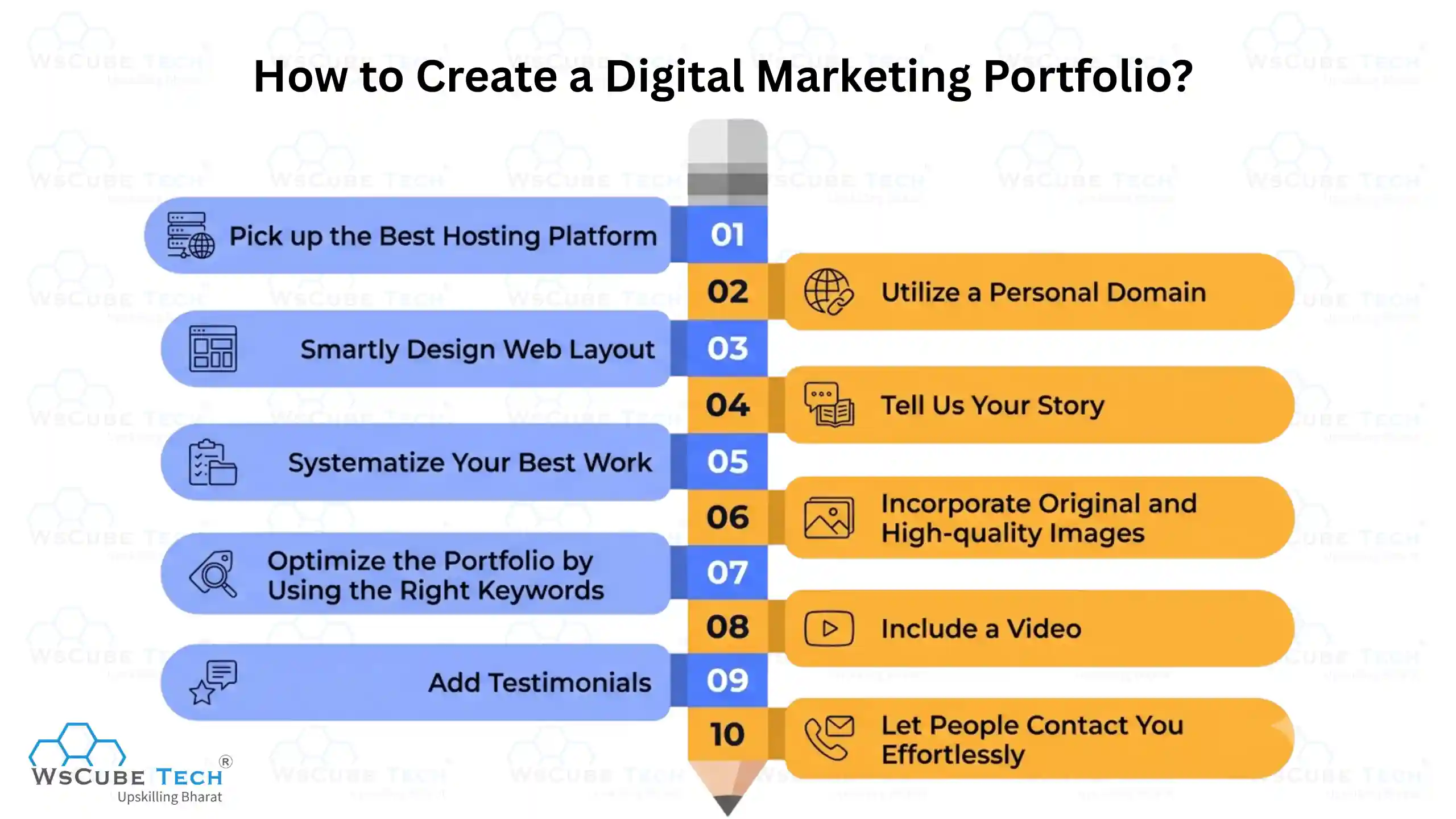
1. Pick up the Best Hosting Platform
Every website starts with hosting. Those creating portfolios have 2 main choices: a self-hosted blog or a free blog. When building your website, going the self-hosted route gives you more flexibility and freedom.
2. Utilize a Personal Domain
To sell your services effectively, find a way to differentiate yourself from the competition. You already have personalized hosting services. Customize your domain to take it to the next level. For example, which is more professional, www.YourName.wordpress.com or www.YourName.com?
3. Smartly Design Web Layout
Your domain and host provide you with more flexibility. However, you will be responsible for developing the look of your site. The entire purpose of your portfolio is to offer potential clients a simple place to view your work. That means it's finally time to create your website, which can be easy. Strikingly themes are a great option when creating a customized but clean web layout. It's an easy but effective tool that provides digital marketing portfolio ideas with many design options for their websites.
4. Tell Us Your Story
Along with the security of a quality hosting platform or the creation of your design, what distinguishes your work from others is You. With the experience to offer quality services, it is best to tell your story based on your work. You can create infographics that tell your quirky story to persuade prospects you are worth working with. Consider developing a content strategy to attract prospects to your website, demonstrate your expertise, and earn their trust as an aspiring digital marketer.
5. Systematize Your Best Work
Indeed, you want your digital marketing portfolio ideas to be creative and personal. However, what convinces clients of your worth is proof of your work. On the other hand, clients need more time to review your work.
So, make things as simple for them as possible by displaying only your best pieces. Choose projects you oversaw or were a part of that produced outstanding results. Consider volunteer work or passion projects that you are proud of so that potential clients can understand your personality and interests.
If you have worked with various clients, select one per industry that perfectly encapsulates your work so that any prospect can see that you have been working with people in their industry.
6. Incorporate Original and High-quality Images
Regardless of the type of service you aspire to offer, adding images to your digital marketing portfolio gives prospects a sense of tangibility. Take screenshots of published articles, social media posts you have created and curated for clients, or even photos of campaigns you've launched.
7. Optimize the Portfolio by Using the Right Keywords
Your portfolio website is a tool for new prospects to find you. A website analysis is vital to optimize your site for the appropriate keywords. SEO is essential, and a straightforward step you can take is to use local SEO to target clients looking for freelance marketers in their area. Instead of just optimizing for freelance digital marketers, optimize for freelance digital marketers in Mumbai, for instance. So, now, how do you find the best keywords? Examine job postings on job boards in the industry to see what SEO keywords prospects probably use.
You can even look for actual job openings and start pitching. Make a point to point your digital marketing portfolio in your pitch.
8. Include a Video
Relevant video content, like images, drives more engagement. Although creating videos takes more time and effort, the benefits are worth it when building your online portfolio. Make a simple video where you introduce yourself and explain how you can aid prospects with their marketing requirements. Include case studies of your past work and the results you achieved.
9. Add Testimonials
When selling your services, word of mouth and social proof is essential. And what better way to sell your services than by displaying what past customers have said about you? After all, people trust others, even if they have never met them. Inquire of prior and current clients about their experiences working with you. Ask them guiding questions to assist them in creating a winning testimonial.
10. Let People Contact You Effortlessly
After demonstrating your earlier work and client testimonials, the prospect may be ready to close the deal and contact you. Make it simple for them to contact you and inquire about the next steps while offering you the information you need to proceed. Before they even get on a discovery call or meeting, a few freelancers have an intake form that asks prospects certain questions about their wants. Others use a straightforward, easily accessible contact form on their website.
Must-Know Concepts in Digital Marketing
Formats to Create a Digital Marketing Portfolio
A digital marketing portfolio can exist in different formats. Here are some standard formats you can use to showcase your work in a digital marketing portfolio:
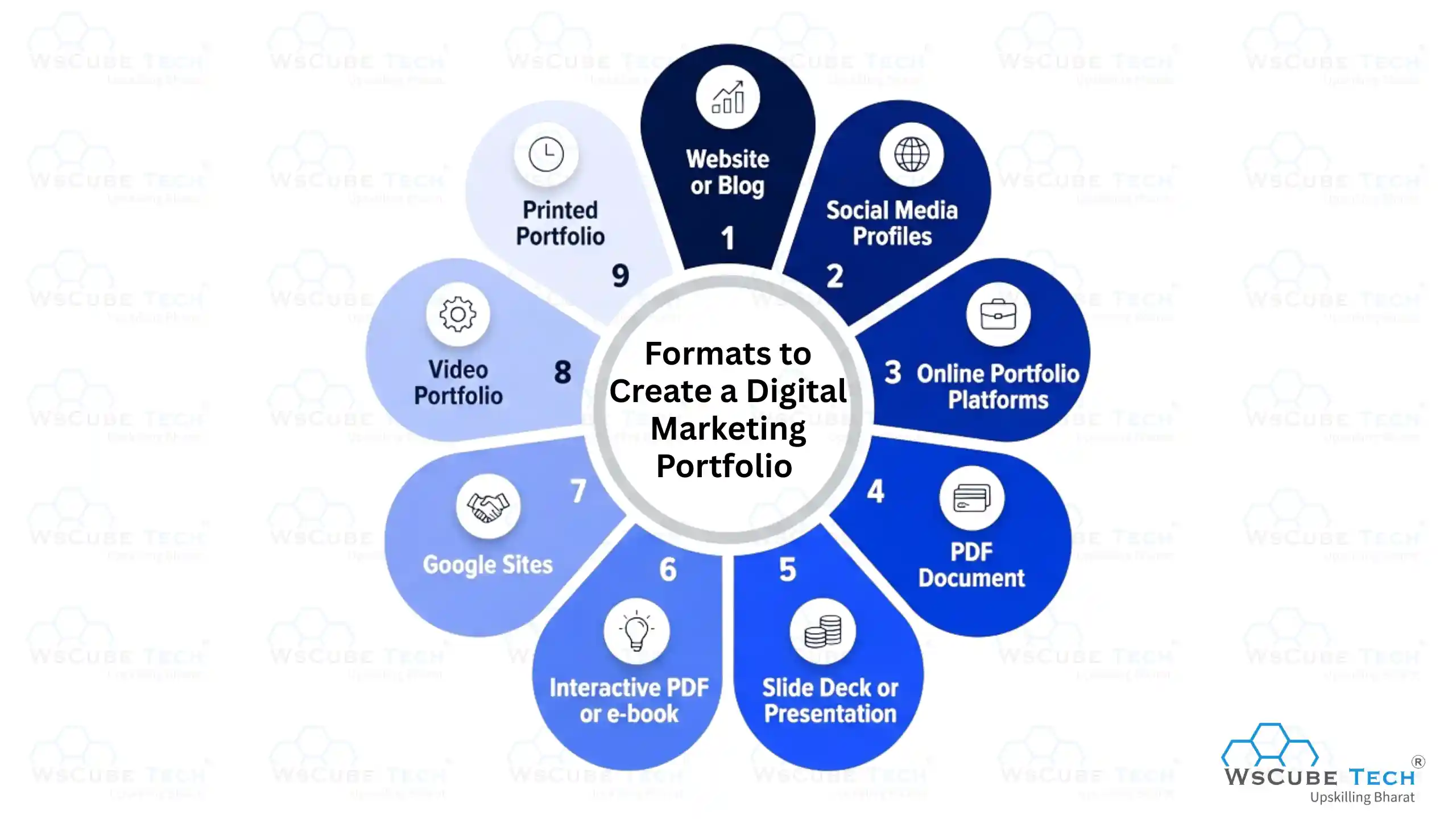
1. Website or Blog
Creating a dedicated website or blog for your portfolio is a well-known and versatile option. You can include case studies, visuals, descriptions, and contact information. Content management systems like Wix, WordPress, or Squarespace help you build your portfolio site.
2. Social Media Profiles
Some digital marketers showcase their work on their LinkedIn, Facebook, or Instagram profiles. These platforms allow you to post images, descriptions, and links to your campaigns or articles.
3. Online Portfolio Platforms
Specialized online portfolio platforms, such as Behance, Dribble, or Portfoliobox, are designed to showcase creative work, including digital marketing projects.
4. PDF Document
A well-designed PDF document can be a downloadable or shareable portfolio. It’s a convenient format for emailing your portfolio to potential clients or employers.
5. Slide Deck or Presentation
PowerPoint or Google Slides can create a visually appealing presentation highlighting your digital marketing projects. You can share this as a downloadable document or present it in meetings.
6. Interactive PDF or e-book
You can create interactive PDFs or e-books with multimedia elements like videos, interactive links, and dynamic content to make your portfolio more engaging.
7. Google Sites
Google Sites is a free website-building platform that allows you to easily create an essential online portfolio.
8. Video Portfolio
Using platforms like YouTube or Vimeo, you can create a portfolio. You can discuss your campaigns, show results, and explain your strategies. This format is particularly engaging and can showcase your presentation skills.
9. Printed Portfolio
While less common in the digital age, some professionals create printed portfolios to present in face-to-face meetings or interviews.
Some Tips for Your Portfolio for Digital Marketing
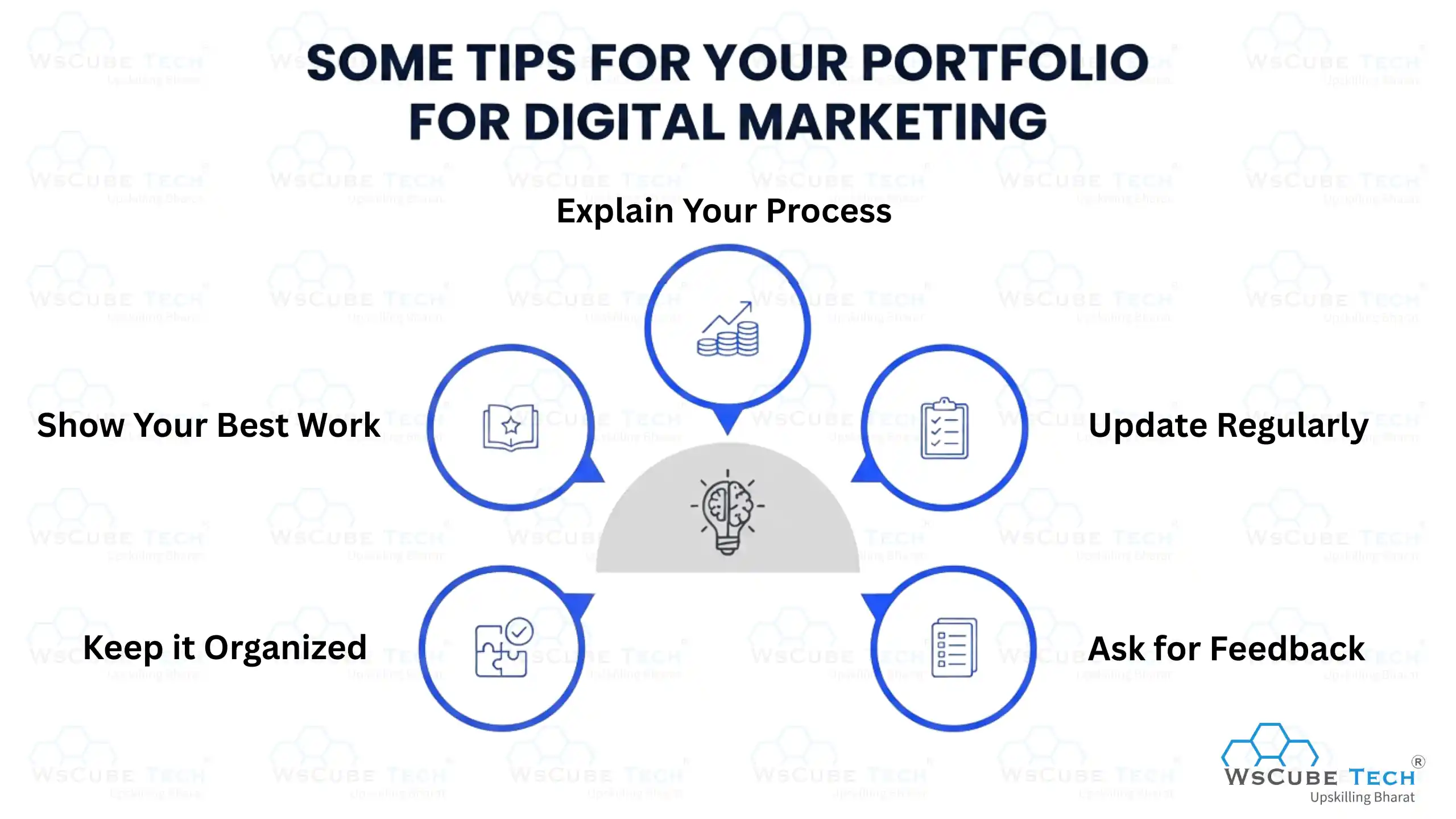
1. Keep it Organized: Your portfolio must be easy to navigate and understand. Arrange your work neatly so people can easily find what they want.
2. Show Your Best Work: Include your top projects and campaigns showcasing your digital marketing skills and achievements. Highlight the ones you are most proud of.
3. Explain Your Process: Share how you approached each project and your strategies for achieving your goals. This will help others understand your thinking and expertise.
4. Update Regularly: Keep your portfolio up-to-date with your latest work and achievements. Add new projects and remove outdated ones to keep them fresh and relevant.
5. Ask for Feedback: Get input on your portfolio from friends, colleagues, or mentors. Their insights help you improve and refine it further.
With these tips, you can build a digital marketing portfolio that effectively showcases your talents and impresses potential employers or clients.
Explore Our Most Popular Marketing Courses
Frequently Asked Questions
A digital marketing portfolio is a professional collection of your work samples, campaigns, results, and credentials that demonstrates your expertise to potential clients and employers. Unlike a resume, it provides visual proof of your skills and measurable outcomes.
Include a short bio, resume, case studies, data-driven results, testimonials, certifications, and contact details. Always back your work samples with real metrics like traffic growth, conversion rates, or engagement numbers.
Start with personal projects, volunteer for nonprofits, or create mock campaigns to showcase your thinking. You can also earn certifications from Google, HubSpot, or Meta and document your learning journey on LinkedIn.
Include 3 to 6 well-documented projects. Focus on quality and measurable impact over quantity. One strong case study with clear results is worth more than ten weak ones.
WordPress and Webflow are best if SEO is a priority. Wix and Squarespace work well for quick setups. Use a custom domain like yourname.com to appear more professional.
A resume lists your credentials and work history in text. A portfolio shows your actual work, strategy, and results in action. Together they create a complete picture of your professional value.
Yes. Most clients want to see proof of your work before hiring you. A strong portfolio acts as a sales tool and can close client deals faster than any pitch or proposal.
Update it every time you complete a significant project or achieve a strong result. An outdated portfolio signals inactivity, while a regularly updated one shows growth and relevance.
Yes, if you explain what went wrong and what you learned from it. It demonstrates depth, honesty, and a growth mindset, which many clients and employers actually value.
Ask past clients, mentors, or collaborators for a short review after completing a project. Guide them with specific questions about results achieved and their overall experience working with you.

Conclusion
The digital marketing portfolio you create will invariably be customized to your wants. Indeed, this is one of the most phenomenal powers of the portfolio website. With diverse options, including professionally designed media and content website templates, your digital portfolio can take many shapes and forms.
But they all share a single goal: to put your work in front of potential clients and showcase it in the best way possible, exactly as you envision. If you are just starting out and have not built your skills yet, enrolling in a digital marketing course is the smartest first step before putting your portfolio together.
Join Our On-Campus Digital Marketing Program
Explore Our Free Courses






Leave a comment
Your email address will not be published. Required fields are marked *Comments (0)
No comments yet.