
Python is among the most popular programming languages today because it is simple, readable, and powerful. It is widely used in web development, artificial intelligence, data science, automation, and software development. Its clear and easy-to-understand syntax makes it an excellent choice for beginners, while its advanced features also support professionals building large-scale applications.
When learning Python, practice is just as important as understanding theory. Reading concepts helps you know what Python can do, but applying them through coding shows how it works in real situations. Writing code regularly improves logical thinking, strengthens problem-solving skills, and builds overall programming confidence.
Exploring different Python project ideas helps you move from basic learning to real-world applications. It encourages creativity, builds practical experience, and shows how complete programs are developed. Step by step, this process helps you grow into a confident and skilled Python developer.
Python Project Ideas for Beginners
Once you learn Python programming, it’s essential to work on a Python project for beginners to strengthen your understanding. Simple projects help you practice basic concepts, improve problem-solving skills, and gain confidence while turning theoretical knowledge into real, hands-on coding experience.
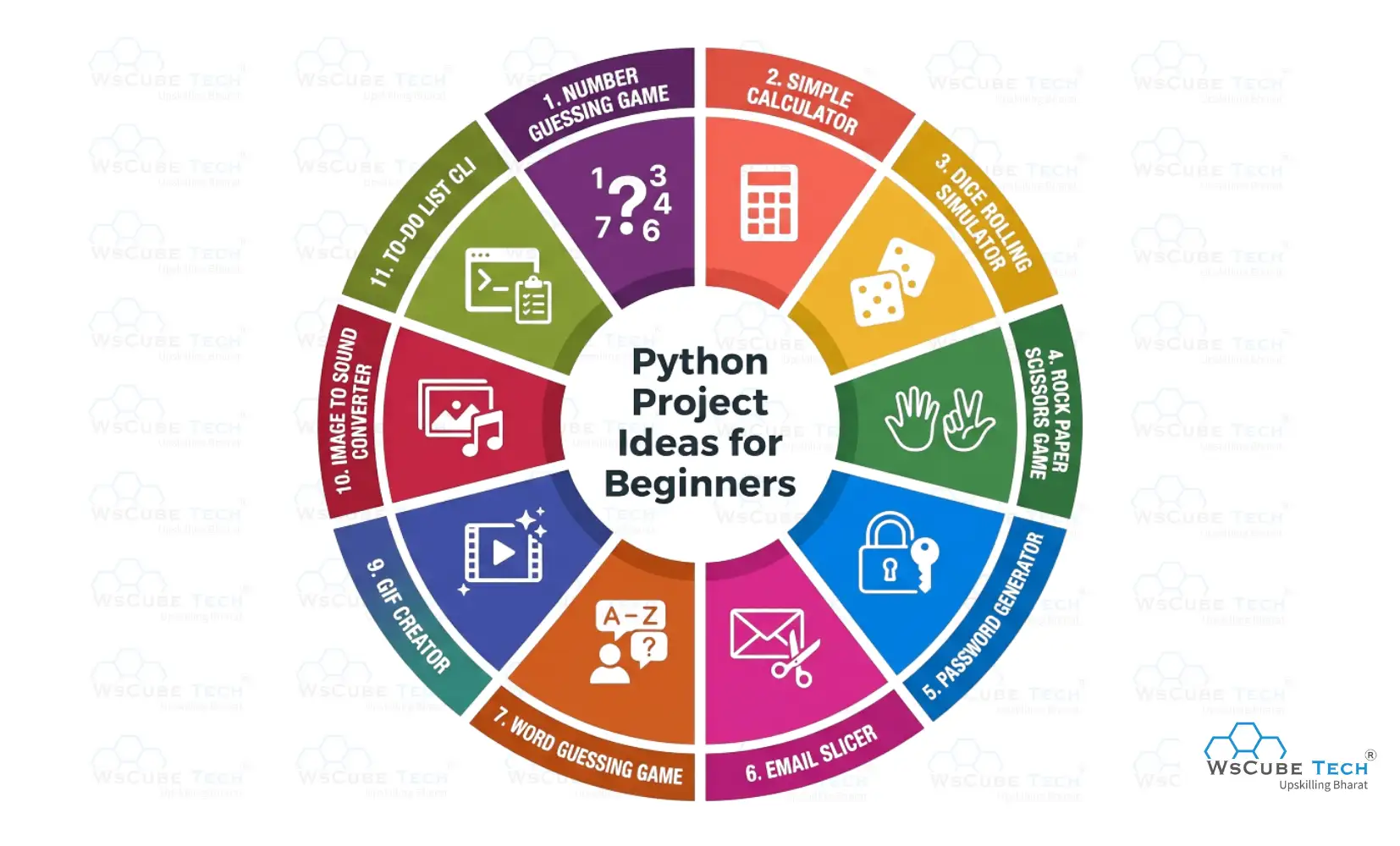
1. Number Guessing Game
The Number Guessing Game is a simple Python project where the program selects a number at random and the player tries to guess it. After each attempt, the program provides hints to help the player get closer to the correct number. It’s an interactive and engaging way to learn basic Python concepts.
How It Works
- The program generates a random number within a fixed range.
- The user enters a number as a guess.
- The program compares the user’s guess with the generated number.
- It displays hints like “Too High” or “Too Low”.
- The game ends when the correct number is guessed.
Skills You Practice
- Working with variables and data types
- Taking user input and displaying output
- Using conditional statements
- Implementing loops
- Using the random module
Source Code: Number Guessing Game
2. Simple Calculator
This Simple Calculator is a beginner-friendly Python project that allows users to perform basic arithmetic operations such as addition, subtraction, multiplication, and division. It’s an excellent way to strengthen foundational Python skills like handling user input, using operators, and applying conditional logic.
How It Works
- The user enters two numbers.
- The program asks which operation to perform (e.g., +, -, ×, /).
- Based on the user’s choice, it performs the selected calculation.
- The result is displayed to the user.
Skills You Practice
- Working with numbers and operators
- Taking user input
- Using conditional statements (if, elif, else)
- Writing simple functions
- Basic program flow control
Source Code: Simple Calculator
3. Dice Rolling Simulator
The Dice Rolling Simulator is a beginner-friendly Python project that mimics the rolling of a dice. When executed, the program randomly selects a number between 1 and 6 (or any defined range) each time the user rolls, just like a real dice. It’s a fun way to learn how randomness works in programming and how to interact with users.
How It Works
- The user chooses to “roll” the dice.
- The program generates a random number within the dice range (usually 1–6).
- The result is displayed to the user.
- The user can roll again or exit the simulation.
Skills You Practice
- Using the random module
- Handling user input
- Working with loops
- Displaying output
- Basic program logic
Source Code: Dice Rolling Simulator
4. Rock, Paper, Scissors Game
The Rock, Paper, Scissors Game is a fun Python project where the player plays against the computer by choosing one of three options: Rock, Paper, or Scissors. The computer makes a random choice too, and the program decides the winner based on classic rules. This project helps you practice user input, randomness, and logic flow.
How It Works
- The user selects Rock, Paper, or Scissors.
- The computer randomly picks one of the three choices.
- The program compares the choices and decides the winner:
- Rock beats Scissors
- Scissors beats Paper
- Paper beats Rock
- It displays the result (win, lose, or tie).
- The game can repeat for multiple rounds.
Skills You Practice
- Working with user input
- Using the random module
- Conditional statements (if, elif, else)
- Game logic implementation
- Looping for repeated play
Source Code: Rock, Paper, Scissors Game
Recommended Professional Certificates
Full Stack Development Mentorship Program
WordPress Bootcamp
5. Password Generator
The Password Generator is a practical Python project that creates random and secure passwords based on user-defined criteria like length and character types. It helps beginners understand randomness, strings, and user interaction in Python, and results in a useful tool for everyday use.
How It Works
- The user selects the desired password length.
- The user can choose whether to include letters, numbers, and symbols.
- The program randomly picks characters based on the selected options.
- It combines them to form a strong password.
- The final password is displayed to the user.
Skills You Practice
- Working with strings
- Using the random module
- Handling user input
- Applying conditional logic
- Combining letters, numbers, and symbols
Source Code: Password Generator
6. Email Slicer
The Email Slicer is a Python project that extracts useful information from email addresses. For example, it can separate the username and domain from an email like example@gmail.com. This project helps beginners understand string manipulation and basic Python operations.
How It Works
- The user enters an email address (for example, someone@example.com).
- The program extracts the username (text before @).
- It also extracts the domain (text after @).
- The results are displayed clearly to the user.
Skills You Practice
- String slicing and manipulation
- Taking user input
- Using basic Python functions
- Working with text and characters
Source Code: Email Slicer
7. Word Guessing Game
The Word Guessing Game is a fun Python project where the player tries to uncover a secret word by guessing one letter at a time. With each guess, the game reveals correct letters and tracks wrong attempts, making it similar to classic hangman-style gameplay. This project helps you practice string handling, loops, and game logic.
How It Works
- The program selects a secret word from a list.
- The user guesses one letter at a time.
- If the guessed letter is in the word, it’s revealed in its correct positions.
- If not, it counts as a wrong guess.
- The game continues until the full word is guessed or attempts run out.
Skills You Practice
- Working with strings
- Loops (for, while)
- Conditional logic (if, else)
- Handling user input
- Building simple game logic
Source Code: Word Guessing Game
8. Snake Game
The Snake Game is a classic Python project in which the user directs a growing snake across the game window, eats food, and increases in length. The gameplay stops when the snake crashes into the wall or its own body. This project is ideal for learning game logic, keyboard input handling, and graphics rendering using Python.
How It Works
- The snake moves in the chosen direction (up, down, left, right).
- Food appears at random positions on the screen.
- Each time the snake eats food, it gets longer and the score increases.
- The game ends if the snake collides with the wall or itself.
Skills You Practice
- Working with game loops
- Keyboard input handling
- Using the pygame library
- Collision detection
- Screen rendering and updates
Source Code: Snake Game
9. GIF Creator
The GIF Creator is a beginner-level Python project that converts a short video clip into an animated GIF. It’s a fun and simple project that introduces you to working with media files and basic file processing in Python.
How It Works
- The user provides a short video file.
- The program reads the video and extracts frames.
- The frames are combined into an animated GIF.
- The final GIF is saved on the computer.
Skills You Practice
- Working with files
- Using Python libraries for media processing
- Looping through video frames
- Saving output files
- Basic automation with Python
Source Code: GIF Creator
10. Image to Sound Converter
This beginner-friendly Python project reads text from an image and converts it into speech. It uses image processing and optical character recognition (OCR) to extract text, then generates audio from it, giving hands-on experience with both image handling and audio output in Python.
How It Works
- The user provides an image file (e.g., JPG or PNG).
- The program extracts text from the image using OCR.
The extracted text is converted into speech. - The audio file is saved and can be played back.
Skills You Practice
- Reading and processing images
- Extracting text from images
- Converting text to speech
- Saving and playing audio files
Source Code: Image to Sound Converter
11. To-Do List (CLI)
The To-Do List (CLI) is a beginner-friendly Python project that helps users manage their daily tasks using the command line. Users are able to create tasks, check their current task list, and remove completed ones. This project is great for learning how Python programs store and manage simple data.
How It Works
- The program displays a menu with options such as Add Task, View Tasks, and Delete Task.
- The user chooses an action by typing the corresponding menu number.
- Tasks are stored in a list or file.
- The list updates whenever tasks are added or removed.
Skills You Practice
- Working with Python lists
- Taking user input
- Using loops to keep the program running
- Conditional statements (if, elif, else)
- Basic command-line interaction
Source Code: To-Do List (CLI)
No Masterclass found!
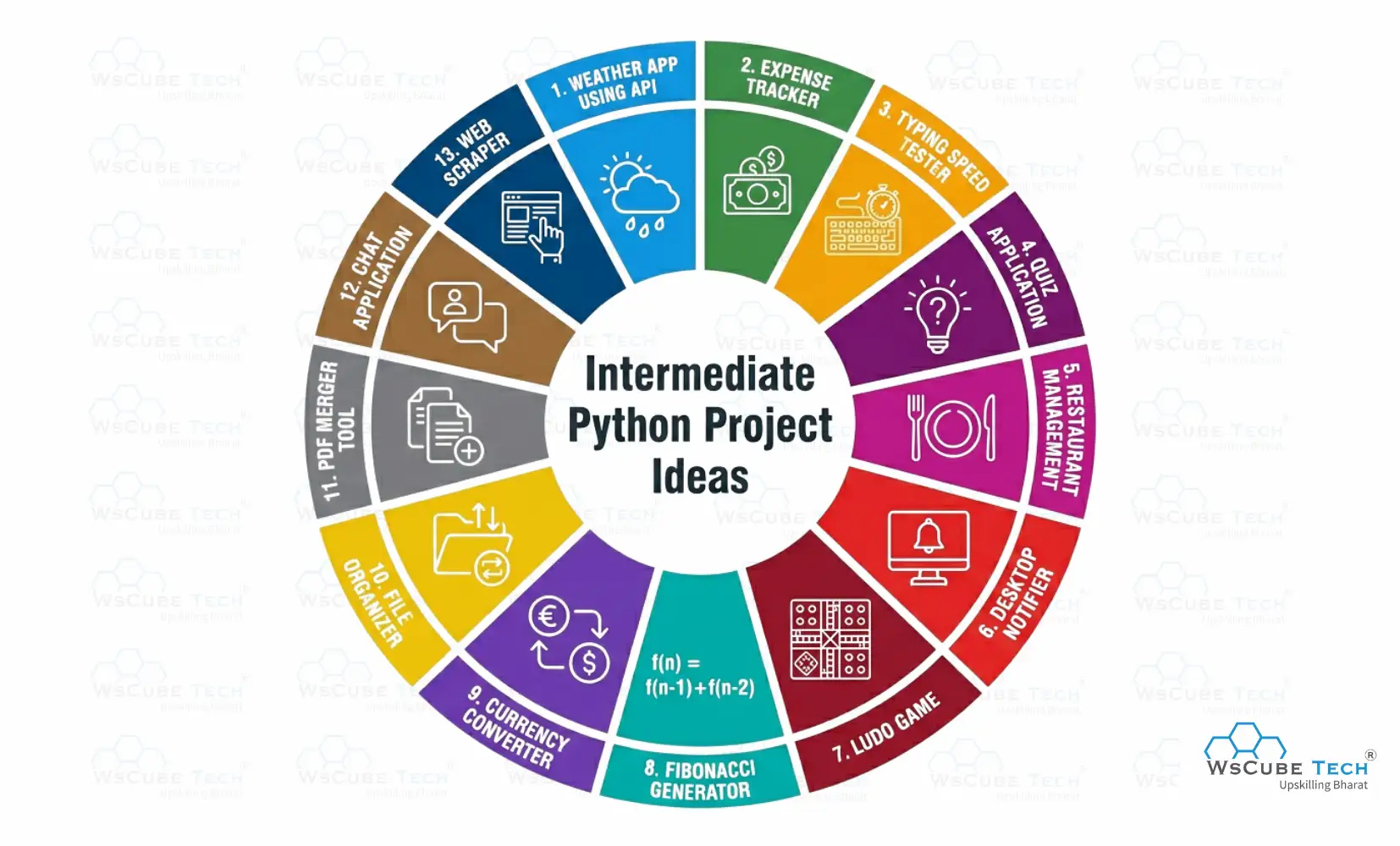
Python Project Ideas (Intermediate Level)
Below are some intermediate Python projects ideas designed to enhance coding skills, improve problem-solving, and strengthen understanding of practical Python concepts.
1. Library Management System
The Library Management System is a intermediate level Python project that helps organize and manage a library’s daily activities digitally. It stores information about books and members, tracks which books are borrowed, and updates records automatically when books are issued or returned.
How It Works
- The program stores a list of books available in the library.
- A user can view all available books.
- The user can borrow a book if it is in the list.
- When a book is returned, it is added back to the library list.
- Users can also donate books, which are then added to the collection.
Skills You Practice
- Understanding Object-Oriented Programming (OOP)
- Working with lists to store data
- Handling user input
- Using functions and classes
- Building a real-world management system
Source Code: Library Management System
2. Weather App Using API
The Weather App is a Python project that fetches and displays weather information for any city. It uses a weather API to retrieve current data, such as temperature, humidity, wind speed, and conditions, helping you learn how to work with APIs and JSON responses in Python.
How It Works
- The user enters a city name.
- The program sends a request to a weather API (like OpenWeatherMap) and gets weather data.
- The weather data is parsed from the API response.
- The app shows temperature, humidity, wind speed, and weather description.
Skills You Practice
- Fetching and handling data from an API
- Working with JSON in Python
- Taking user input and showing results
- Building interactive applications
Source Code: Weather App Using API
3. URL Shortener
The URL Shortener is a Python project that converts long URLs into shorter, easy‑to‑share links. It lets users input a long URL and receive a compact short link that redirects to the original address. This project helps you learn about handling strings, web requests, and building useful tools in Python.
How It Works
- The user enters a long URL.
- The program generates a shorter version of that URL.
- The shortened link redirects to the original URL when used.
- Shortened links can be shared easily and stored.
Skills You Practice
- Handling URLs and strings in Python
- Working with web requests
- Building practical Python applications
- Basic data handling for storing links
Source Code: URL Shortener
4. Expense Tracker
The Expense Tracker is a Python project that helps users record and manage their daily expenses. It allows users to add expenses, categorize them, and track how much money they are spending over time. This project is useful for understanding how real-world financial tracking systems work.
How It Works
- The user enters expense details such as date, category, and amount.
- The program saves these expense entries.
- Users can view all recorded expenses in a list.
- Users can delete or update expenses.
Skills You Practice
- Handling user input and data storage
- Managing lists and records
- Working with files or simple databases
- Building a practical project to manage personal finances
Source Code: Expense Tracker
5. Typing Speed Tester
The Typing Speed Tester is a Python project that measures how fast and accurately a user can type a given piece of text. It displays a sentence, tracks the time the user takes to type it, and calculates the typing speed in words per minute (WPM). This helps users practice typing and understand how Python handles time and string comparison.
How It Works
- The program shows a sample text for the user to type.
- A timer starts when the user begins typing.
- After typing, the program checks the user’s input against the original text.
- It calculates typing speed (WPM) and displays results.
Skills You Practice
- Working with strings
- Measuring time in Python
- Comparing text
- Taking user input
- Performing calculations
Source Code: Typing Speed Tester
Read More Python Blogs
| Python Syllabus (Curriculum) | Python Developer Roadmap |
| Print a Newline in Python | Iterate Through Dictionary in Python |
| 10+ Best Python Books | Top 21 Python Developer Skills |
6. Quiz Application
The Quiz Application is a Python project that displays multiple-choice questions to the user, checks answers, and tracks the score. It’s a fun way to test knowledge while practicing important programming skills.
How It Works
- The program shows a question with several answer choices.
- The user selects an answer for each question.
- The program checks whether the answer is correct.
- A score is updated based on correct answers.
- The final score is displayed at the end.
Skills You Practice
- Working with lists or dictionaries
- Using loops
- Conditional logic (if, elif, else)
- Handling user input
- Tracking and displaying scores
Source Code: Quiz Application
7. Restaurant Management
The Restaurant Management System is an intermediate-level Python project designed to manage a restaurant’s daily operations digitally. It helps handle menu items, customer orders, billing, and order records efficiently. This project gives real-world experience in building management systems using Python and logical workflows.
How It Works
- The user can view the restaurant menu and item prices.
- Customers place orders by selecting items and quantities.
- The program processes orders and calculates the total bill.
- Transaction history and receipts are stored and can be reviewed later.
Skills You Practice
- Designing real-world applications
- Working with lists, dictionaries, and conditions
- Handling user input and calculations
- Implementing billing logic
- Understanding basic management system workflows
Source Code: Restaurant Management
8. Desktop Notifier
The Desktop Notifier is a Python project that displays pop-up messages on your computer screen as reminders or alerts. This is useful for showing notifications like reminders, messages, or short alerts while working or running a script. It teaches beginners how to interact with system notifications using Python.
How It Works
- The program uses a notification library to create pop-up messages.
- The user defines the title and message to show.
- When the script runs, a notification appears on the desktop.
- You can use it for reminders, alerts, or messages during a long task.
Skills You Practice
- Working with Python libraries for system features
- Installing and using external packages
- Sending desktop notifications
- Taking user input for messages
- Running scripts that interact with your operating system
Source Code: Desktop Notifier
9. Ludo Game
The Ludo Game is a Python project that recreates the classic board game where 2–4 players race their tokens from start to finish by rolling a die. Players take turns, roll the dice to move their pieces, and try to be the first to bring all their tokens home. This project teaches game logic, turn-based mechanics, and how to handle multiple players in code.
How It Works
- Players take turns rolling a virtual dice.
- Each dice roll determines how many steps a player’s token moves.
- Tokens follow the board path and must reach the center exactly.
- The game continues until one player moves all tokens to the center.
Skills You Practice
- Game logic and turn structure
- Handling multiple players
- Using loops and conditions
- Using random numbers for dice rolls
- Structuring larger Python programs
Source Code: Ludo Game
10. Fibonacci Generator
The Fibonacci Generator is a Python project that generates numbers in the Fibonacci sequence. In this sequence, each number is the sum of the two previous numbers, starting from 0 and 1. This project helps strengthen your understanding of loops, functions, and number logic.
It’s a great way to practice mathematical problem-solving using Python.
How It Works
- The user enters how many Fibonacci numbers to generate.
- The program starts with the first two numbers (0 and 1).
- Each next number is calculated by adding the previous two.
- The sequence is displayed up to the requested count.
Skills You Practice
- Working with loops
- Using variables for calculations
- Understanding number sequences
- Writing reusable functions
- Logical thinking and problem-solving
Source Code: Fibonacci Generator
Recommended Professional Certificates
Full Stack Development Mentorship Program
WordPress Bootcamp
11. Currency Converter
The Currency Converter is a beginner‑friendly Python project that converts an amount from one currency to another using real‑time exchange rate data. It provides a graphical interface for selecting currencies and entering values, helping you learn API usage, data handling, and GUI development in Python.
How It Works
- The user enters an amount to convert.
- The source and target currencies are selected.
- The program retrieves exchange rates from an online API.
- The converted amount is calculated and displayed to the user.
Skills You Practice
- Fetching and handling data from an API
- Working with JSON responses
- Building a graphical user interface
- Performing real‑world calculations
Source Code: Currency Converter
12. File Organizer
The File Organizer is a beginner‑friendly Python project that automatically sorts and organizes files in a folder into categories such as images, music, and documents. It scans a given directory and moves files into appropriate folders, helping you keep your directories neat and structured.
How It Works
- The user selects a folder to organize.
- The program scans all files in the specified folder.
- Files are grouped based on type and extension (e.g., images, music, documents).
- The program moves files into corresponding subfolders within the directory.
Skills You Practice
- Working with files and directories in Python
- Using loops and conditionals to categorize files
- Automating repetitive tasks
- Building useful utility tools
Source Code: File Organizer
13. PDF Merger Tool
The PDF Merger Tool is an intermediate Python project that combines multiple PDF files into one document. It introduces you to working with file manipulation libraries and automating repetitive tasks.
How It Works
- The user provides multiple PDF files to merge.
- The program uses a Python library to read and combine the selected PDFs.
- The merged output is saved as a single PDF file.
- The tool handles multiple file inputs efficiently.
Skills You Practice
- Using external Python libraries (PyPDF2)
- Reading and writing files
- Working with loops and file lists
- Understanding PDF file structures
- Automating file management tasks
Source Code: PDF Merger Tool
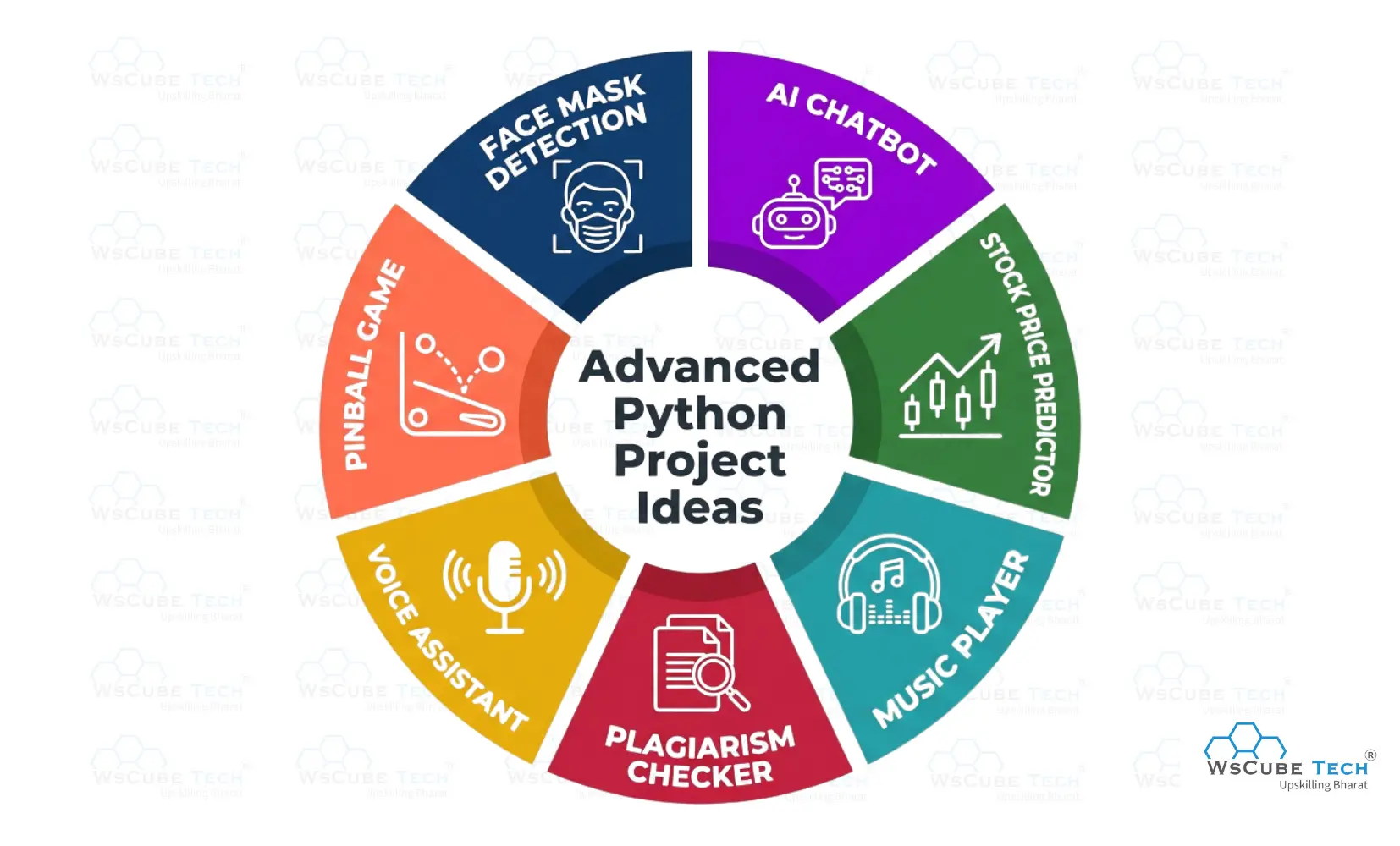
Python Projects Ideas (Advanced Level)
Below are the advanced-level Python project ideas that help you design complex applications, use powerful libraries, and strengthen real-world problem-solving and development skills.
1. Face Mask Detection
The Face Mask Detection project is an advanced Python application that uses computer vision and deep learning to identify whether a person is wearing a face mask. It analyzes images or live video from a webcam, detects human faces, and classifies each face as “Mask” or “No Mask.” This project demonstrates how AI can be applied to real-world safety and monitoring systems.
How It Works
- The system captures video from a webcam or reads an image.
- A face detection model locates faces in each frame.
- Each detected face is passed to a trained deep learning model.
- The model predicts whether a mask is present or not.
- The result is displayed with labels on the screen.
Skills You Practice
- Working with computer vision
- Using deep learning models
- Image processing with OpenCV
- Loading and using trained models
- Real-time video analysis
Source Code: Face Mask Detection
2. AI Chatbot
The AI Chatbot is an advanced Python project that uses natural language processing (NLP) and machine learning to simulate human-like conversations. It can understand user queries, provide intelligent responses, and even perform tasks like answering FAQs or fetching information. This project demonstrates how AI can be applied in real-world conversational systems.
How It Works
- The user inputs a message or question.
- The chatbot processes the text using NLP techniques.
- A trained model predicts the most appropriate response.
- The chatbot displays the response in the console, GUI, or web interface.
- The system can continuously interact with the user in real-time.
Skills You Practice
- Natural Language Processing (NLP) with Python libraries
- Machine learning model integration
- Text preprocessing and tokenization
- Building conversational AI systems
- Handling user input and generating responses
Source Code: AI Chatbot
3. Stock Price Predictor
The Stock Price Predictor is a Python project that forecasts future stock prices using historical data and machine learning models. It helps learners understand how to analyze time series data, train predictive models, and visualize trends, a practical application of Python in finance.
How It Works
- Historical stock price data is collected from APIs or CSV files.
- The data is cleaned and preprocessed for modeling.
- A machine learning model, such as Linear Regression or LSTM, is trained on historical data.
- The trained model predicts future stock prices.
- Predictions are visualized with graphs comparing actual versus predicted prices.
Skills You Practice
- Handling and analyzing time series data with pandas
- Implementing machine learning models using scikit-learn or TensorFlow/Keras
- Preprocessing and feature scaling for better predictions
- Visualizing data and predictions with matplotlib
- Understanding the basics of financial forecasting
Source Code: Stock Price Predictor
Practice Coding With Our Free Compilers
| Online Python Compiler | Online HTML Compiler | Online C Compiler |
| Online C++ Compiler | Online JS Compiler | Online Java Compiler |
4. Plagiarism Checker
The Plagiarism Checker is an advanced Python project that analyzes text documents and detects similarity or copied content by comparing their contents using text processing and similarity algorithms. It’s useful for academic, editorial, or content creation tasks to ensure originality.
How It Works
- The user places two or more text documents in the project folder.
- The program reads the text files and processes their content.
- Text is transformed into numeric vectors for comparison.
- A similarity measure (like cosine similarity) calculates how alike the documents are.
- The program displays similarity results or warnings.
Skills You Practice
- Text processing and string manipulation
- Converting text into vectors for comparison
- Using similarity metrics like cosine similarity
- Loading and processing multiple files
- Presenting analysis results to users
Source Code: Plagiarism Checker
5. Voice Assistant
The Voice Assistant is a Python project that listens to voice commands, processes them, and performs tasks such as searching online, speaking responses, and reading files. It’s a practical example of how Python can be used for natural language interaction and automation.
How It Works
- The program uses a microphone to capture voice input.
- Speech recognition converts the audio into text.
- The assistant interprets commands and executes actions like searching Google or Wikipedia.
- It gives spoken feedback using text-to-speech.
- Users can interact hands-free through voice.
Skills You Practice
- Using speech recognition modules
- Text-to-speech integration
- Handling real-time voice input and output
- Command processing and automation logic
- Working with external Python libraries
Source Code: Voice Assistant
6. Pinball Game
The Pinball Game is a Python project built using the Pygame library. It simulates the classic arcade pinball experience, featuring ball physics, flippers, bumpers, and scoring mechanics. Players can launch the ball and interact with game elements in real-time, making this a fun and challenging project that teaches game development fundamentals.
How It Works
- The game initializes a graphical window using the Pygame library.
- The player launches the pinball with a key press (e.g., space bar).
- Flippers are controlled with left/right arrow keys to keep the ball in play.
- Physics logic handles bouncing off bumpers, walls, and other objects.
- Score is updated based on ball interactions with targets.
Skills You Practice
- Using Pygame for graphics and game loops
- Handling keyboard events and real-time input
- Implementing basic physics and collision detection
- Managing game state and scoring logic
- Drawing sprites and animations in Python
Source Code: Pinball Game
7. Music Player
The Music Player is an advanced Python project that lets users play audio files with features like play, pause, resume, and stop. It uses Python libraries to handle audio playback and provides a simple interface for managing music, demonstrating multimedia application development in Python.
How It Works
- The user selects music files to play.
- The program loads the selected audio using Python libraries.
- Controls like play, pause, resume, and stop manage music playback.
- The player can switch between tracks and control volume.
- Music plays through the system audio output in real time.
Skills You Practice
- Handling multimedia (audio playback) in Python
- Using libraries like pygame or tkinter
- Building graphical or console-based user interfaces
- Event handling for button clicks and input
- Managing playlists and file selection
Source Code: Music Player
Tips for Building Python Projects
These tips help you plan, build, and improve Python projects efficiently, focusing on clean code, learning growth, real-world practice, debugging skills, and long-term development success for beginners and advanced learners.
- Start With Clear Requirements: Before coding, clearly define the problem, features, inputs, and outputs so your project stays focused, organized, easier to debug, and simpler to expand later.
- Use Version Control: Use Git and GitHub to track changes, manage mistakes, collaborate safely, experiment freely, and showcase your work professionally for future learning, interviews, and portfolio growth.
- Write Clean Code: Follow readable naming, proper indentation, comments, and modular functions to make your code understandable, reusable, easier to maintain, and friendly for others reviewing your project.
- Test and Debug Regularly: Test small parts of your program frequently, handle errors carefully, and debug step by step to catch issues early and avoid large problems later.
- Improve With Feedback: After finishing, review your project, accept feedback, refactor weak areas, add features gradually, and compare with better solutions to continuously improve your skills.
Keep building, keep improving, and each project will make you a more confident and skilled Python developer.
If you want structured learning, expert guidance, and real-world projects to accelerate your growth, joining a professional Python course can help you turn your practice into real career opportunities.
FAQs about Python Project Ideas
You should start with small, practical tasks that match your current skill level. Look for Python project ideas that use basic concepts like loops, conditions, and functions, then slowly move toward projects involving files, APIs, or simple automation.
You can begin with simple Python projects like a calculator, number guessing game, to-do list, or password generator. These projects help you understand logic building, user input, and program flow without feeling overwhelmed.
When you build Python projects, you apply theory to real situations. You learn debugging, problem-solving, and structuring programs properly. This practical experience improves your confidence and helps you understand how real software is developed.
You should choose a Python project that pushes your skills without feeling too difficult. If you understand the main logic and can finish most parts with a little research, it’s a good match. The right project helps you learn new ideas while improving your existing programming skills.
You can level up by adding features to your existing projects. For example, turn a basic app into one that uses files or APIs. Intermediate Python projects usually involve more logic, data handling, and real-world problem solving.
You can try real-world Python projects like expense trackers, automation tools, weather apps, chatbots, recommendation systems, and data analysis dashboards. These projects help you understand how Python is used to solve practical, real-life problems.
You should select topics that solve real problems and show your technical skills clearly. Good Python projects for students include machine learning, web applications, data analysis, or automation systems that demonstrate practical knowledge and creativity.
You should build several Python projects, starting with small ones and gradually increasing difficulty. The goal is not just quantity, but learning, where each project teaches you something new and strengthens your overall programming skills.
You can explore GitHub, coding communities, and tutorials for ideas for Python projects. Try to recreate projects in your own way, add extra features, or combine two ideas to create something unique and creative.
Free Courses for You





Leave a comment
Your email address will not be published. Required fields are marked *Comments (0)
No comments yet.