
Most students hear these two words on day one of their tech journey. Write a few lines of code, and someone calls you a coder. Build a full working app, and suddenly you are a programmer. So, what actually changed in between?
This is where the coding vs. programming debate starts. Both sound similar. Both involve typing code on a screen. But the depth, the thinking, and the final output are very different. Understanding that gap early saves you months of confusion.
This coding vs programming guide breaks it down in simple language. You will learn what each one means, the skills each one needs, the salaries paid in India, and which one you should learn first before joining a full stack development course. No jargon. No heavy theory.
Coding vs. Programming: Quick Answer
Coding and programming are closely related, but they are not exactly the same. Coding focuses on writing instructions in a programming language, while programming covers the broader process of planning, coding, testing, debugging, and maintaining software. In simple terms, coding is a part of programming, while programming involves more than just writing code.
- Coding: Writing code to perform a specific task.
- Programming: Planning and building a complete software solution.
Quick takeaway: If coding is about writing the instructions, programming is about figuring out what to build, how to build it, and making sure it works properly.
What Is Coding?
Coding is the act of converting simple logic into a language a machine can read. You take a small task, like showing a message on the screen or adding two numbers, and you write it in Python, Java, C++, or JavaScript. The computer reads those lines and does exactly what you told it.
Coding does not need a big plan or a full design document. It needs correct syntax and clear logic. That is why coding is usually the first skill students pick up. Once you can write clean, working lines of code, you can slowly move towards bigger problems and full projects.
How Coding Works
Coding follows a simple process: you write instructions, run them, check the result, and fix any errors.
- Understand the task: Identify what you want the code to do and what output you expect.
- Choose a programming language: Pick a language such as Python, Java, or JavaScript based on the task.
- Write the code: Use the language's syntax and logic to create the required instructions.
- Run the code: Use a compiler, interpreter, or runtime environment to execute the code.
- Check the output: See whether the program produces the expected result.
- Fix errors: Debug the code, correct any issues, and run it again until it works correctly.
Quick Note: Getting an error is normal. Even senior developers fix errors every single day.
Tools Coders Use
Coders mostly work with light, simple tools that help them write and run code quickly.
| Tool | What It Is Used For |
| VS Code | Writing and editing code with helpful shortcuts |
| Sublime Text | A fast, lightweight editor for quick coding |
| Notepad++ | Simple editing for small scripts and files |
| Replit | Writing and running code directly in a browser |
| Google Colab | Running Python code online without any setup |
| Command Line | Running programs and checking output |
| GitHub | Saving code and sharing it with others |
Example of Coding in Action
Say your teacher asks you to print your name on the screen. In Python, you write one line:
print("My name is Aditi")That is coding. One clear task, one instruction, one output. Add two numbers, check if a number is even, print a table of 5. All of these are coding tasks. They are small, direct, and self-contained.
Recommended Professional Certificates
Full Stack Development Course with AI Engineering
WordPress Bootcamp
What Is Programming?
Programming is the full process of building a working software product. It starts long before the first line of code. You study the problem, decide how the solution should behave, design the structure, write the code, test it, fix the bugs, and keep improving it.
Programming also covers the parts most people never see. Things like handling errors, managing databases, protecting user data, and making sure the app does not crash when a thousand people use it at once. Coding is one part of this. Programming is the whole journey from an idea to a working product.
How Programming Works
Programming follows a proper cycle. Every step has a purpose, and coding sits in the middle of it.
Here is how it happens:
- Understand the problem: Identify what needs to be solved and who will use the software.
- Plan the solution: Define the logic, workflow, features, and overall structure.
- Choose the technology: Select the programming language, frameworks, databases, and tools needed.
- Write the code: Build the solution by writing and connecting different parts of the program.
- Test the software: Check whether everything works as expected and identify bugs or issues.
- Debug and improve: Fix problems, improve performance, and make the software more reliable.
- Deploy and maintain: Release the software for users, then continue updating and maintaining it over time.
Expert Advice: Spend time on planning. A well-planned program takes far less time to debug later.
Tools Programmers Use
Programmers use heavier tools because they manage full projects, not single files.
| Tool | What It Is Used For |
| IntelliJ IDEA / Eclipse | Building and managing large Java projects |
| PyCharm | Full Python development with debugging support |
| Git and GitHub | Version control and team collaboration |
| Docker | Packaging apps so they run the same everywhere |
| Postman | Testing APIs before connecting them to the app |
| MySQL / MongoDB | Storing and managing application data |
| Jira | Tracking tasks, bugs, and project progress |
| AWS / Azure | Hosting and running the software online |
Example of Programming in Action
Now think about your college attendance app. It needs a login page, a database of students, a screen for teachers to mark attendance, a monthly report, and a rule that blocks students below 75 percent.
You have to decide what happens if the internet drops. You have to protect student data. You have to test it with real users. Writing the code is only one part. Planning, testing, connecting, and maintaining the whole thing is programming.
Upcoming Masterclass
Attend our live classes led by experienced and desiccated instructors of Wscube Tech.


Coding vs. Programming: Key Differences
This table gives you the complete difference between coding and programming in one view.
| Basis | Coding | Programming |
| Scope | Writing instructions for a single task | Building a complete software solution end to end |
| Main Goal | Make the computer produce the correct output | Solve a real problem for real users |
| Skills Needed | Basic syntax, simple logic, one language | Logic, algorithms, data structures, design, testing, debugging |
| Tools Used | Text editors, online compilers, basic terminal | IDEs, version control, databases, testing tools, cloud platforms |
| Output | A working script or a small program | A full application, system, or product |
| Complexity | Low to medium, easy to start | Medium to high, needs planning and structure |
| Time Taken | Minutes to a few hours | Weeks to months, sometimes years |
| Planning Involved | Very little | Detailed planning before and after coding |
| Career Title | Coder, Junior Coder, Coding Intern | Programmer, Software Developer, Software Engineer |
Is Coding a Part of Programming?
Yes. Coding is one stage inside programming. Programming is the full cycle of planning, coding, testing, and maintaining software, and coding is the step where you actually write the instructions.
Here is how the two fit together:
- Programming starts with understanding the problem. Coding does not.
- Coding turns the plan into actual working lines of code.
- Programming continues after the code is written, through testing and fixing.
- You can code without programming, but you cannot program without coding.
- Learning coding first makes programming much easier later.
Think of it like building a house. Coding is laying the bricks. Programming is the blueprint, the material choice, the plumbing, the wiring, and the final inspection.
Coding vs. Programming: Skills Compared
The skills overlap at the start, then split as projects get bigger. Coding needs accuracy. Programming needs accuracy plus design thinking.
| Skill Area | Coding | Programming |
| Language Syntax | Must have | Must have |
| Logic Building | Basic level | Advanced level |
| Data Structures | Helpful | Essential |
| Algorithms | Rarely needed | Core requirement |
| Debugging | Simple errors | Complex system-level bugs |
| Software Design | Not needed | Very important |
| Database Knowledge | Not needed | Important |
| Testing | Manual checking | Structured testing and automation |
| Teamwork Tools | Optional | Daily requirement |
Skills Needed for Coding
Coding focuses on writing clear and correct instructions. You mainly need:
- Programming language syntax: Understand the rules and structure of at least one language.
- Basic logic: Work with variables, conditions, loops, and functions.
- Problem-solving: Break simple tasks into smaller instructions.
- Debugging: Read error messages, find mistakes, and fix your code.
- Attention to detail: Write accurate code and check the output carefully.
Skills Needed for Programming
Programming builds on coding skills and requires a broader set of technical and problem-solving abilities:
- Strong logic: Break complex problems into practical solutions.
- Data structures and algorithms: Choose efficient ways to store data and solve problems.
- Software design: Plan how different parts of an application work together.
- Databases and APIs: Manage data and connect different systems or services.
- Testing and debugging: Find issues, improve performance, and make software reliable.
- Team collaboration: Use tools such as Git and GitHub when working on larger projects.
Expert Advice: Data structures and algorithms are the real dividing line between a coder and a programmer.
Read More Related Guides
Coder vs. Programmer vs. Developer vs. Software Engineer: Job Titles Explained
These four titles confuse almost every student. This table clears it up.
| Field | Coder | Programmer | Developer | Software Engineer |
| Main Work | Writes code for given tasks | Writes and structures full programs | Builds complete applications and features | Designs and scales entire software systems |
| Scope of Role | Narrow and task-based | Program level | Product level | System and architecture level |
| Planning Role | Almost none | Some planning | Plans features and flow | Plans architecture and long-term design |
| Skills Required | One language, basic logic | Algorithms, logic, debugging | Frameworks, APIs, databases, UI | System design, scalability, security, testing |
| Typical Experience | 0 to 1 year | 1 to 3 years | 2 to 5 years | 3 years and above |
| Common Tools | Editors, online compilers | IDEs, debuggers | Frameworks, Git, databases | Cloud, CI/CD, monitoring, design tools |
| Education | Any stream with skills | Any stream with strong basics | Degree or bootcamp with projects | Usually a technical degree, or strong equivalent experience |
| Career Growth | Moves into programming | Moves into development | Moves into engineering or lead roles | Moves into architect or CTO track |
Is Coding Easier Than Programming?
Yes, coding is easier than programming. Coding deals with one small task at a time, while programming asks you to design, build, test, and maintain a full system.
Here is why coding feels easier:
- Coding tasks are short, so you see results within minutes.
- You only need one language and basic syntax to start.
- Errors are usually simple, like a missing bracket or wrong spelling.
- There is no planning document, no design phase, no deployment step.
- Free online compilers let you practice without installing anything.
And here is why programming feels harder:
- You have to think about users, edge cases, and future changes.
- Bugs can hide across multiple files and take hours to trace.
- You need algorithms and data structures to keep things fast.
- You work with teams, deadlines, and version control.
- The work does not end after the code runs. Testing and maintenance follow.
Quick Note: Easier does not mean less valuable. Clean coding skills are what make strong programmers.
Which Should You Learn First: Coding or Programming?
Start with coding. Always. It builds the base you need before you can handle full projects. Here is a simple order students can follow.
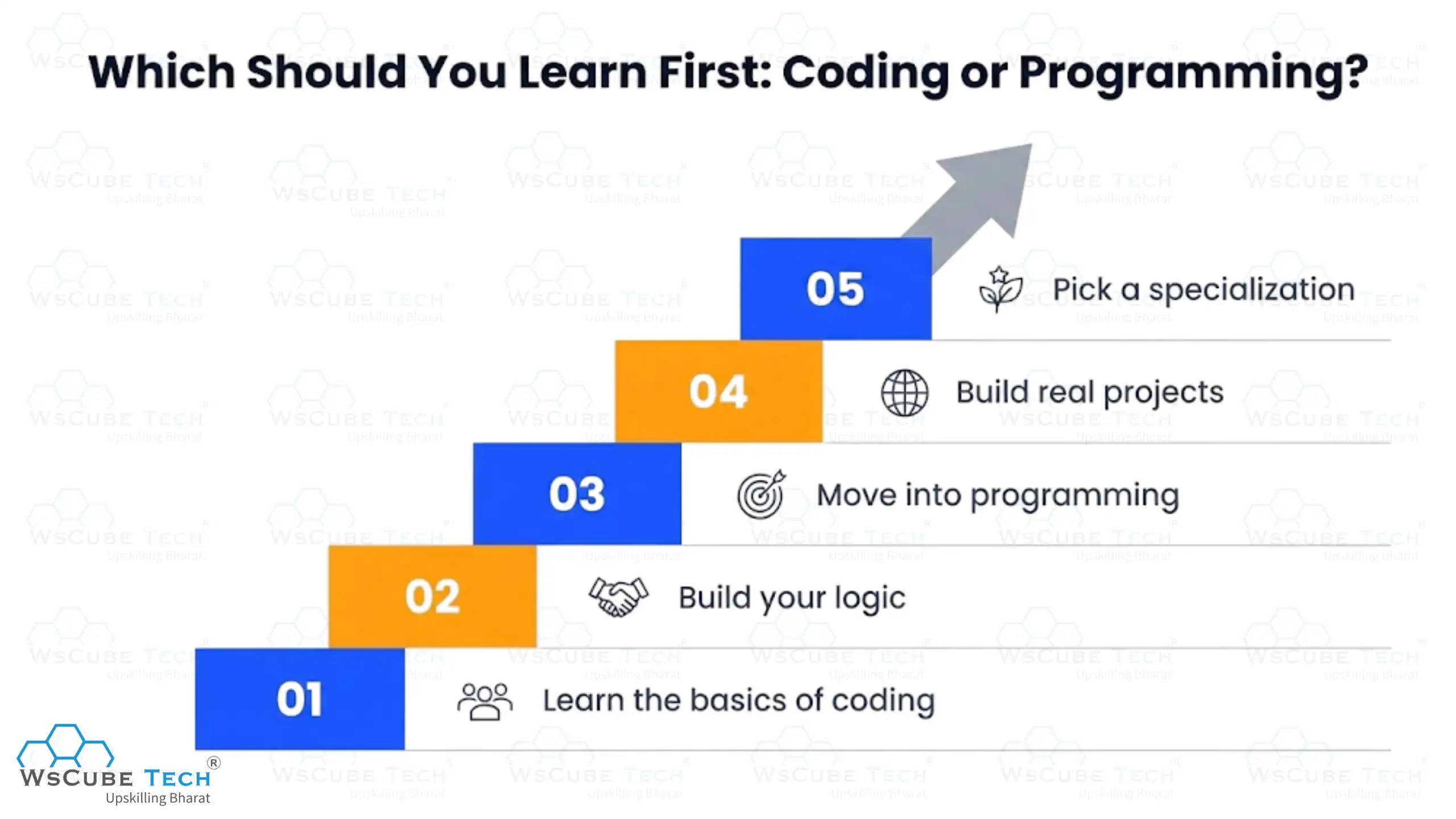
Step 1: Learn the basics of coding
Pick one programming language and stick with it instead of switching between several languages. Python is a beginner-friendly option because of its simple syntax. Learn variables, data types, conditions, loops, and functions, and practice by writing small programs regularly.
Step 2: Build your logic
Once you understand the basics, start solving simple coding problems to improve your logical thinking. Practice with strings, arrays, patterns, and basic mathematical problems. Focus on understanding how to approach a problem rather than simply memorizing solutions.
Step 3: Move into programming
Now start learning data structures and algorithms to handle more complex problems. Understand concepts such as time complexity, memory usage, and how different data structures affect your code. This is where you begin moving from basic coding toward broader programming skills.
Step 4: Build real projects
Apply what you have learned by building projects such as a calculator, to-do app, or website with login and a database. Projects help you understand how different parts of an application work together. You can also explore programming languages.
Step 5: Pick a specialization
Once your coding and programming basics are strong, choose an area that interests you, such as web development, app development, data, or AI. From there, focus on the tools and technologies used in that field. A structured full stack development course can be useful if you want to learn frontend, backend, and databases together.
Coder vs. Programmer Salary in India
Salaries for coding and programming roles depend on your skills, city, and company. The table below shows indicative annual ranges for common coding and programming roles in India.
| Role | Typical Range |
| Coder / Junior Coder | ₹2.5 LPA to ₹3.5 LPA |
| Computer Programmer | ₹3 LPA to ₹6 LPA |
| Software Developer | ₹7 LPA to ₹12 LPA |
| Backend Developer | ₹6 LPA to ₹18 LPA |
| Full Stack Developer | ₹6 LPA to ₹15 LPA |
| Software Engineer | ₹8 LPA to ₹12 LPA |
| Senior Software Engineer | ₹15 LPA to ₹37 LPA |
Source: Salary data in this blog is collected from Ambitionbox. Figures are indicative and change with experience, location, and company size.
Explore Our Web Development Related Courses
Different Careers in Coding
Coding skills can help you enter several roles where writing, modifying, testing, or maintaining code is a major part of the work.
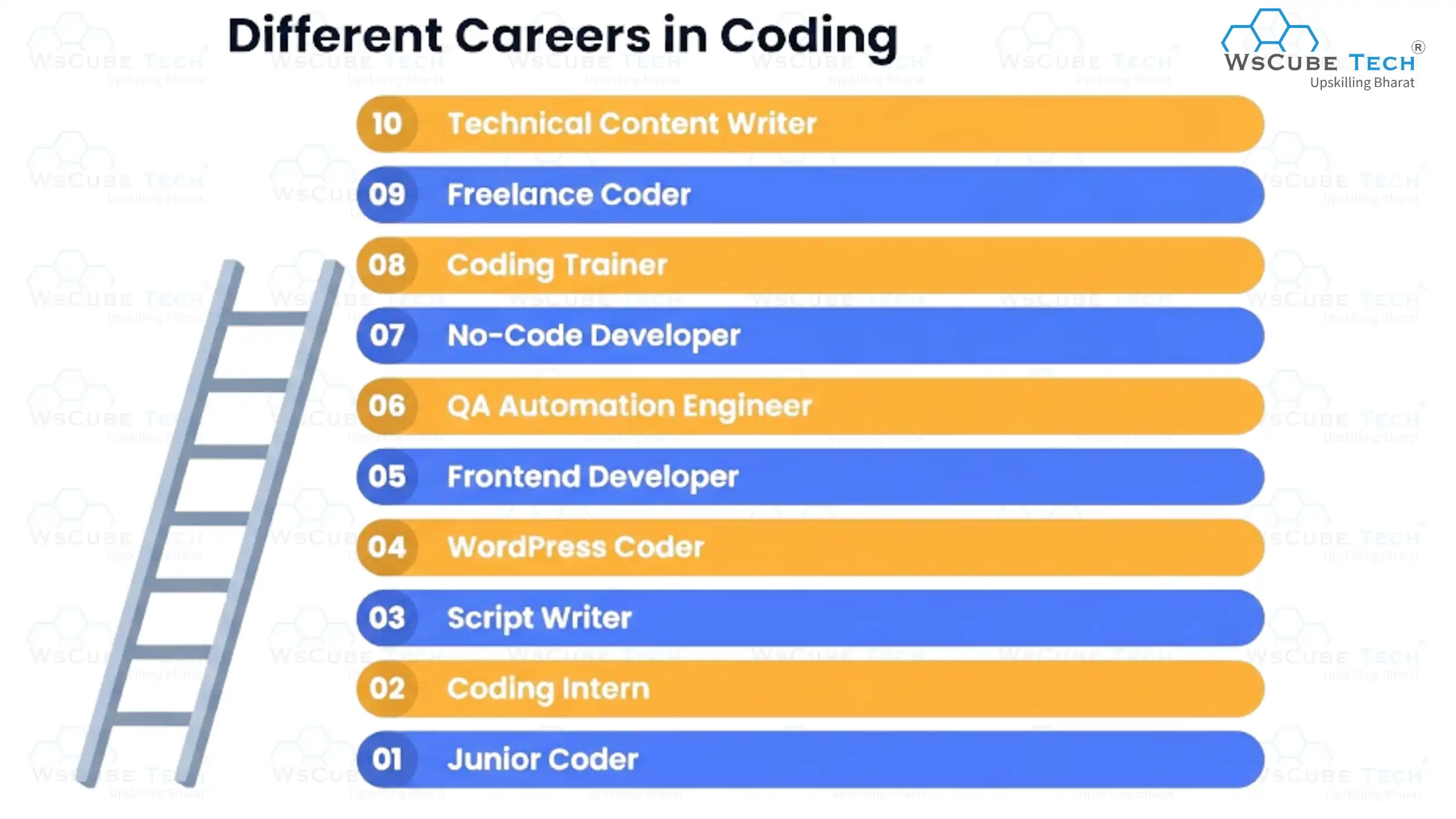
1. Junior Coder
A Junior Coder writes and modifies code for small features or tasks under the guidance of experienced developers. They also fix basic bugs, test their code, and learn the team's coding standards and tools.
2. Coding Intern
A Coding Intern works on real projects while gaining practical development experience. They usually assist senior developers, write simple code, test features, and learn how software teams work.
3. Script Writer / Automation Coder
A Script Writer creates small programs or scripts to automate repetitive tasks. They may automate data processing, file management, testing, reporting, or other routine workflows.
4. WordPress Coder
A WordPress Coder builds and customizes websites using WordPress, themes, plugins, HTML, CSS, and JavaScript. They may modify website layouts, add features, fix issues, and improve website functionality.
5. Frontend Developer
A Frontend Developer builds the part of a website or application that users see and interact with. They use HTML, CSS, JavaScript, and frontend frameworks to turn designs into responsive, interactive interfaces.
6. QA Automation Engineer
A QA Automation Engineer writes automated tests to check whether software works correctly. They use tools such as Selenium to test features, identify bugs, and reduce repetitive manual testing.
7. No-Code / Low-Code Specialist
A No-Code or Low-Code Specialist builds applications and workflows using platforms that require little traditional coding. They use tools such as Bubble or Zapier to create solutions, automate processes, and connect different services.
8. Coding Trainer
A Coding Trainer teaches programming concepts and coding skills to students or aspiring developers. They explain programming fundamentals, guide learners through projects, and help them develop practical coding skills.
9. Freelance Coder
A Freelance Coder works independently on coding projects for different clients. They may build websites, write scripts, fix bugs, or customize existing software based on client requirements.
10. Technical Content Writer
A Technical Content Writer creates tutorials, documentation, guides, and other technical content. They use their coding knowledge to explain programming concepts, tools, and software in a way that readers can understand.
Different Careers in Programming
Programming skills can lead to roles that involve building software, solving complex problems, and working with larger systems and technologies.
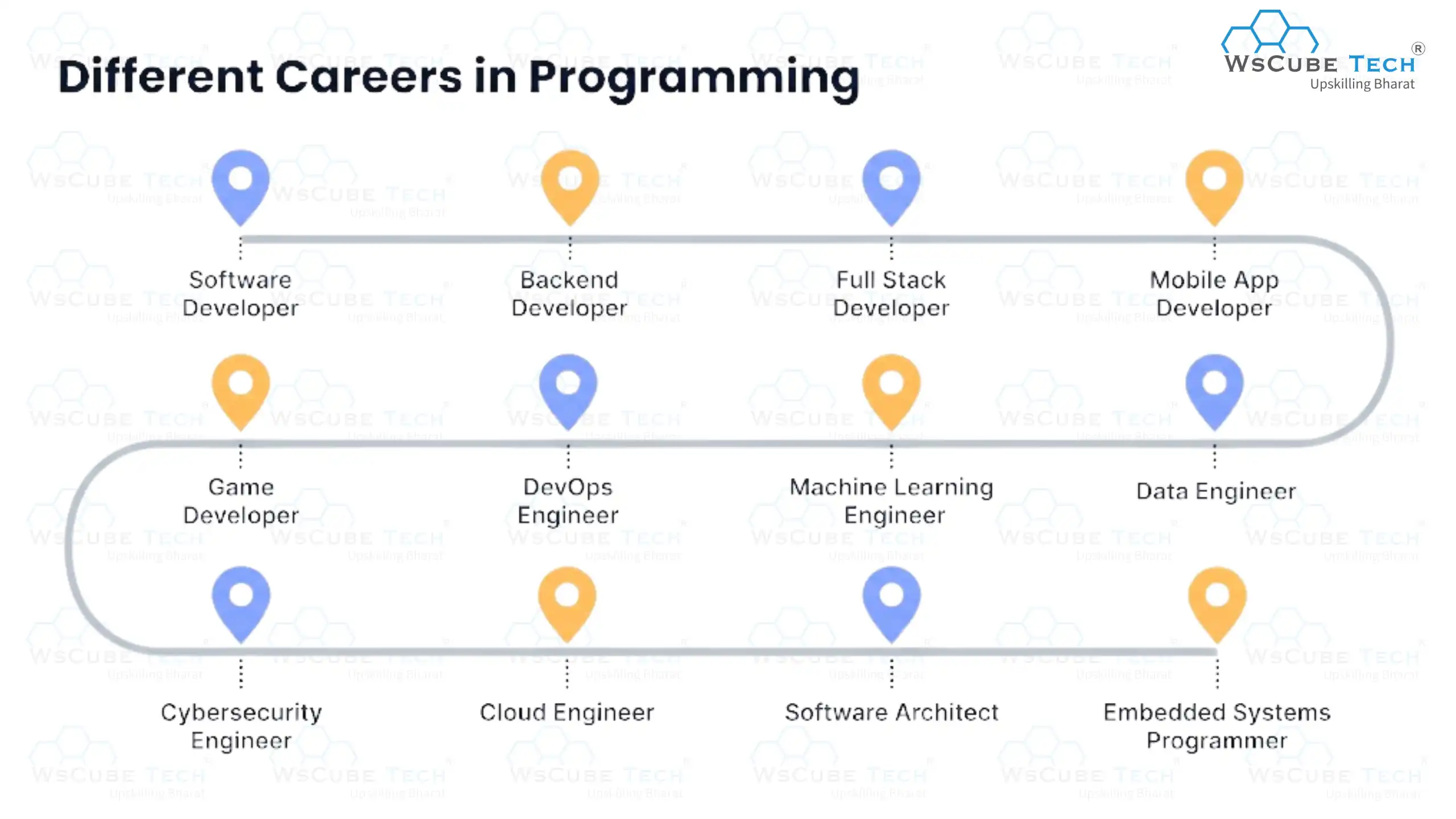
1. Software Developer
A Software Developer designs, builds, tests, and maintains software applications. They work with other developers and teams to turn requirements into reliable software products.
2. Backend Developer
A Backend Developer builds the server-side part of websites and applications. They work with APIs, databases, business logic, and backend programming languages such as Java, Python, and Node.js.
3. Full Stack Developer
A Full Stack Developer works on both the frontend and backend of an application. They build user interfaces, server-side logic, APIs, and databases to create complete web applications.
4. Mobile App Developer
A Mobile App Developer creates applications for smartphones and tablets. They use technologies such as Kotlin, Swift, or Flutter to build, test, and maintain Android and iOS applications.
5. Data Engineer
A Data Engineer builds systems that collect, process, store, and move large amounts of data. They create data pipelines and work with databases and cloud platforms to make data available for analysis and applications.
6. Machine Learning Engineer
A Machine Learning Engineer develops and deploys systems that use machine learning models. They work with data, algorithms, model training, and software systems to build AI-powered features and applications.
7. DevOps Engineer
A DevOps Engineer helps development teams build, deploy, and run software efficiently. They work with servers, cloud platforms, CI/CD pipelines, monitoring, and automation to improve software delivery.
8. Game Developer
A Game Developer creates the software behind video games for computers, consoles, or mobile devices. They use programming languages and game engines such as Unity or Unreal Engine to build gameplay, graphics, and game systems.
9. Cybersecurity Engineer
A Cybersecurity Engineer develops and protects software and systems against security threats. They write secure code, identify vulnerabilities, implement security controls, and test systems for potential weaknesses.
10. Cloud Engineer
A Cloud Engineer builds and manages applications and infrastructure on cloud platforms. They work with services from AWS, Azure, or Google Cloud to deploy applications, manage resources, and improve scalability.
11. Software Architect
A Software Architect designs the overall technical structure of complex software systems. They decide how different components should work together and help teams make decisions about scalability, security, and technology.
12. Embedded Systems Programmer
An Embedded Systems Programmer writes software that runs inside devices and hardware products. They may program systems used in cars, appliances, medical devices, industrial machines, and other connected hardware.
Expert Advice: Keep an eye on future programming languages like Rust, Go, and Kotlin. Early skills in these give you an edge.

FAQs about Coding Vs. Programming
No. Coding is writing instructions in a language a computer understands, while programming covers planning, coding, testing, and maintaining full software. So the answer to is coding the same as programming is no; coding is only one part of programming.
Yes. You can write small scripts and simple programs with basic syntax and logic alone. But you cannot build a complete, reliable application without programming skills like design, testing, and debugging.
Mostly yes. Both use languages like Python, Java, C++, and JavaScript. The difference is depth. Programmers use advanced features, frameworks, and libraries that coders usually do not touch.
Programming jobs pay more. Coding roles usually start around ₹2 to ₹4 LPA, while programming and developer roles often start at ₹5 LPA and grow much faster with experience.
No, a degree is not compulsory. Many companies now hire on skills, projects, and portfolios. A degree helps with campus placements and some MNC filters, but strong projects matter more.
For a beginner, coding means writing small working programs, and programming means building a complete project around them. Knowing what is difference between coding and programming early helps you pick the right learning path.
Python is widely seen as the best programming language for beginners because of its simple syntax and huge community. JavaScript is a close second if you want to build websites quickly.
There are several categories, including procedural, object-oriented, functional, and scripting languages. Understanding each type of programming language helps you choose the right one for your goal.
Basic coding takes around 2 to 3 months with daily practice. Learning coding and programming to a job-ready level usually takes 6 to 12 months, depending on how much you build.
Yes. Most web and app development work needs only basic maths. Strong maths becomes important only in fields like machine learning, data science, and game physics.
Yes. Demand for developers is still strong across product companies, startups, and IT services. Roles involving AI, cloud, and full stack skills are growing the fastest.
Java, Python, Node.js, PHP, and Go are the most in demand. Backend Programming Languages handle servers, databases, and business logic, so they carry high salary value.
AI tools speed up code writing but cannot replace problem-solving, system design, or judgment. Coders doing only repetitive work face more risk than programmers who design solutions.
Rust, Go, Kotlin, and TypeScript are seen as strong Future programming languages. They are being adopted fast for speed, safety, and modern app development.
Start with one side to build depth, then expand. A full stack path is useful if you want more job options, faster startup roles, and the ability to build complete products on your own.
Yes, in a small way. Job posts using programming vs coding wording often expect different depth. Coding roles test syntax and logic, while programming roles test design, algorithms, and project experience.
Yes. Students from class 6 onwards can start with block-based tools, then move to Python. Early exposure builds logic and makes college-level programming much easier.
Explore Our Free Tech Tutorials
| Python Tutorial | Java Tutorial | JavaScript Tutorial |
| C Tutorial | C++ Tutorial | HTML Tutorial |
| CSS Tutorial | SQL Tutorial | DSA Tutorial |
Practice Coding With Our Free Compilers
| Online Python Compiler | Online HTML Compiler | Online C Compiler |
| Online C++ Compiler | Online JS Compiler | Online Java Compiler |
Join Our On-Campus Full Stack Related Courses
Free Courses for You



Leave a comment
Your email address will not be published. Required fields are marked *Comments (0)
No comments yet.