Have you ever wondered how websites and web apps are created? In 2026, web development has become one of the most in-demand and exciting career skills for students, freelancers, and tech enthusiasts.
Many beginners feel confused about where to start, which programming language to learn, and which tools are important. Learning web development can feel overwhelming at first.
Without proper guidance, beginners often waste time and struggle to build real skills but following a clear web development learning path makes all the difference. The good news is that web development becomes easier with the right learning path.
If you want to start your journey in development, this blog will help you get started the right way. In this blog, you will learn about important skills, useful tools, common challenges, career opportunities, salary expectations, and tips to become a successful web developer in 2026.
What is Web Development?
Web development is the process of creating and maintaining websites and web applications that run on the internet. It includes designing web pages, writing code, managing databases, and improving website performance for a better user experience. To learn web development, it is important to understand its main areas and technologies. Below are the important parts of web development:
- Front-End Development
- Back-End Development
- Full-Stack Development
- Web Design
- Database Management
- Web Development Frameworks
- APIs and Server Management
- Website Testing and Deployment
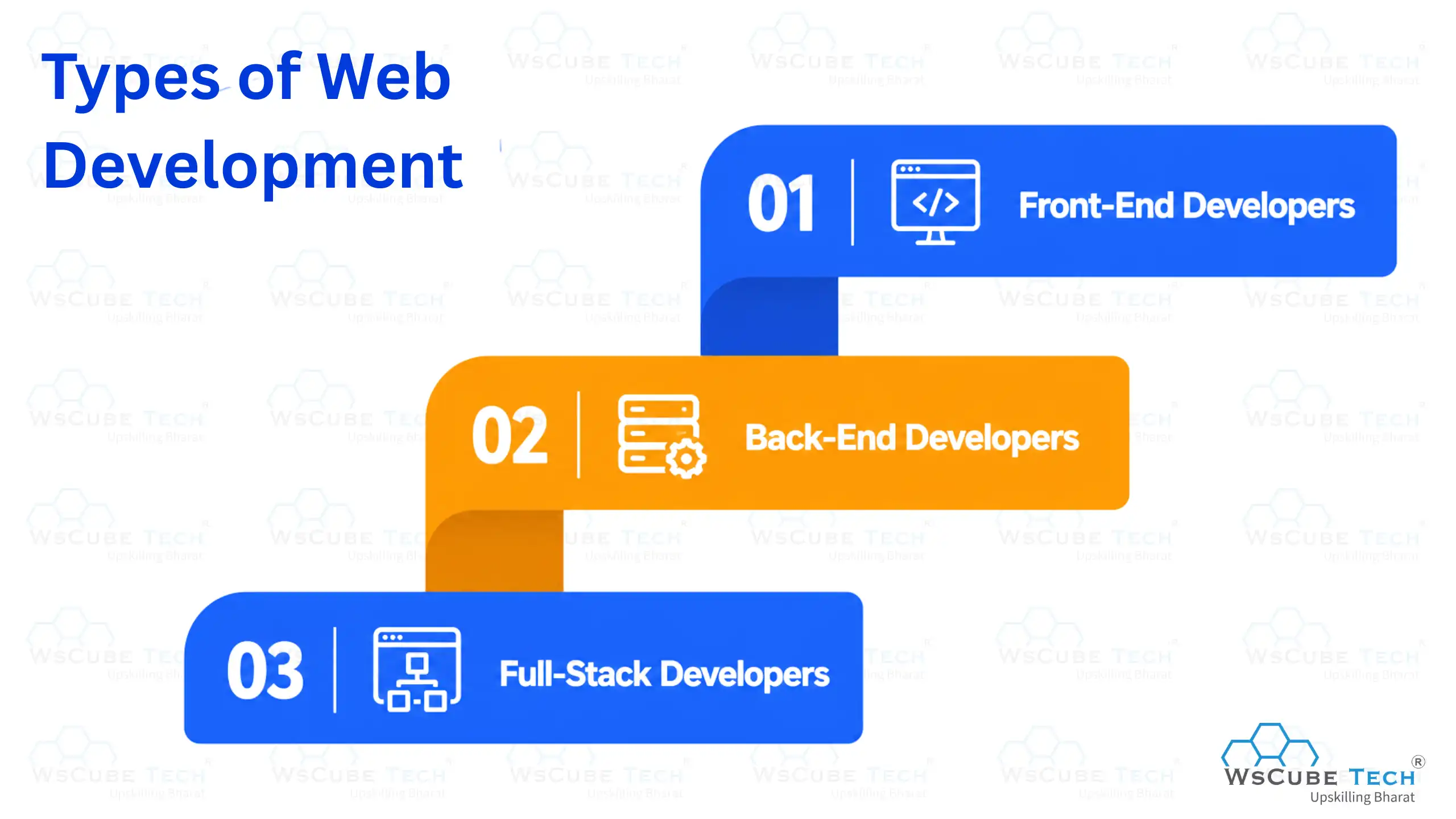
Types of Web Development
Web development includes different categories based on website functionality, design, and server management. Below are the main types of web development used in modern websites:
Front-End Development
Front-end development focuses on creating the visual and interactive part of a website that users see and use directly. Below are the important key aspects of front-end development:
- HTML Structure: HTML is used to create the basic structure of web pages, including headings, paragraphs, images, forms, buttons, and navigation menus.
- CSS Styling: CSS helps design websites by adding colors, layouts, animations, fonts, spacing, and responsive designs for a better user experience on devices.
- JavaScript Functionality: JavaScript adds interactivity to websites, such as sliders, drop-down menus, popups, dynamic content updates, and interactive user actions.
- Responsive Design: Responsive design ensures websites work properly on desktops, tablets, and mobile devices with flexible layouts and optimized screen adjustments.
- Front-End Frameworks: Frameworks like React, Angular, and Vue help developers build faster, scalable, and interactive user interfaces for modern web applications.
Back-End Development
Back-end development focuses on the server-side functionality of websites and web applications. It manages databases, servers, APIs, and application logic. Below are the important key aspects of back-end development:
- Server Management: Back-end developers manage servers to ensure websites run smoothly, securely, and efficiently without performance or connectivity issues.
- Database Handling: Databases store, organize, and manage website information such as user details, login data, transactions, and application records securely.
- API Integration: APIs help websites connect with external applications, payment gateways, cloud services, and third-party platforms for additional functionality.
- Server-Side Programming: Languages like PHP, Python, Java, and Node.js are used to process requests and handle website functionality behind the scenes.
- Authentication and Security: Back-end systems protect websites using authentication, encryption, secure login systems, and data protection techniques against cyber threats.
Full-Stack Development
Full-stack development combines both front-end and back-end development skills to build complete websites and web applications. Below are the key areas of full-stack development:
- Front-End Development Skills: Full-stack developers use HTML, CSS, JavaScript, and frameworks to create responsive and interactive website user interfaces.
- Back-End Development Skills: Back-end technologies help full-stack developers manage servers, databases, APIs, and website functionality efficiently.
- Database Management: Full-stack developers work with databases to store, organize, update, and manage website and application data securely for smooth functionality and better user experience.
- Version Control Systems: Tools like Git and GitHub help developers track code changes, collaborate with teams, and manage projects effectively.
- Deployment and Hosting: Full-stack developers deploy websites on hosting platforms and manage server configurations for smooth website performance.
Recommended Professional Certificates
Full Stack Development Course with AI Engineering
WordPress Bootcamp
Skills Required to Learn Web Development
Below are the important technical skills required to become a successful web developer:
Technical Skills
- HTML and CSS: HTML and CSS are used to create and design web pages with proper structure, layouts, colors, fonts, spacing, and responsive website designs.
- JavaScript Programming: JavaScript helps developers add interactive features like sliders, forms, animations, popups, and dynamic content to websites and web applications.
- Front-End Frameworks: Frameworks like React, Angular, and Vue help developers build modern, responsive, scalable, and interactive user interfaces more efficiently.
- Back-End Development: Back-end skills help manage servers, databases, APIs, authentication systems, and website functionality using programming languages and frameworks.
- Database Management: Database skills are important for storing, organizing, updating, and managing website and application data securely and efficiently.
- Version Control Systems: Tools like Git and GitHub help developers track code changes, manage projects, and collaborate effectively with development teams.
- Responsive Web Design: Responsive design skills ensure websites work properly across desktops, tablets, and mobile devices with optimized layouts and user experience.
- Web Hosting and Deployment: Deployment skills help developers publish websites online, manage hosting services, and maintain website performance and accessibility.
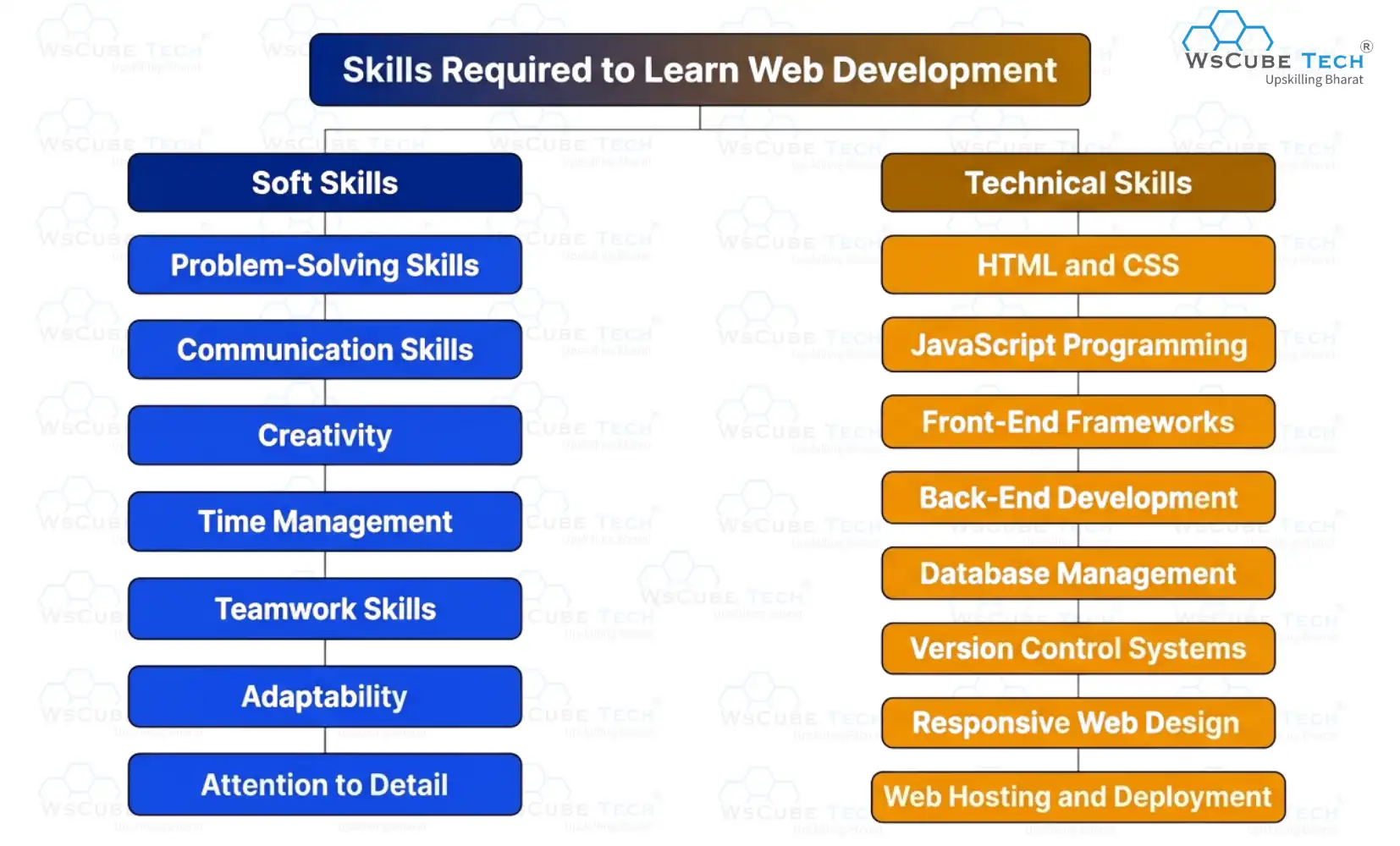
Soft Skills
- Problem-Solving Skills: Web developers need strong problem-solving skills to identify coding issues, debug errors, and create effective solutions for websites and applications.
- Communication Skills: Good communication helps developers explain ideas clearly, understand client requirements, and collaborate effectively with designers, developers, and project teams.
- Creativity: Creativity helps developers design attractive websites, improve user experience, and create unique features that make websites more engaging and interactive.
- Time Management: Time management skills help developers complete projects on schedule, manage multiple tasks, and maintain productivity during development work.
- Teamwork Skills: Teamwork is important for collaborating with designers, developers, testers, and project managers while building websites and web applications efficiently.
- Adaptability: Web development technologies change regularly, so developers must adapt to new tools, frameworks, programming languages, and industry trends quickly.
- Attention to Detail: Attention to detail helps developers write clean code, identify small errors, and ensure websites function properly without design or performance issues.
How to Learn Web Development? Step-by-Step
Below is the complete web development roadmap that helps learners understand how to learn web development step by step in a simple and structured way:
- Step 1: Understand the Basics of Web Development
- Step 2: Learn HTML and CSS
- Step 3: Learn JavaScript Fundamentals
- Step 4: Practice Responsive Web Design
- Step 5: Learn Front-End Frameworks
- Step 6: Understand Back-End Development
- Step 7: Learn Database Management
- Step 8: Work with Version Control Systems
- Step 9: Build Real-World Projects
- Step 10: Learn Website Hosting and Deployment
- Step 11: Create a Portfolio Website
- Step 12: Apply for Internships and Jobs
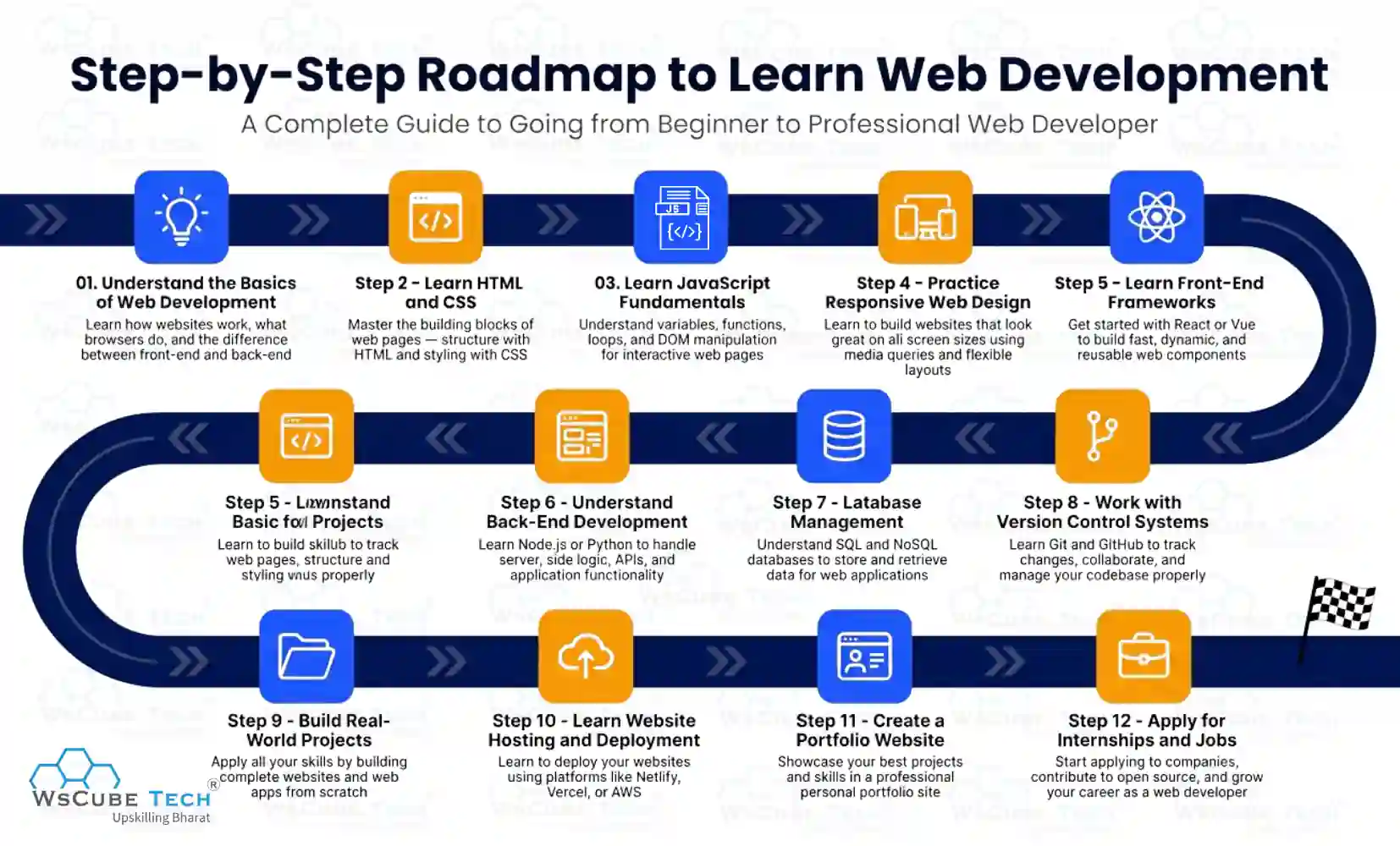
Now, let’s discuss each step in detail to understand the complete learning path for becoming a web developer.
Step 1: Understand the Basics of Web Development
The first step in learning web development is understanding how websites and web applications work on the internet. It is important to learn the difference between frontend, backend, and full-stack development before moving to programming languages and frameworks.
You should also understand basic concepts like servers, browsers, domains, hosting, databases, and APIs. Learning these fundamentals creates a strong foundation and helps you understand advanced web development technologies more easily in the future.
Step 2: Learn HTML and CSS
Learning HTML and CSS is one of the most important steps in web development, as these technologies help create and design websites from scratch. Here are the key concepts you should focus on:
- HTML Structure: Learn how to structure web pages using elements like headings, paragraphs, links, images, tables, lists, and forms for organized website content.
- CSS Styling: Understand how to style websites using colors, fonts, spacing, borders, backgrounds, and layouts to improve website appearance and user experience.
- Semantic HTML: Learn semantic HTML tags like header, nav, section, article, and footer to create meaningful and well-structured web pages.
- CSS Selectors: Practice using CSS selectors, classes, and IDs to apply styles efficiently and manage website design more effectively.
- Basic Web Projects: Build simple projects like landing pages, portfolio websites, and login forms to strengthen your practical web development skills.
A strong understanding of HTML and CSS creates the foundation for learning JavaScript, front-end frameworks, and advanced web development technologies more effectively.
Step 3: Learn JavaScript Fundamentals
JavaScript is one of the most important programming languages in web development because it adds interactivity and dynamic functionality to websites. After learning HTML and CSS, beginners should focus on understanding JavaScript fundamentals to create interactive web applications. Here are the important concepts you should learn:
- Variables and Data Types: Learn how to store and manage different types of data using variables, strings, numbers, arrays, and objects in JavaScript.
- Functions and Events: Understand how functions work and learn event handling to create interactive features like button clicks, form submissions, and popups.
- DOM Manipulation: Learn how to use JavaScript to modify website content, styles, and elements dynamically through Document Object Model manipulation.
- Loops and Conditions: Practice loops and conditional statements to control program flow and perform repetitive tasks efficiently in web applications.
- Basic JavaScript Projects: Build simple projects like calculators, to-do lists, image sliders, and interactive forms to improve practical JavaScript development skills.
A strong understanding of JavaScript fundamentals helps you build interactive websites and makes it easier to learn advanced front-end frameworks and libraries later.
Step 4: Practice Responsive Web Design
Responsive web design helps websites work properly on desktops, tablets, and mobile devices. It improves user experience by creating flexible and visually appealing layouts for different screen sizes. Here are the key concepts you should focus on:
- Media Queries: Learn how to use media queries to apply different styles for various screen sizes and improve website responsiveness on multiple devices.
- Flexible Layouts: Understand flexible layouts using percentages, relative units, and responsive containers to create adaptable and properly structured web pages.
- Responsive Images: Learn techniques for resizing and optimizing images so they display correctly without affecting website performance and design quality.
- Mobile-First Design: Practice designing websites for mobile devices first and then scaling layouts for larger screens like tablets and desktops.
- Responsive Web Projects: Build responsive landing pages, portfolios, and navigation menus to improve your practical responsive web design skills effectively.
Learning responsive web design helps create modern websites that provide a smooth and consistent experience across all devices and screen sizes.
Step 5: Learn Front-End Frameworks
Front-end frameworks help developers build modern, interactive, and scalable websites more efficiently. These frameworks provide reusable components, faster development processes, and better website performance for modern web applications. Below are the key concepts you should focus on:
- React Framework: Learn React to build dynamic and component-based user interfaces for modern websites and single-page web applications efficiently.
- Angular Framework: Understand Angular for creating large-scale and feature-rich web applications with structured architecture and advanced front-end development features.
- Vue.js Framework: Learn Vue.js to create lightweight, flexible, and interactive user interfaces with simple syntax and efficient performance.
- Component-Based Development: Practice building reusable components to improve code organization, maintainability, and development speed in front-end applications.
- Front-End Projects: Build projects like dashboards, portfolio websites, and interactive applications to strengthen your practical front-end framework development skills.
Learning front-end frameworks helps developers create modern web applications faster and prepares them for advanced front-end development and industry-level projects.
Upcoming Masterclass
Attend our live classes led by experienced and desiccated instructors of Wscube Tech.




Step 6: Understand Back-End Development
Back-end development focuses on the server-side functionality of websites and web applications. It manages databases, servers, APIs, authentication, and application logic that work behind the scenes to keep websites functional and secure. Here are the key concepts you should focus on:
- Server-Side Programming: Learn programming languages like Node.js, Python, PHP, or Java to handle website functionality and process user requests efficiently.
- Database Management: Understand how databases store, organize, update, and manage website and application data securely for smooth functionality.
- API Development: Learn how APIs connect websites with external applications, payment gateways, and third-party services to add additional website features.
- Authentication Systems: Practice implementing login systems, password protection, and user authentication methods to improve website security and access control.
- Back-End Projects: Build projects like login systems, blog websites, and database-driven applications to strengthen practical back-end development skills.
Understanding back-end development helps developers build fully functional websites and prepares them for advanced full-stack web development projects.
Step 7: Learn Database Management
Database management is an important part of web development because websites and applications use databases to store and manage information efficiently. Here are the key concepts you should focus on:
- SQL Databases: Learn SQL databases like MySQL and PostgreSQL to store, retrieve, update, and manage structured website data efficiently.
- NoSQL Databases: Understand NoSQL databases like MongoDB for handling unstructured and flexible data used in modern web applications.
- Database Queries: Practice writing database queries to insert, update, delete, and retrieve information from databases accurately and efficiently.
- Database Relationships: Learn how tables and collections are connected to manage related website and application data properly.
Learning database management helps developers create dynamic websites and applications that can securely handle large amounts of data efficiently.
Step 8: Work with Version Control Systems
Version control systems help developers track code changes, manage projects, and collaborate efficiently during web development. These tools improve teamwork, code management, and project organization. Here are the key concepts you should focus on:
- Git Fundamentals: Learn Git basics like repositories, commits, branches, cloning, and merging to manage code changes effectively during development.
- GitHub Platform: Understand how GitHub helps store projects online, collaborate with teams, and manage web development repositories efficiently.
- Branch Management: Practice creating and managing branches to work on different features without affecting the main project codebase.
- Code Collaboration: Learn collaboration workflows like pull requests and code reviews for effective teamwork in web development projects.
Learning version control systems helps developers manage projects professionally and prepares them for real-world software and web development environments.
Step 9: Build Real-World Projects
Building real-world web development projects is an important step in your learning journey. It helps you apply frontend, backend, databases, APIs, and frameworks in practical scenarios. By working on projects, you understand how different web technologies connect and gain confidence in developing websites and web applications.
You can also explore 30 Web Development Project Ideas to find useful practice projects and improve your development skills. Working on multiple projects will strengthen your coding abilities, improve problem-solving skills, and help you build a strong portfolio for internships and job opportunities.
Step 10: Learn Website Hosting and Deployment
Website hosting and deployment help make websites accessible on the internet. It also helps developers manage and maintain websites properly. Here are the key concepts you should focus on:
- Web Hosting Platforms: Learn about hosting platforms like Netlify, Vercel, Hostinger, and AWS used to host websites and web applications online.
- Domain Management: Understand how domains work and learn to connect domain names with hosted websites for better accessibility and branding.
- Deployment Tools: Learn deployment tools and platforms used to upload, manage, and update websites efficiently during web development projects.
- Cloud Services: Explore cloud services that help manage servers, databases, storage, and website scalability in modern web development environments.
- Server Management: Understand basic server configuration, website maintenance, and performance optimization techniques for smooth website functionality and security.
Learning website hosting and deployment helps developers publish real-world projects and gain practical experience in managing websites professionally.
Step 11: Create a Portfolio Website
Creating a portfolio website is an important step in web development because it helps showcase your skills, projects, and practical experience professionally. A portfolio also helps employers and clients understand your technical abilities and development knowledge.
Your portfolio website should include project details, technical skills, contact information, and links to GitHub or live projects. A strong portfolio improves job opportunities and helps build a professional online presence.
Step 12: Apply for Internships and Jobs
Applying for internships and web development jobs is the final step in your learning journey. Internships help you gain real-world experience, improve practical skills, and understand professional development workflows used in the industry.
You should prepare a strong resume, portfolio website, and GitHub profile before applying for opportunities. Participating in coding challenges, networking, and contributing to projects can also improve your chances of getting web development internships and jobs.
Web Development Career Guides
| How to Become a Web Developer? | What does a Web Developer do? |
| Is Web Development a Good Career? | How to Become Frontend Developer? |
| How to Become Backend Developer? | How to Become Full Stack Developer? |
Important Tools Used in Web Development
Below are some important web development tools used to build modern websites and web applications:
| Tool Category | Tools |
| Code Editors | VS Code, Sublime Text, Atom |
| Version Control | Git, GitHub, GitLab |
| Front-End Frameworks | React, Angular, Vue.js |
| Back-End Frameworks | Node.js, Express.js, Django |
| Database Tools | MySQL, MongoDB, PostgreSQL |
| Design Tools | Figma, Adobe XD, Canva |
| Browser Developer Tools | Chrome DevTools, Firefox Developer Tools |
| Hosting Platforms | Netlify, Vercel, Hostinger |
| API Testing Tools | Postman, Insomnia |
| Package Managers | npm, Yarn |
Common Challenges Faced While Learning Web Development
After exploring how to learn web development from scratch, it is also important to understand the common challenges faced during the learning journey. Below are the major challenges faced while learning web development:
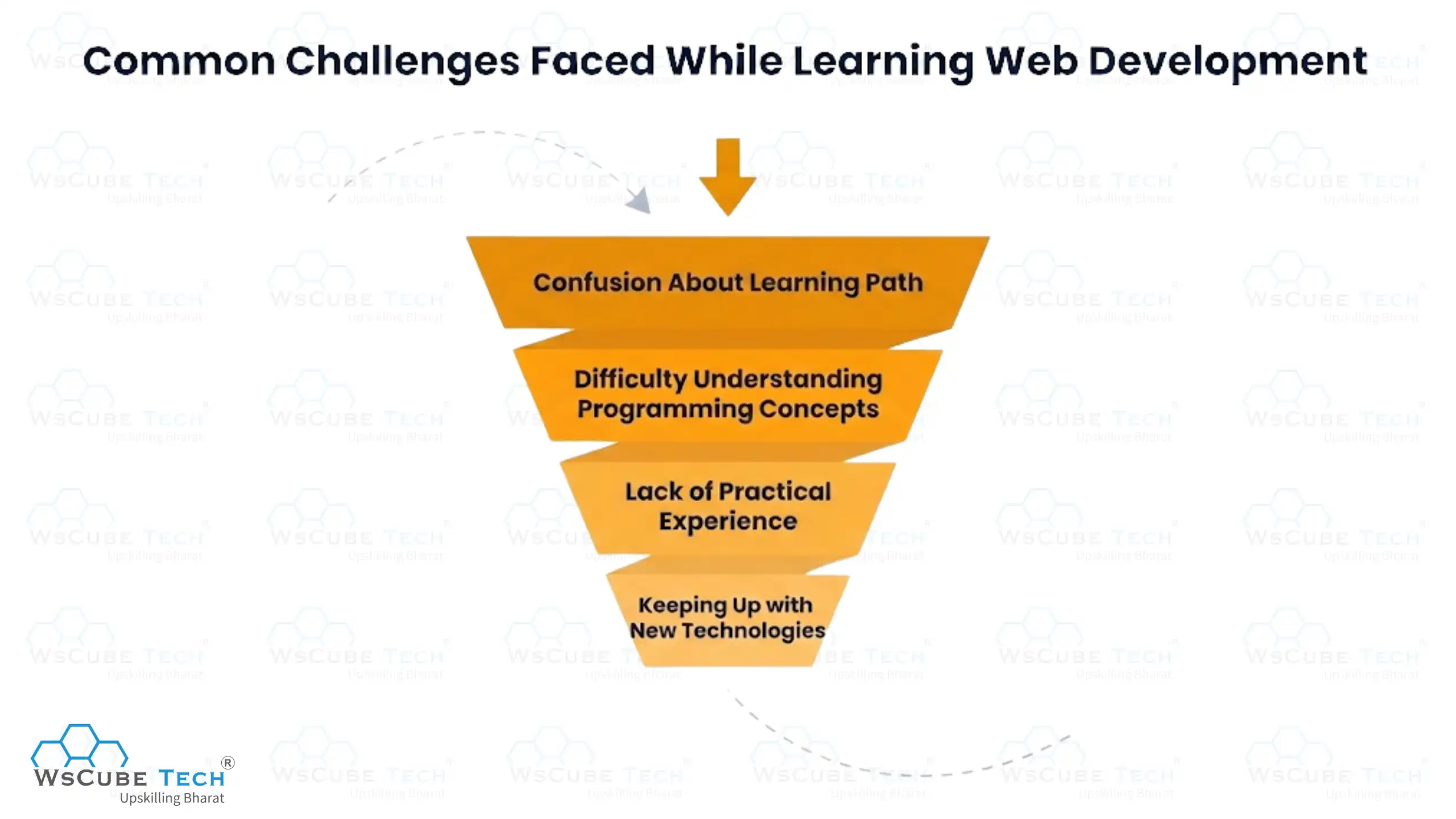
1. Confusion About Learning Path
Many learners feel confused about which programming languages, frameworks, and technologies to learn first because web development includes multiple career paths, tools, and learning resources. Choosing the right roadmap without proper guidance can make the learning process more difficult and overwhelming.
2. Difficulty Understanding Programming Concepts
Understanding concepts like JavaScript, APIs, databases, backend development, and debugging can feel difficult for beginners. Learning programming logic and solving coding problems requires regular practice, patience, and hands-on development experience.
3. Lack of Practical Experience
Learning only through tutorials without building projects can limit practical understanding of web development concepts. Real-world projects help improve coding skills, problem-solving abilities, and confidence in developing websites and web applications.
4. Keeping Up with New Technologies
Web development technologies and frameworks change regularly, making it challenging to stay updated with modern tools and industry trends. Continuous learning and regular practice are important for understanding new frameworks, libraries, and development practices.
Tips to Become a Successful Web Developer
Becoming a successful web developer requires continuous learning, practical experience, and regular coding practice. Below are some important tips to become a successful web developer:
- Practice coding or programming regularly
- Build real-world projects
- Learn modern web technologies
- Improve problem-solving skills
- Create a strong portfolio website
- Stay updated with industry trends
- Learn version control systems
- Participate in coding communities
- Focus on responsive web design
- Work on frontend and backend skills
Explore Our Web Development Related Courses
Career Opportunities in Web Development
Below are the major career opportunities available in web development:
| Career Role | Description |
| Front-End Developer | Develops the visual and interactive parts of websites using HTML, CSS, JavaScript, and front-end frameworks. |
| Back-End Developer | Manages server-side logic, databases, APIs, and website functionality for web applications and platforms. |
| Full-Stack Developer | Works on both front-end and back-end development to build complete websites and web applications. |
| Web Designer | Creates website layouts, visual designs, graphics, and user-friendly website interfaces for better user experience. |
| UI/UX Designer | Focuses on improving website usability, user experience, and interface design for web and mobile applications. |
| WordPress Developer | Builds and manages websites using WordPress themes, plugins, and content management system tools. |
| Web Application Developer | Develops dynamic web applications with advanced features, databases, APIs, and interactive functionalities. |
| DevOps Engineer | Manages deployment, hosting, server configuration, automation, and website performance optimization processes. |
| Freelance Web Developer | Works independently on website development projects for clients, businesses, and organizations remotely. |
| Software Engineer | Designs, develops, tests, and maintains software systems, applications, and web-based platforms professionally. |
Salary Expectations of Web Developers
Below are the salary ranges of web developers according to different job roles and experience levels:
| Job Role | Salary Range |
| Front-End Developer | ₹6 LPA – ₹7 LPA |
| Back-End Developer | ₹10 LPA – ₹12 LPA |
| Full-Stack Developer | ₹9 LPA – ₹11 LPA |
| Web Designer | ₹3 LPA – ₹4 LPA |
| UI/UX Designer | ₹7 LPA – ₹9 LPA |
| WordPress Developer | ₹3 LPA – ₹5 LPA |
| Web Application Developer | ₹6 LPA – ₹8 LPA |
| DevOps Engineer | ₹8 LPA – ₹10 LPA |
| Software Engineer | ₹8 LPA – ₹10 LPA |
Future Scope of Web Development
The future scope of web development is growing rapidly due to increasing digital transformation, e-commerce expansion, and rising demand for online services across industries. Businesses are continuously investing in websites and web applications to improve customer engagement, online presence, and digital operations.
According to the global web development market, which was valued at around USD 57.31 billion in 2024, it is expected to reach nearly USD 99.99 billion by 2035, growing at a CAGR of 5.19% during 2025–2035.
Modern technologies like AI, cloud computing, responsive web applications, and low-code development platforms are creating new opportunities in web development. The demand for frontend, backend, and full-stack developers is expected to increase significantly as companies continue focusing on digital platforms and user experience improvements in the coming years.

FAQs About Learning Web Development
Web development is the process of creating and maintaining websites and web applications using technologies like HTML, CSS, JavaScript, databases, servers, and frameworks to build functional and interactive online platforms.
Start by learning HTML, CSS, and JavaScript fundamentals, then practice responsive design, frontend frameworks, backend development, databases, and real-world projects to gradually improve your web development skills and practical experience.
Web developers need skills like frontend development, responsive design, backend development, database management, version control, and problem-solving to build modern websites and web applications.
Popular programming languages used in web development include HTML, CSS, JavaScript, PHP, Python, Java, TypeScript, and SQL for building frontend interfaces, backend systems, databases, and dynamic web applications.
Learning web development usually takes around 6 to 12 months, depending on your consistency, practice, and project experience. Strong development skills require regular coding and hands-on learning.
Yes, web development can be learned without a degree through online courses, tutorials, coding practice, real-world projects, and self-learning. Strong practical skills and a good portfolio are highly valued in the industry.
You can learn web development at home using online tutorials, coding platforms, courses, documentation, and practical projects. Regular coding practice and consistent learning are important for improving web development skills effectively.
Yes, web development remains a strong career option in 2026 because businesses continue investing in websites, web applications, e-commerce platforms, and digital services, increasing demand for skilled frontend and backend developers.
Frontend development focuses on website design and user interfaces, while backend development manages servers, databases, APIs, authentication, and application functionality that work behind the scenes of websites and applications.
React is considered one of the best frontend frameworks for beginners because of its simple component-based structure, large community support, reusable components, and wide industry demand in modern web development projects.
Learning web development in 3 months requires consistent daily practice, focusing on HTML, CSS, JavaScript, responsive design, basic backend concepts, and small projects to build practical development experience quickly and effectively.
Beginners should build projects like portfolio websites, landing pages, calculators, to-do apps, blog websites, and simple web applications to improve coding skills and gain practical web development experience effectively.
The salary of a web developer in India depends on skills, experience, technologies, and job roles. Entry-level developers generally earn between ₹3 LPA and ₹6 LPA in the industry.
Yes, web development jobs are expected to remain in high demand in 2026 because businesses, startups, and organizations continue expanding digital platforms, websites, and online services across multiple industries worldwide.
Conclusion
This web development guide has covered everything from basics to career opportunities. Web development is one of the most valuable and in-demand skills in 2026. Learning frontend, backend, databases, frameworks, and real-world projects can help build strong technical and practical development skills.
With continuous practice, modern tools, and the right learning roadmap, anyone can start a successful career in web development. Enroll in a structured full stack development course to build projects and staying updated with new technologies. This will improve career opportunities and long-term growth in the industry.
Explore Our Free Tech Tutorials
| Python Tutorial | Java Tutorial | JavaScript Tutorial |
| C Tutorial | C++ Tutorial | HTML Tutorial |
| CSS Tutorial | SQL Tutorial | DSA Tutorial |
Practice Coding With Our Free Compilers
| Online Python Compiler | Online HTML Compiler | Online C Compiler |
| Online C++ Compiler | Online JS Compiler | Online Java Compiler |
Join Our On-Campus Full Stack Related Courses
Free Courses for You




Leave a comment
Your email address will not be published. Required fields are marked *Comments (0)
No comments yet.