

Every business wants customers who trust the brand, return again, and recommend it to others. To make that happen, you first need to understand what customers actually experience at every step—before, during, and after they interact with you. This is where customer journey maps become extremely useful.
A customer journey map helps you clearly see how a person discovers your brand, what actions they take, what problems they face, and what makes them feel satisfied or frustrated along the way.
Instead of guessing what customers want, you get a structured view of their real journey across touchpoints like ads, websites, calls, emails, and support. When used correctly, a customer journey map helps improve user experience, reduce drop-offs, increase conversions, and align marketing, sales, product, and support teams around one common goal—serving the customer better.
What is Customer Journey?
A customer journey is the complete path a person follows while interacting with a brand. It starts from the moment they first hear about a product or service and continues through research, purchase, usage, and long-term relationship.
This journey includes every interaction—seeing an ad, visiting a website, talking to sales, using the product, contacting support, and even sharing feedback.

What is Customer Journey Map?
A customer journey map is a simple visual or written representation of the steps a customer goes through while interacting with a business. It shows the customer’s actions, thoughts, and feelings at different stages, from first discovering a product to becoming a loyal user.
In simple terms, it answers questions like: How did the customer find us? What did they do next? Where did they face confusion? What made them happy or unhappy?
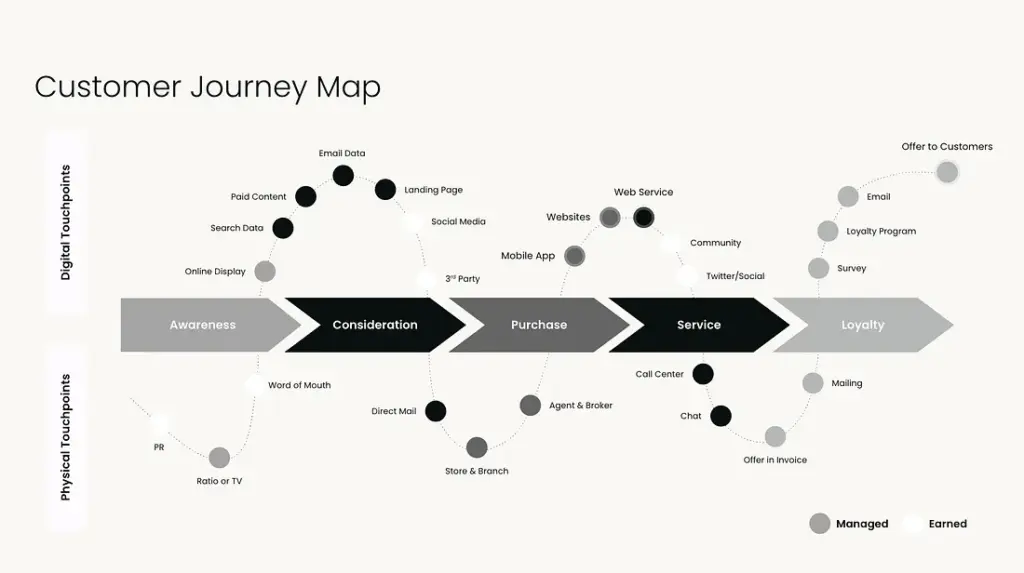
Instead of focusing on internal business processes, a customer journey map focuses only on the customer’s perspective. It helps teams understand real experiences rather than assumptions. This makes it easier to fix problems, improve communication, and create smoother, more meaningful interactions across the entire journey.
Benefits of Customer Experience Journey Map
These are the advantages of having a customer journey map:
1. Improves Customer Experience
A customer journey map highlights what customers feel at each stage. This helps you remove confusion, reduce frustration, and create smoother interactions, leading to a more positive and consistent experience across all touchpoints.
2. Identifies Pain Points Early
Journey mapping clearly shows where customers struggle—slow pages, unclear messaging, complex checkout, or poor support. Fixing these issues early prevents drop-offs and improves overall satisfaction.
3. Aligns Teams Around the Customer
Marketing, sales, product, and support teams often work in silos. A shared journey map gives everyone the same understanding of the customer, improving collaboration and decision-making.
4. Increases Conversions and Retention
When you understand what customers need at each step, you can guide them better. This leads to higher conversions during purchase and stronger retention after onboarding.
5. Supports Data-Driven Decisions
Customer experience journey maps combine user behavior, feedback, and insights into one view. This helps teams prioritize improvements based on real customer needs instead of assumptions.
6. Enhances Personalization
By understanding motivations and emotions at each stage, businesses can deliver more relevant messages, offers, and experiences that feel personalized rather than generic.
7. Improves Product and Service Design
Journey mapping reveals gaps between customer expectations and actual delivery. This helps teams design better products, features, and services that truly solve user problems.
Recommended Professional Certificates
AI-Powered Digital Marketing Course
Performance Marketing Bootcamp
SEO Specialist Bootcamp
Stages of Customer Journey Map
These are the customer experience journey map stages:
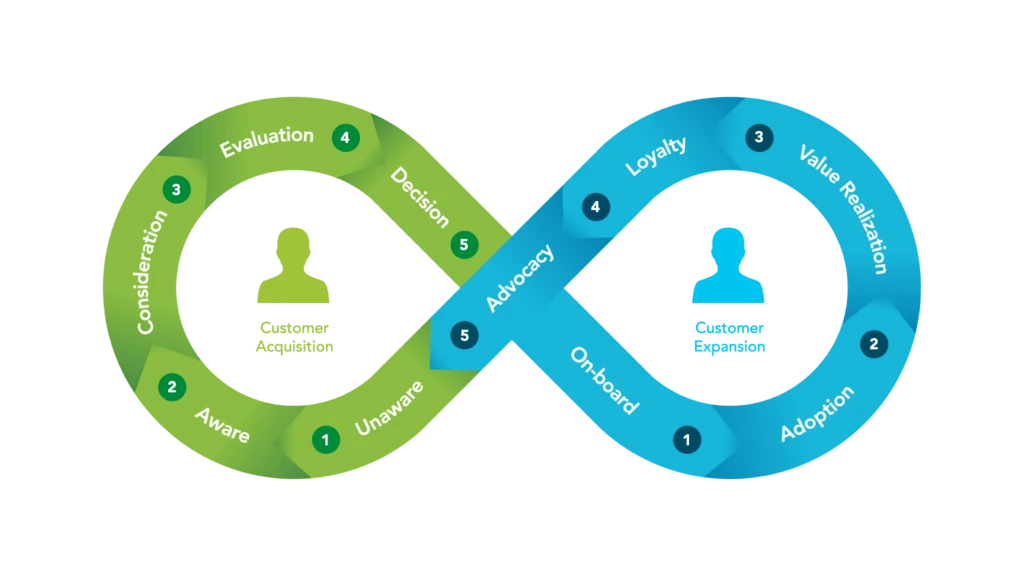
1. Awareness
This is the stage where a customer first learns about a brand or solution. They might discover it through ads, social media, search engines, or word of mouth. At this stage, the customer is not ready to buy but is becoming aware of a possible solution.
Example: A user sees a Google search result for “best fitness apps” and clicks a blog post.
2. Consideration
In this stage, the customer actively compares options. They research features, prices, reviews, and alternatives to decide what fits their needs best. Clear information and trust signals matter most here.
Example: The user compares three fitness apps by reading reviews and watching demo videos.
3. Decision / Purchase
Here, the customer is ready to take action. They choose a product or service and complete the purchase or sign-up. Any friction at this stage can cause abandonment.
Example: The user selects a fitness app plan and completes payment after seeing a free trial offer.
4. Onboarding
Onboarding is the customer’s first real experience after purchase. The goal is to help them understand and use the product easily. A smooth onboarding builds confidence and reduces early drop-offs.
Example: The app shows a guided setup and sends welcome emails explaining key features.
5. Usage / Experience
At this stage, the customer regularly uses the product or service. Their satisfaction depends on performance, usability, and support. Continuous value delivery is critical here.
Example: The user tracks workouts daily and receives personalized fitness tips.
6. Support
Customers may face issues or questions during usage. Quick and helpful support plays a major role in maintaining trust and loyalty.
Example: The user contacts chat support to resolve a syncing issue and gets a fast solution.
7. Retention
Retention focuses on keeping customers engaged over time. Regular updates, communication, and value reinforcement help prevent churn.
Example: The app sends progress reports and renewal reminders with added benefits.
8. Advocacy
Satisfied customers may promote the brand by leaving reviews, referrals, or social shares. This stage turns customers into brand advocates.
Example: The user recommends the fitness app to friends and posts a positive review.
Components of a Customer Journey Map
These are the key components of a customer journey map:
| Component | Description |
| Customer Persona | A clear profile of the target customer, including goals, needs, and behavior |
| Journey Stages | Key phases like awareness, consideration, purchase, and retention |
| Customer Actions | Specific actions taken by the customer at each stage |
| Touchpoints | All interaction points such as ads, website, email, support, or app |
| Emotions & Mindset | How the customer feels at each stage (confused, excited, satisfied) |
| Pain Points | Problems or frustrations faced during the journey |
| Opportunities | Areas where the experience can be improved or optimized |
| Channels | Platforms used during the journey like mobile, desktop, social media |

Data Necessary for Customer Journey Mapping
1. Customer Persona Data
You need a clear understanding of who your customers are. This includes:
- Age group, location, job role, or industry
- Goals, needs, motivations
- Common challenges and expectations
This data ensures the journey map reflects a real customer, not a generic user.
2. Customer Actions Data
This shows what customers do at each stage of their journey:
- Pages visited
- Buttons clicked
- Forms filled
- Products viewed or purchased
Sources include website analytics, CRM systems, and app usage data.
3. Touchpoint Data
Touchpoints are where customers interact with your brand:
- Ads, social media posts
- Website pages
- Emails, chats, calls
- Mobile apps or offline interactions
Mapping touchpoints helps you see how customers move between channels.
4. Behavioral Data
This data explains how customers behave, not just what they do:
- Time spent on pages
- Drop-off points
- Repeat visits
- Navigation paths
Behavioral insights help identify friction and confusion points.
5. Customer Feedback Data
Direct feedback shows what customers feel and think:
- Surveys and feedback forms
- Reviews and ratings
- Support tickets and complaints
- Chat transcripts
This data adds emotional context to the journey.
6. Emotional & Sentiment Data
Understanding emotions is critical for journey mapping:
- Frustration during checkout
- Confidence after onboarding
- Satisfaction after support resolution
This data comes from surveys, interviews, and customer conversations.
7. Pain Point Data
Pain points highlight where customers struggle:
- Failed payments
- Confusing navigation
- Slow response times
- Poor communication
Identifying these helps prioritize improvements.
Customer Journey Mapping Examples
Below are practical, easy-to-understand customer journey map examples that show how journey maps work in real scenarios.
Example 1: E-Commerce Customer Journey Map
An online shopping brand maps the journey of a first-time buyer. The journey starts with a social media ad, moves to product browsing, comparison, checkout, delivery, and post-purchase support. The map highlights pain points like slow page loading and cart abandonment, helping the brand optimize checkout flow and improve conversions.
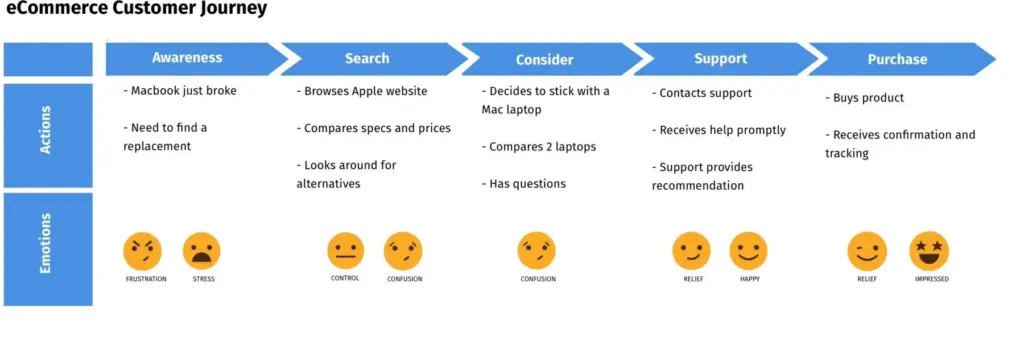
Key takeaway: Improves purchase experience and reduces drop-offs.
Example 2: SaaS Product Onboarding Journey Map
A SaaS company maps the journey of a new user signing up for a free trial. The journey includes sign-up, onboarding emails, first login, feature discovery, and upgrade decision. The map reveals confusion during setup, leading the team to add guided tutorials and in-app prompts.
Key takeaway: Improves activation and trial-to-paid conversion.
Example 3: Service-Based Business Journey Map
A digital agency maps the journey of a client looking for marketing services. The journey includes website visit, inquiry form, consultation call, proposal sharing, onboarding, and ongoing communication. The map identifies delays between inquiry and response, helping improve lead response time.
Key takeaway: Enhances trust and lead-to-client conversion.
Upcoming Masterclass
Attend our live classes led by experienced and desiccated instructors of Wscube Tech.



Types of Customer Journey Maps (With Examples)
1. Current State Customer Journey Map
This type shows how customers experience your brand right now. It captures real touchpoints, emotions, pain points, and actions based on existing processes. Businesses use this map to identify gaps, friction, and opportunities for improvement.
Example: Mapping how users currently complete checkout on an e-commerce website to identify why carts are abandoned.
2. Future State Customer Journey Map
A future state map visualizes how you want the customer experience to look after improvements. It focuses on ideal interactions, smoother transitions, and better emotional outcomes. This map helps guide strategy and innovation.
Example: Designing a smoother onboarding experience for a SaaS tool after identifying current setup issues.
3. Day-in-the-Life Journey Map
This map captures a customer’s entire day, including activities not directly related to your brand. It provides deeper context into habits, routines, and motivations, helping teams design more relevant solutions.
Example: Mapping a working professional’s daily routine to understand when and how they use a productivity app.
4. Service Blueprint Journey Map
A service blueprint goes beyond customer actions and includes behind-the-scenes processes, systems, and teams that support the experience. It helps organizations align internal operations with customer needs.
Example: Mapping both customer interactions and internal support workflows for a customer support process.
5. Digital Customer Journey Map
This type focuses only on digital touchpoints, such as websites, apps, emails, ads, and social media. It helps businesses optimize omnichannel digital experiences and understand cross-device behavior.
Example: Mapping how users move from a Google search to a landing page, email follow-up, and final purchase.
How to Create a Customer Journey Map?
Creating a customer journey map is not about drawing boxes or filling templates. It is about understanding real customer behavior and turning that understanding into better experiences. Below is a clear, practical process you can follow, explained step by step.
1. Begin With a Clear Journey Framework
Instead of starting from a blank page, use a basic customer journey framework that already includes stages like awareness, consideration, purchase, and post-purchase. This gives structure to your thinking and ensures you don’t miss important phases of the journey.
A framework keeps the map focused on the customer’s flow rather than internal processes.
Key things to focus on:
- Keep the framework simple at the start
- Align stages with how customers actually move
- Avoid overloading the map with unnecessary details
- Treat the framework as flexible, not fixed
2. Define the Purpose of Your Journey Map
Before mapping anything, be clear about why you are creating the customer journey map. Different goals lead to very different maps. You might want to improve conversions, reduce churn, fix onboarding issues, or improve support experience. A clear objective ensures the map stays actionable.
Key things to focus on:
- Decide what problem you want to solve
- Choose one primary goal, not many
- Align the map with business outcomes
- Define what success looks like
3. Build Customer Personas With Real Intent
A journey map must represent a real customer type, not “everyone.” Creating clear personas helps you understand motivations, expectations, fears, and decision triggers. Personas ensure the journey map reflects human behavior, not assumptions made inside the organization.
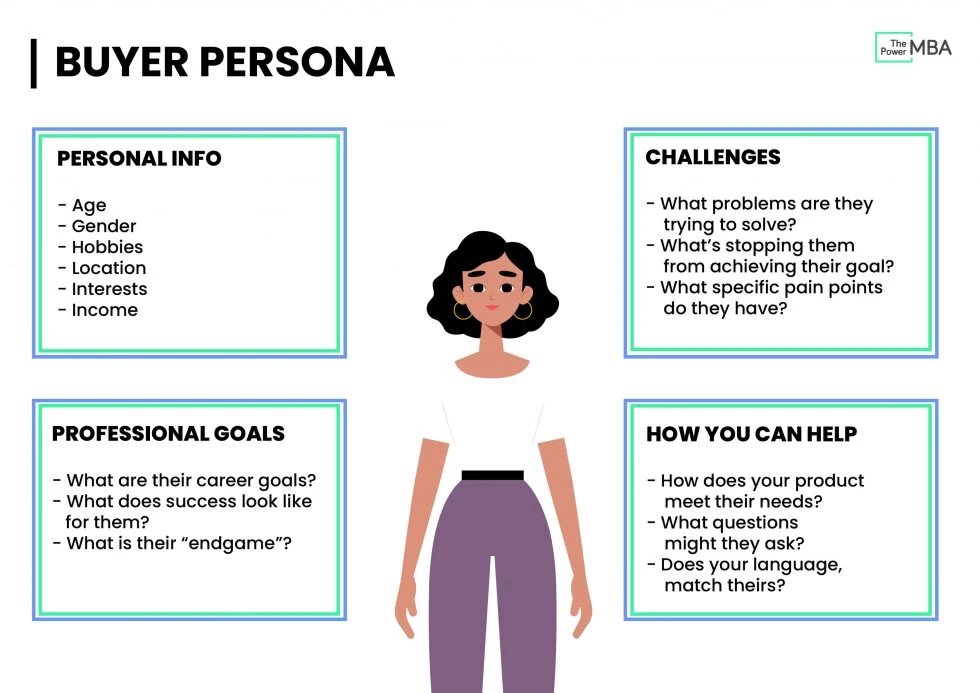
Key things to focus on:
- Base personas on real data and insights
- Include goals, challenges, and motivations
- Keep personas realistic and specific
- Avoid creating too many personas at once
4. Select the Primary Persona to Map
Trying to map journeys for all customers at once creates confusion. Choose one primary persona and focus entirely on their experience. This makes the journey map deeper, more accurate, and more useful. Other personas can be mapped separately later.
Key things to focus on:
- Pick the persona most critical to your goal
- Focus on one journey at a time
- Avoid mixing different user behaviors
- Ensure the persona has a clear objective
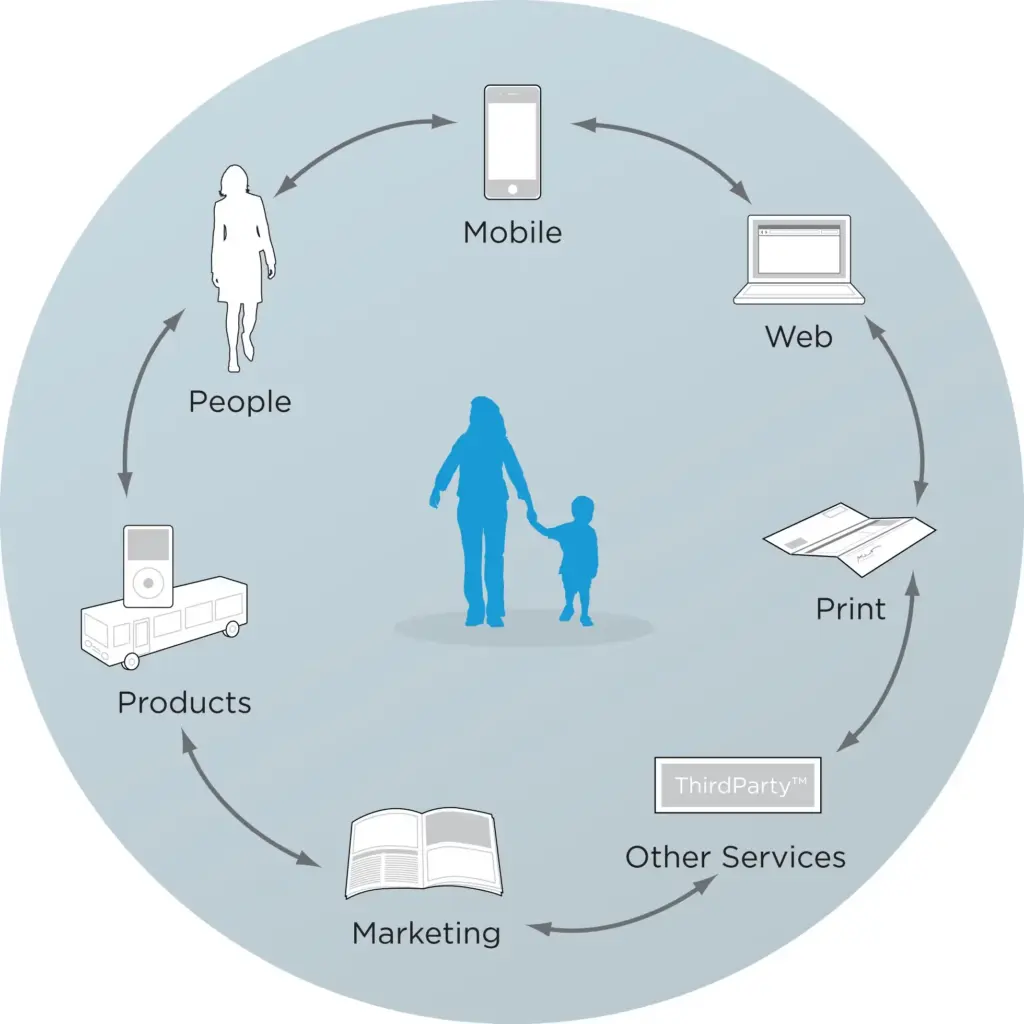
5. Identify Every Customer Touchpoint
Touchpoints are moments where customers interact with your brand—ads, website pages, emails, calls, support chats, apps, or even offline interactions. Listing all touchpoints helps you understand how customers move across channels and where experiences break down.
Key things to focus on:
- Include both online and offline touchpoints
- Capture pre-purchase and post-purchase interactions
- Note where customers switch channels
- Identify gaps or missing touchpoints
6. Assess Available Resources and Gaps
At each stage of the journey, customers rely on resources such as content, tools, support, and technology. This step helps you understand what resources currently exist and what is missing. It also highlights where teams or systems may be overloaded.
Key things to focus on:
- List tools, content, and support currently available
- Identify missing or weak resources
- Check team ownership at each stage
- Highlight dependencies and constraints
7. Experience the Journey as a Customer
One of the most powerful steps is to walk through the journey yourself exactly as a customer would. This helps uncover friction that data alone may not reveal—confusing language, slow steps, broken links, or unclear instructions.
Key things to focus on:
- Use real devices and channels
- Follow the same steps customers take
- Note emotions at each stage
- Capture moments of confusion or frustration
8. Analyze Insights and Identify Opportunities
Once the journey is mapped, analyze it carefully. Look for drop-off points, emotional lows, repeated issues, and moments where expectations are not met. These insights help prioritize what needs improvement and where changes will have the highest impact.
Key things to focus on:
- Identify pain points and friction areas
- Look for emotional highs and lows
- Prioritize issues based on impact
- Connect insights to measurable outcomes
9. Continuously Update and Improve the Map
Customer behavior changes over time due to new technologies, channels, and expectations. A customer journey map is not a one-time exercise. It should be reviewed and updated regularly to stay relevant and useful.
Key things to focus on:
- Update the map using new data and feedback
- Revisit after major product or process changes
- Validate assumptions regularly
- Treat the map as a living document
Expand Your Marketing Skills
Top Tools for Customer Journey Mapping
| Tool Name | Best For | Key Strength |
| Miro | Visual journey mapping | Easy collaboration and templates |
| Lucidchart | Structured journey maps | Clean diagrams and flow clarity |
| UXPressia | CX-focused mapping | Personas, emotions, and analytics |
| Smaply | Professional journey maps | Service blueprints and exports |
| Figma | Design-led teams | Flexible, design-friendly mapping |
Customer Journey Mapping Best Practices
Creating a customer journey map is effective only when it reflects real customer behavior and leads to meaningful improvements. Below are the top 5 customer journey mapping best practices that help teams build maps that are practical, accurate, and useful.
1. Base the Journey Map on Real Customer Data
A customer journey map should never be built on assumptions. Use real data from analytics, customer feedback, support tickets, interviews, and usability tests. Real data helps you understand what customers actually do, where they struggle, and how they feel at each stage, making the map trustworthy and actionable.
2. Focus on One Persona and One Goal at a Time
Trying to map multiple personas or goals in a single journey creates confusion. Always focus on one customer persona and one clear objective, such as improving onboarding or increasing conversions. This keeps the journey map simple, focused, and easier to analyze.
3. Map Emotions Along With Actions
Actions alone do not tell the full story. Always capture customer emotions—confusion, excitement, frustration, or satisfaction—at each stage. Emotional insights help you identify experience gaps that numbers alone cannot explain and guide better experience design.
4. Involve Cross-Functional Teams
Customer journeys touch marketing, sales, product, and support. Involving multiple teams while creating the journey map ensures shared understanding and better alignment. Collaboration also helps uncover internal gaps that impact customer experience.
5. Treat the Journey Map as a Living Document
Customer behavior, expectations, and channels change over time. A customer journey map should be reviewed and updated regularly using new data and insights. Treating it as a living document ensures it stays relevant and continues to drive improvement.
Explore Our Most Popular Marketing Courses
FAQs About Customer Journey Mapping
It helps businesses understand customer behavior, identify friction points, improve experience, increase conversions, and align teams around customer needs.
Product managers, marketers, UX designers, CX teams, founders, and customer success teams can all benefit from creating customer journey maps.
You need customer personas, behavioral data, touchpoints, feedback, emotions, conversion data, and support insights to create an accurate journey map.
There is no fixed number. Most journey maps include 5 to 8 stages, depending on the business model and customer behavior.
Journey maps should be reviewed regularly and updated whenever customer behavior, channels, or business processes change.
Yes, even small businesses benefit from journey mapping as it helps improve customer experience, reduce friction, and build loyalty.
Yes, by identifying and fixing drop-off points, customer journey mapping directly helps improve conversion rates.
A user journey map usually focuses on product usage and UX, while a customer journey map covers the entire experience, including marketing, sales, and support.
Yes, emotions are essential because they explain why customers behave the way they do at different stages.
A digital customer journey map focuses only on online touchpoints like websites, apps, emails, ads, and social media interactions.
Basic journey maps can be created in a few hours, while detailed, data-driven maps may take days or weeks.
The main goal is to understand and improve customer experience by identifying problems, emotions, and opportunities across the journey.
By improving experience, reducing friction, and increasing satisfaction, journey mapping helps drive conversions, retention, and brand advocacy.
Yes, AI can analyze large datasets, predict behavior patterns, and provide insights to enhance journey mapping efforts.

Join Our On-Campus Digital Marketing Program
Explore Our Free Courses





Leave a comment
Your email address will not be published. Required fields are marked *Comments (0)
No comments yet.