
DevOps is a modern approach that combines software development and IT operations to help teams build, test, and release software faster and more efficiently. It focuses on collaboration, automation, continuous integration, and continuous improvement to streamline the entire development process. By adopting DevOps practices, companies can reduce errors, improve software quality, speed up deployments, and deliver a better experience to users.
Learning DevOps can feel challenging in the beginning because it involves multiple tools, technologies, and workflows. That’s why having a clear learning path is important. This DevOps roadmap provides a structured step-by-step guide for both beginners and professionals, helping you understand what to learn first and which skills to build next. By following this roadmap, you can avoid confusion, save time, gain practical hands-on experience, and confidently prepare for real-world DevOps roles and projects.
What is DevOps, and Why is it Important?
DevOps is a way of working that brings software development and IT operations teams together. It focuses on automation, continuous integration, continuous delivery, and shared responsibility. With DevOps, teams build, test, and deploy software in smaller steps, making the process faster and more controlled. This approach reduces manual effort, lowers the chance of errors, and helps applications move smoothly from development to production.
Key Benefits of DevOps
- Faster Software Delivery: DevOps automates build, test, and deployment workflows, helping teams release features and bug fixes faster with fewer errors and delays.
- Strong Team Collaboration: Development and operations teams collaborate closely, improving communication, coordination, and teamwork to ensure smoother and more efficient software delivery.
- Better Software Quality: Continuous testing and quick feedback help detect issues early, resulting in more stable and high-quality applications for users.
- Higher System Stability: Monitoring and automation identify problems early, reduce downtime, and keep applications running smoothly and reliably in production environments.
- Easy Scalability: DevOps makes it easier to scale systems based on user demand, ensuring applications perform well as business needs grow.
- Improved Security: Security checks are added early, reducing risks and protecting applications and data throughout development and deployment.
- Cost Efficiency: Automation minimizes manual effort and resource waste, saving time and reducing infrastructure and operational costs.
Who is a DevOps Engineer?
A DevOps Engineer is a professional who works between software development and IT operations teams. Their role is to make software delivery faster, smoother, and more reliable by using automation, collaboration, and continuous monitoring. They help teams build, test, deploy, and manage applications efficiently while keeping systems stable, secure, and ready for real-world users.
Key Responsibilities of a DevOps Engineer
- Build and manage CI/CD pipelines to automate code building, testing, and deployment for faster software releases.
- Manage cloud infrastructure and servers to keep applications scalable, available, and cost-efficient.
- Automate infrastructure and configuration to ensure systems are consistent and easy to maintain.
- Monitor system performance, logs, and alerts to identify issues and maintain application stability quickly.
- Work closely with development and operations teams to improve workflows and deployment processes.
Demand for DevOps Engineers in 2026 and Beyond
The graph clearly shows the rapid growth of the global DevOps market, increasing from around $11.5 billion in 2023 to nearly $19.4 billion by 2026. This steady rise highlights how organizations are heavily investing in DevOps solutions and services to improve automation, cloud adoption, and faster software delivery.

Looking ahead, the growth is expected to accelerate even more. The global DevOps market is projected to reach USD 66.0 billion by 2033, growing at an impressive CAGR of 19.1% from 2024 to 2033. This long-term growth clearly shows that DevOps is no longer optional, companies are adopting it as a core strategy to stay competitive, deliver software faster, and scale efficiently in cloud-driven environments.
By 2026, the growing market size directly translates into strong demand for DevOps engineers, especially in cloud infrastructure, CI/CD pipelines, containerization, and monitoring. As businesses continue scaling digital products, DevOps professionals remain critical for ensuring system reliability, faster deployments, and operational efficiency, making DevOps one of the most in-demand tech careers.
Recommended Professional Certificates
Full Stack Development Course with AI Engineering
WordPress Bootcamp
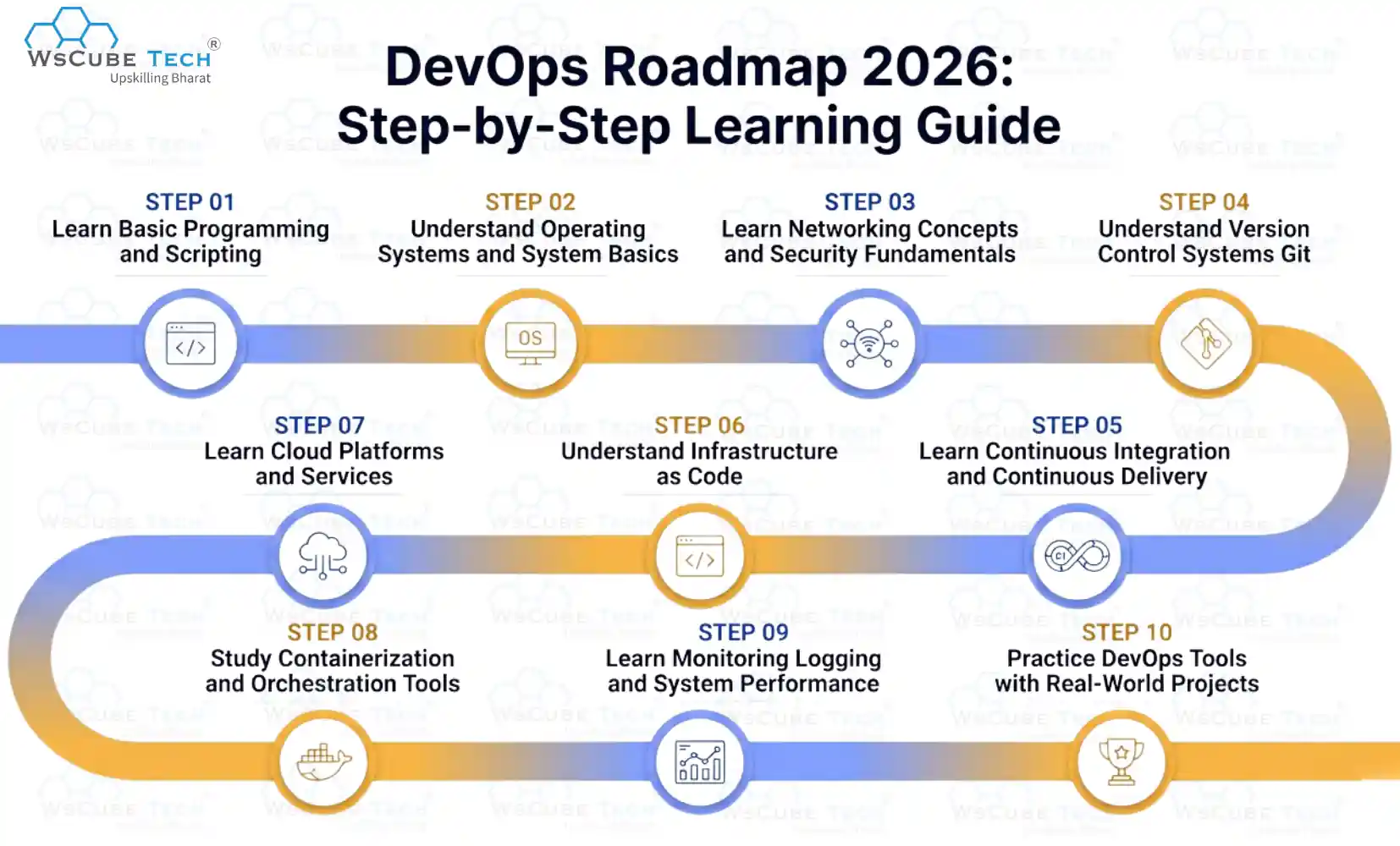
DevOps Roadmap 2026: Step-by-Step Learning Guide
This DevOps roadmap gives a clear, step-by-step path from beginner to job-ready, helping you learn core concepts, tools, cloud platforms, and automation skills required for real-world DevOps roles.
- Learn basic programming and scripting
- Understand operating systems and system basics
- Learn networking concepts and security fundamentals
- Understand version control systems (Git)
- Learn continuous integration and continuous delivery
- Understand infrastructure as code (IaC)
- Learn cloud platforms and services
- Study containerization and orchestration tools
- Learn monitoring, logging, and system performance
- Practice DevOps tools with real-world projects
Next, we will go through each step one by one to clearly explain what you should learn, how to practice effectively, and how to progress confidently in your DevOps learning journey.
Step 1: Learn basic programming and scripting
Learning programming is the first step in the DevOps Engineer roadmap. It helps you understand how applications work and how to automate daily tasks. As a DevOps engineer, programming is used to write scripts, manage systems, and build automation workflows.
You should start with Python because it is easy to learn and widely used for automation. Shell scripting (Bash) is also important for working with Linux systems and servers. Basic knowledge of JavaScript or Go is helpful for modern tools and cloud-native applications.
Focus on writing simple scripts and learning concepts like loops, conditions, functions, and file handling. Regular practice helps automate tasks faster and builds confidence while working with DevOps tools.
If you want to learn Python in detail, you can follow our Python tutorial that covers basic to advanced topics and helps you become more confident and skilled.
Step 2: Understand operating systems and system basics
Understanding operating systems is an important step in the DevOps career roadmap. It helps you know how servers work, how applications run, and how system resources are managed in real environments.
Start by learning Linux, as it is widely used in DevOps and cloud systems. Focus on basic commands, file systems, users and permissions, processes, and package management. You should also understand how Windows systems work at a basic level.
Learn system basics like memory usage, CPU management, disk storage, networking, and process monitoring. Regular practice with real systems helps you troubleshoot issues faster and work confidently with servers and DevOps tools.
Step 3: Learn networking concepts and security fundamentals
Networking and security concepts are very important in DevOps because applications communicate over networks and must be protected from threats. Understanding how data moves between systems and how connections are secured helps you deploy, manage, and troubleshoot applications safely in real-world environments.
3.1 Networking concepts to learn:
- IP Address: A unique address assigned to each device on a network. It allows servers, computers, and services to find and communicate with each other.
- DNS (Domain Name System): Converts domain names into IP addresses so browsers can find servers easily.
- HTTP: A protocol used to transfer data between a web browser and a server.
- HTTPS: A secure Version of HTTP that protects data by encrypting it during transfer, helping prevent unauthorized access and data interception.
- Ports: Logical endpoints that direct network traffic to the correct application or service running on a server.
- Protocols: Rules that define how data is sent and received over a network, such as TCP and UDP.
- Firewalls: Security tools that act as a barrier between trusted and untrusted networks, allowing or blocking traffic based on security rules to protect systems from threats.
- Load Balancers: Systems that distribute incoming traffic across multiple servers to improve performance, ensure high availability, and prevent any single server from becoming overloaded.
3.2 Security fundamentals to focus on:
- Authentication: Verifies a user’s or system’s identity before granting access to an application or service.
- Authorization: Defines what actions a user or system is allowed to perform.
- SSH: A secure way to access and manage remote servers.
- Encryption: Protects data by converting it into a secure format during storage or transfer.
- SSL/TLS: Security protocols that encrypt data sent over networks, commonly used for secure websites and APIs.
- Access Control: Limits system access based on user roles and permissions.
Learning these basics helps you build secure, reliable, and well-connected DevOps systems.
Step 4: Understand version control systems (Git)
Version control is a core skill in the DevOps roadmap 2026 and is used in almost every real-world software project. Git helps teams manage code changes in a structured and safe way. When multiple developers work on the same application, Git ensures that all changes are tracked, reviewed, and merged correctly without breaking the code.
Git stores the complete history of a project. You can see what changed, who made the change, and when it happened. If a bug is introduced or something goes wrong, Git allows you to quickly return to a stable version. This makes development faster, safer, and more organized.
Core Git Concepts You Must Learn
- Repository (Repo): A repository stores the project code along with its complete change history. It can exist locally on your system or remotely on platforms like GitHub.
- Commit: A saved snapshot of code changes, along with a message that explains what was changed and why.
- Branch: A separate line of development used to work on new features, bug fixes, or experiments without affecting the main codebase.
- Merge: Brings changes from one branch into another, most often combining a feature branch with the main branch.
- Clone: It creates a local copy of a remote repository so you can start working on the project.
- Pull: Updates your local repository with the latest changes from the remote repository.
- Push: Sends your local commits to the remote repository so others can access and review your changes.
You should also practice using platforms like GitHub, GitLab, or Bitbucket to collaborate with teams and manage projects. Strong Git knowledge helps you avoid code conflicts, track progress, and work confidently in real DevOps environments.
Step 5: Learn continuous integration and continuous delivery (CI/CD)
Continuous Integration and Continuous Delivery are key DevOps practices that allow you to build, test, and release software quickly and smoothly. CI/CD automates code integration and deployment, reducing manual effort and lowering the chance of errors.
- Continuous Integration (CI) is a practice where code changes are automatically built and tested each time they are added to the repository. This helps detect problems early and keeps the code stable for ongoing development.
- Continuous Delivery (CD) ensures that tested code is always ready for deployment. It automates release steps so applications can be deployed quickly and safely to production or staging environments.
CI/CD Tools
There are several tools commonly used for CI/CD automation. These tools help create pipelines, automate testing, manage deployments, and improve software delivery speed and reliability across development, testing, and production environments.
- Jenkins: An open-source automation server commonly used to create and manage CI/CD pipelines. It supports many plugins and works with almost any programming language or platform.
- GitHub Actions: A built-in automation feature in GitHub that helps you create workflows to automatically test, build, and deploy code directly from your repository, making development and delivery faster and more efficient.
- GitLab CI/CD: Provides integrated CI/CD pipelines within GitLab, making it easy to manage code, tests, and deployments from a single platform.
- Azure DevOps: A Microsoft platform that provides tools for CI/CD pipelines, source code management, and project planning to support building, testing, and releasing applications efficiently.
Learning CI/CD helps you deliver high-quality software faster, reduce deployment failures, and confidently manage real-world DevOps workflows.
Upcoming Masterclass
Attend our live classes led by experienced and desiccated instructors of Wscube Tech.





Step 6: Understand infrastructure as code (IaC)
Infrastructure as Code (IaC) is a DevOps practice that lets you manage servers, networks, and cloud resources using code instead of manual setup. It helps create infrastructure in a consistent, automated, and repeatable way.
With IaC, infrastructure configurations are written in files and stored in version control systems. This makes changes easy to track, review, and reuse, while reducing manual mistakes across development, testing, and production environments.
IaC tools automatically create and manage infrastructure based on defined code. This ensures the same setup every time, improves scalability, and simplifies infrastructure management.
Common IaC tools include Terraform, AWS CloudFormation, Azure ARM Templates, and Ansible. Learning IaC helps you manage cloud infrastructure efficiently and work confidently in real-world DevOps environments.
Step 7: Learn cloud platforms and services
Cloud platforms are a core part of DevOps because most modern applications run on the cloud. Learning cloud services helps you deploy applications, manage infrastructure, scale systems, and control costs without handling physical servers.
Cloud platforms provide on-demand resources such as virtual machines, storage, databases, and networking. These services allow applications to scale easily, improve availability, and support DevOps automation and CI/CD workflows.
7.1 Major Cloud Platforms to Learn
- Amazon Web Services (AWS): The most popular cloud platform offering services for computing, storage, databases, networking, security, and DevOps automation. AWS is commonly used in real-world DevOps roles.
- Microsoft Azure: A cloud platform from Microsoft that integrates well with Windows, .NET, and enterprise systems. Azure provides strong support for CI/CD, DevOps tools, and cloud security.
- Google Cloud Platform (GCP): Known for high performance, data analytics, and excellent Kubernetes support. GCP is commonly used for cloud-native and container-based applications.
7.2 Important Cloud Services to Understand
- Compute Services: Virtual machines and serverless services used to run applications without managing physical hardware.
- Storage Services: Object, block, and file storage used to store application data, backups, logs, and media files securely.
- Networking Services: Virtual networks, load balancers, and DNS services used to manage traffic flow and system connectivity.
- Database Services: Managed databases that reduce setup and maintenance effort.
- Security Services: Identity management, access control, encryption, and security policies used to protect cloud resources and data.
Learning cloud platforms and services helps you deploy scalable and secure applications, support DevOps automation, and work confidently with modern cloud infrastructure in real production environments.
Step 8: Study containerization and orchestration tools
Containerization and orchestration are key pillars of DevOps. They help us package applications in a consistent, portable way and manage them efficiently at scale. These practices improve deployment speed, system reliability, scalability, and enable smooth automation across modern DevOps workflows.
8.1 Containerization
Containerization allows us to bundle an application along with its dependencies, libraries, and configuration into a single container. This ensures the application runs the same across development, testing, staging, and production environments, reducing environment-related issues.
Common Containerization Tool:
- Docker: A commonly used containerization platform that helps us build, run, and manage containers easily. Docker integrates well with CI/CD pipelines and supports fast, consistent, and reliable application delivery.
8.2 Orchestration
Orchestration is used to manage and control multiple containers running across different machines or clusters. It automates critical tasks such as container deployment, scaling, networking, load balancing, and failure recovery, which is essential for running large and complex applications in production.
Common Orchestration Tool:
- Kubernetes: The most popular container orchestration tool. Kubernetes helps us manage containerized applications efficiently using features like auto-scaling, self-healing, service discovery, and rolling updates.
Learning containerization and orchestration helps us deploy applications faster, scale systems automatically, reduce downtime, and confidently manage production-ready DevOps environments.
Step 9: Learn monitoring, logging, and system performance
Monitoring, logging, and performance management are very important in DevOps to keep systems stable and reliable. They help us understand how applications and infrastructure behave in real time and allow us to find and fix issues before users are affected.
- Monitoring: Monitoring tracks the health of servers, applications, and services. It helps us watch CPU usage, memory, disk space, response time, and uptime, so problems can be identified early.
- Logging: Logging collects and stores application and system logs. Logs help us understand what happened inside an application, troubleshoot errors, analyze failures, and improve system behavior over time.
- System Performance: Performance monitoring focuses on how well applications respond under load. It helps us find slow queries, bottlenecks, and resource issues, ensuring applications remain fast and scalable.
Common Tools to Learn
- Prometheus: Used for monitoring system metrics and generating alerts.
- Grafana: Used to visualize metrics with dashboards.
- ELK Stack (Elasticsearch, Logstash, Kibana): Used for centralized logging and log analysis.
- Cloud Monitoring Tools: Built-in tools from AWS, Azure, and GCP for tracking cloud resources.
Explore More on Roadmap Guides
Step 10: Practice DevOps tools with real-world projects
Practicing DevOps tools with real-world projects is the most important step in the DevOps roadmap. It helps you apply what you have learned and understand how different tools work together in real environments. Projects build confidence and prepare you for real DevOps job roles.
Start with small projects such as setting up a CI/CD pipeline, deploying an application on the cloud, or containerizing an app using Docker. Practice using Git for version control, cloud services for hosting, and monitoring tools to track system health. Real-world projects improve problem-solving skills and help you showcase your practical DevOps experience during interviews.
Career Opportunities After Learning DevOps
Following a DevOps roadmap 2026 for beginners helps you gain practical skills in automation, cloud computing, and deployment. These skills open multiple career paths across software, cloud, and infrastructure roles in today’s fast-growing tech industry. Below are some career options you can pursue.
- DevOps Engineer: Works on CI/CD pipelines, automation, cloud infrastructure, and system reliability. This role focuses on faster releases, stable systems, and smooth collaboration between development and operations teams.
- Cloud Engineer: Plans, builds, and maintains cloud infrastructure and services. This role ensures applications scale smoothly while balancing performance, security, and cost efficiency across modern cloud environments.
- Site Reliability Engineer (SRE): Focuses on system stability, monitoring, and performance by applying software engineering principles to operations, reducing downtime and improving reliability of large-scale applications.
- Platform Engineer: Builds internal platforms, tools, and reusable infrastructure that help development teams deploy, manage, and scale applications easily without handling complex infrastructure details.
- Release Engineer: Manages software release processes and deployment schedules. This role ensures version control, smooth releases, and stable updates with minimal risk and downtime.
- Automation Engineer: Creates scripts and automation workflows to reduce manual tasks. This role improves efficiency, supports consistent deployments, and helps maintain reliable systems across environments.
Explore Our Web Development Related Courses
Salary Expectations for DevOps Engineers in India
- Entry-Level DevOps Engineer: ₹4 – ₹8 LPA
- Mid-Level DevOps Engineer: ₹10 – ₹18 LPA
- Senior DevOps Engineer: ₹20 – ₹35+ LPA
Salaries vary based on skills, experience, location, and the tools or cloud platforms you work with.
Future Scope of DevOps
The future scope of DevOps is very strong as companies continue to adopt cloud computing, automation, and faster software delivery. DevOps skills are in high demand because organizations want reliable systems, quick releases, and better collaboration.
In the coming years, DevOps will grow with trends like cloud-native applications, containers, Kubernetes, and infrastructure automation. Security integration (DevSecOps), AI-driven monitoring, and platform engineering will also create more career opportunities for DevOps professionals.
DevOps roles will continue to evolve, offering long-term career growth, high salaries, and opportunities across industries such as IT, finance, healthcare, and e-commerce.

FAQs About DevOps Roadmap
DevOps is a way of working where you combine development and operations practices. You focus on automation, faster releases, and better teamwork, helping you deliver software quickly, safely, and with fewer errors in real environments.
As a DevOps engineer, you manage CI/CD pipelines, automate deployments, handle cloud infrastructure, monitor systems, and fix issues. Your role helps teams release software faster while keeping applications stable, secure, and reliable.
Linux is better for DevOps because you mostly work with servers, cloud platforms, and containers. You get strong command-line control, better scripting support, and the same environment used in real production systems.
It usually takes you 6 to 12 months to learn DevOps basics and tools. The exact time depends on your background, practice level, and how consistently you work on real-world projects.
Yes, you can learn DevOps without coding experience. You should start with basic scripting in Python or Bash. Simple automation scripts help you understand tools, workflows, and real DevOps tasks more clearly.
You need skills in Linux, Git, networking, CI/CD, cloud platforms, containers, and monitoring. Along with tools, you must understand automation, system basics, and problem-solving to grow in DevOps roles.
Yes, a DevOps roadmap for freshers works well if you follow it properly. It starts with fundamentals and slowly introduces tools and projects, helping you build confidence and job-ready skills from scratch.
Yes, cloud knowledge is very important for DevOps. You use cloud services to deploy, scale, and manage applications, making platforms like AWS, Azure, or GCP essential for real DevOps work.
No, you do not need a degree to become a DevOps engineer. You can build a DevOps career by learning skills, practicing tools, completing real projects, and showing hands-on experience through GitHub and practical knowledge.
Yes, DevOps is a strong career choice. As companies focus on automation, cloud, and faster delivery, you will find steady demand, good salaries, and long-term growth opportunities in DevOps roles.
Explore Our Free Tech Tutorials
| Python Tutorial | Java Tutorial | JavaScript Tutorial |
| C Tutorial | C++ Tutorial | HTML Tutorial |
| CSS Tutorial | SQL Tutorial | DSA Tutorial |
Practice Coding With Our Free Compilers
| Online Python Compiler | Online HTML Compiler | Online C Compiler |
| Online C++ Compiler | Online JS Compiler | Online Java Compiler |
Join Our On-Campus Full Stack Related Courses
Free Courses for You





Leave a comment
Your email address will not be published. Required fields are marked *Comments (0)
No comments yet.